
01Who this is for
- Community admins benefit because they can match course access to the community’s engagement strategy.
- Course creators can control enrollment timing and monetization within the community.
02Course unlock options, explained
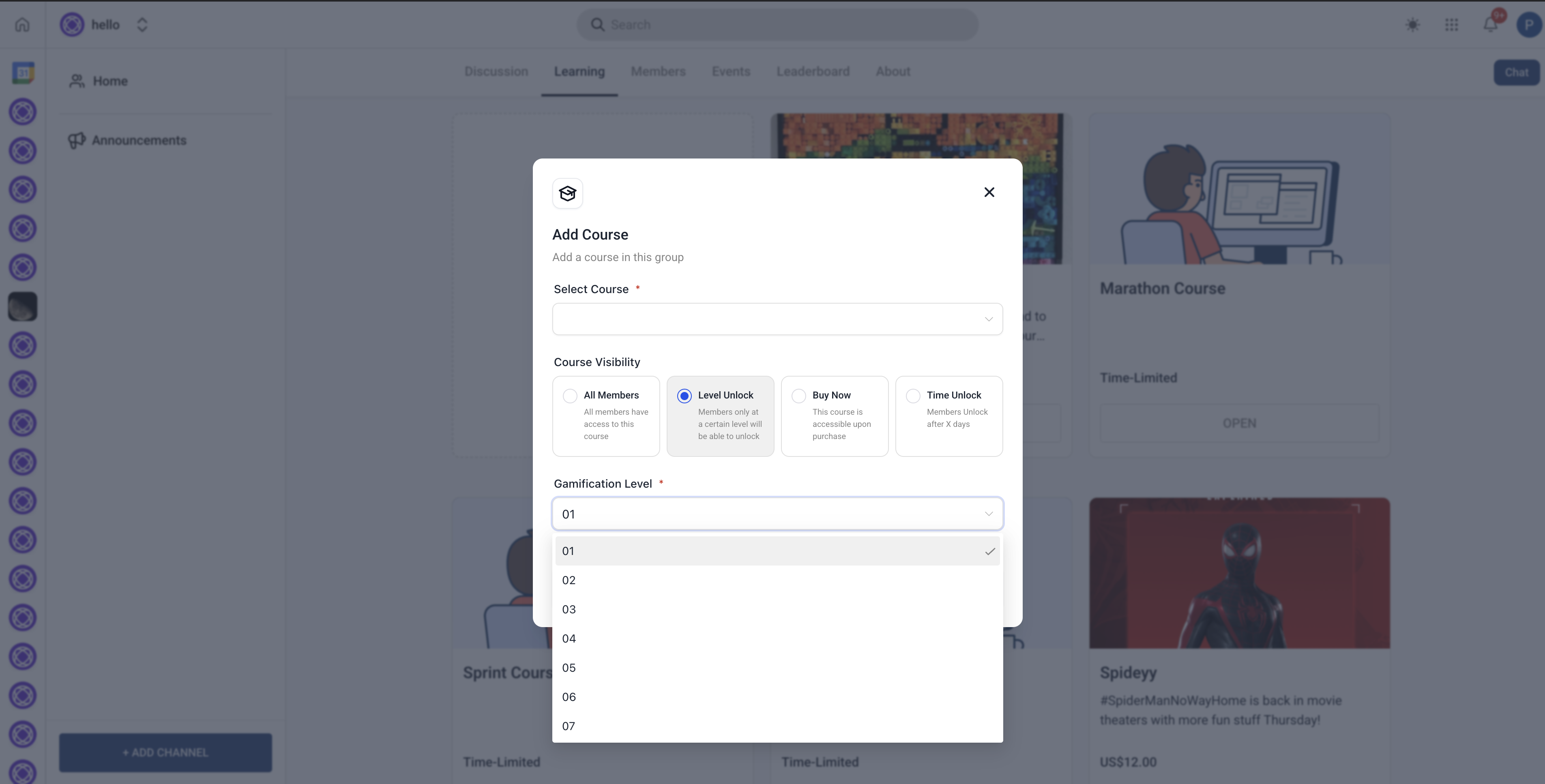
The Course Unlock feature adds four ways to restrict enrollment in a community course. An admin selects one method per course: open for all members, a required leaderboard level, a direct purchase option, or a timed release after a member joins.
When a method is chosen, the platform enforces the rule for new enrolments. Existing members keep whatever access they already have, even if the setting changes later. All configurations are made inside a course’s Access Settings within the community admin area.
03How businesses use course unlock options
- Online fitness coaching community. The coach sets a Level Unlock requiring members to reach a specific leaderboard rank before accessing advanced workout videos. This encourages members to engage in challenges. The setting is entered in the Access Settings of the desired course.
- Software developer community. The group offers a premium programming course as a Buy Now option. Admins input the price and choose subscription or one time payment. After payment, members right away receive enrollment in the course.
- Professional certification organization. The organization defines a Time Unlock of 30 days, so new members can only start the certification prep course after a month in the community. The day count is entered in the course’s Access Settings.
04How to set up and use course unlock options in HighLevel
Set up course access
- Open the Course Settings area.
- Navigate to the community admin panel.
- Select the course you want to configure.
- Choose an Unlock Option.
- If All Members is selected, no further action is needed.
- If Level Unlock is selected, enter the required leaderboard level.
- If Buy Now is selected, specify the price and payment options.
- If Time Unlock is selected, set the number of days after joining.
- Click Save to apply the changes.
- Members will now see access restrictions based on the selected option.
05What it looks like in HighLevel
06Settings that matter
- Unlock Option. Determines which of the four access methods the course will use.
- All Members. Grants open enrollment to every community member without extra configuration.
- Level Unlock. Requires members to reach a specified leaderboard level before they can enroll.
- Buy Now. Enables a one time purchase or subscription for immediate course access.
- Time Unlock. Delays enrollment until a set number of days have passed since the member joined the community.
- Required leaderboard level. Specifies the leaderboard rank needed for Level Unlock courses.
- Price and payment options. Defines the cost and payment method for Buy Now courses.
- Number of days after joining. Sets the delay period for Time Unlock courses.
07Things to know before you rely on it
- Only one unlock method can be applied to a course; multiple methods are not allowed.
- Changing unlock settings after a course launches only affects new enrolments; existing members keep their current access.
08How it connects to the rest of HighLevel
- Managing members inside groups in HighLevel Group member management
- Setting up gamification in HighLevel Communities Leaderboard setup
- Paid groups in HighLevel: configure payments and access Payment configuration
Michael's take

Michael ReimerFounder of CRM Pros, HighLevel Commander and Certified Admin
Course unlock options give community admins clear control over enrollment, but anyone not handling community access can skip it.
Get More InformationOpens on HighLevelPublished November 2, 2026 · Updated November 16, 2026