
Lead research
When a contact is created, enrich the record and write a short brief for sales.
Home/HighLevel/AI/Managed Agents
HighLevel AI · Managed Agents
GoHighLevel Managed Agents, formerly called Super Agents, are custom AI teammates you build by describing their job. They fire on real events in your CRM, such as a new contact or a new opportunity, and complete tasks inside HighLevel and in other tools through connectors. They are the open ended layer of HighLevel's AI.
The short answer
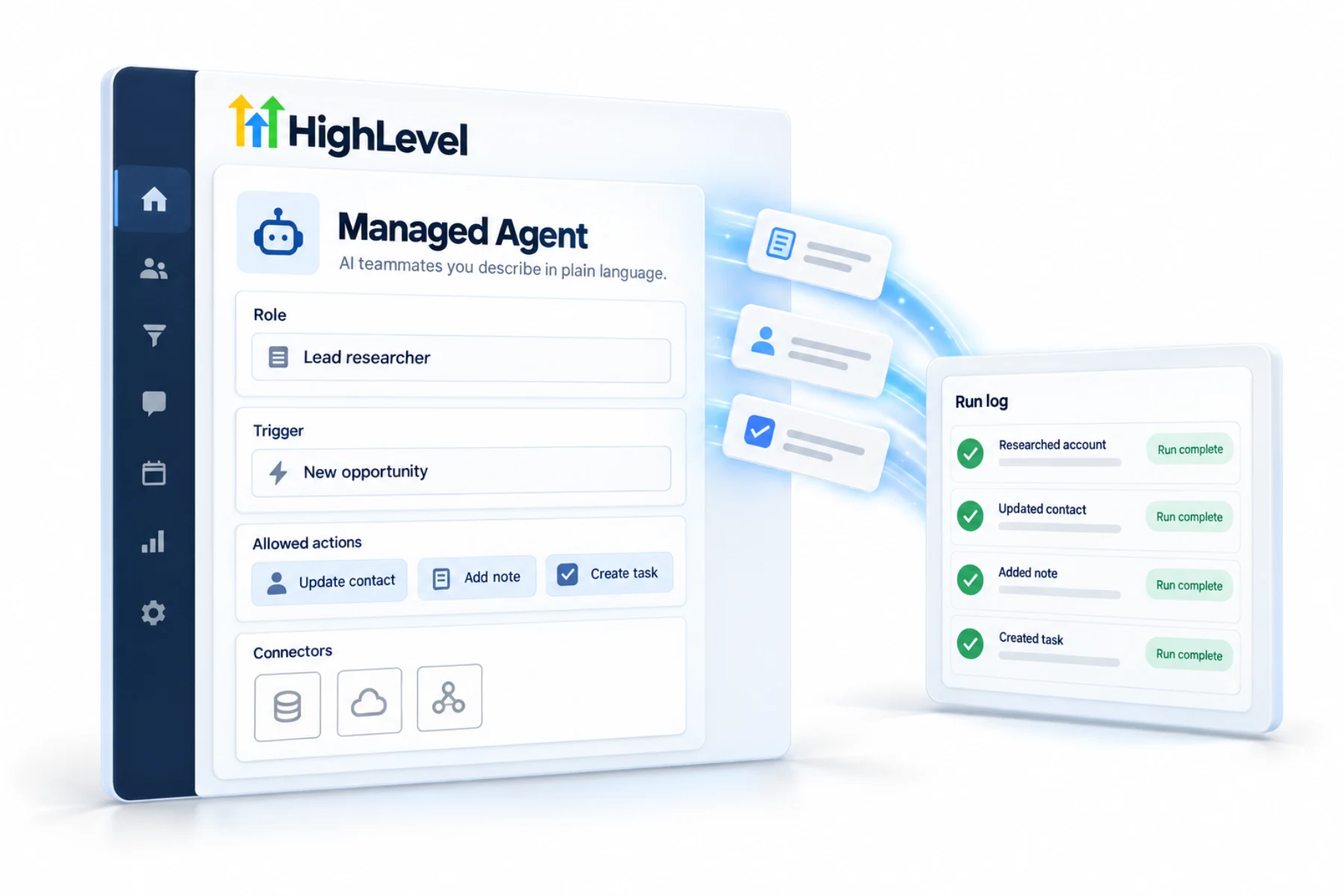
HighLevel Managed Agents, formerly called Super Agents, are AI teammates you create in Agent Studio by describing their role and allowed actions in plain language. They run when CRM events happen, such as a contact being created, and act inside HighLevel and in outside tools through connectors. Growth includes 100 runs a month and Unlimited includes 1,000.
Michael is a sponsored HighLevel affiliate. Links to HighLevel use his partner link at no extra cost to you. HighLevel prices and product facts on this page come from HighLevel's own pricing page and help center, checked on the date above.
How it works
Ideas
When a contact is created, enrich the record and write a short brief for sales.
When an opportunity stalls, add a task and draft a check in message.
When a deal is won, create the onboarding tasks and notify the delivery team.
Through connectors, update a project tool or a spreadsheet when something changes in the CRM.
Managed Agents can be cloned and shared through snapshots, which makes them useful for agencies deploying the same agent to many clients.
Which agent
| Managed Agents | Conversation AI | Ask AI | |
|---|---|---|---|
| Works for | Your team | Your customers | You |
| Started by | CRM events | Incoming messages | Your request |
| Typical job | Automate tasks across tools | Answer, qualify, book | Create, find, act in the app |
Worked example
A Managed Agent is only as good as the description you give it. Write it the way you would brief a new assistant on day one: the job, the limits and what done looks like.
Here is a description for a lead research agent. When a new contact is created from the website form, read what they submitted. Write a brief of no more than five sentences covering who they are, what they asked for and how urgent it sounds. Save the brief as a note on the contact and create a task for the sales owner, due today. Do not message the contact. Do not change any field other than the note. If the form is empty or looks like spam, add a tag for review and stop.
The Managed Agents setup guide walks through the builder screens.
Fit
The honest test is whether you could describe the job to a person in a paragraph and trust them with it on their first day. If yes, it is a good Managed Agent. What AI can and cannot do covers the wider limits.
Run allowances by plan are in the GoHighLevel AI plans overview. You can build and test a Managed Agent during a 30 day trial through Michael's link.
Avoid
Once an agent is proven, agencies can deploy it to other clients through a snapshot. The snapshot guide covers packaging, and which AI plan is best shows which plan includes how many runs.

Managed Agents are where HighLevel is going. Think of every repetitive task your team does after a CRM event, and write it down as a job description.
Questions
They are custom AI teammates that you create in Agent Studio by describing their role and allowed actions in plain language. They run when CRM events happen, such as a contact being created, and act inside HighLevel and in outside tools through connectors. They were formerly called Super Agents.
Yes. Managed Agents were formerly called Super Agents. The name changed and the idea stayed the same: an AI teammate you describe in plain language that runs on CRM events. If you see Super Agents in an older tutorial, it means the same feature.
Managed Agents are billed by runs. AI Employee Growth at $50 a month includes 100 runs, and Unlimited at $97 a month includes 1,000. Without a plan, runs are pay per use. Plans are per subaccount, so each client account that runs agents needs its own.
Yes. Managed Agents act in outside tools through connectors from HighLevel's growing MCP catalog. That is what makes them the open ended layer of HighLevel's AI: one agent can respond to a CRM event, do work inside HighLevel and complete a step in another tool.
Yes, through snapshots. Managed Agents can be cloned and shared, so an agency can build an agent once and deploy the same agent to many client subaccounts. Check the trigger and the connectors in each new subaccount before you publish the agent there.
No. Managed Agents work for your team and run tasks when CRM events happen. Conversation AI and Voice AI are the customer facing agents.
CRM events trigger a Managed Agent, such as Contact Created, Opportunity Created or Form Submitted. You pick the trigger when you describe the job. Choose the one event that should start the work, then test the agent with realistic requests before you change its status to Published.
Use the testing panel with realistic requests, then change the status from Draft to Published and review its runs.
Next step
Start a trial, build the first system and test it before the first invoice. Usage fees for phone, SMS, email and AI can apply during the trial.
HighLevel has three plans at a flat monthly price, each with unlimited users and contacts. See what each one includes and what it costs.
Compare the PlansStarter, Unlimited and Founder