
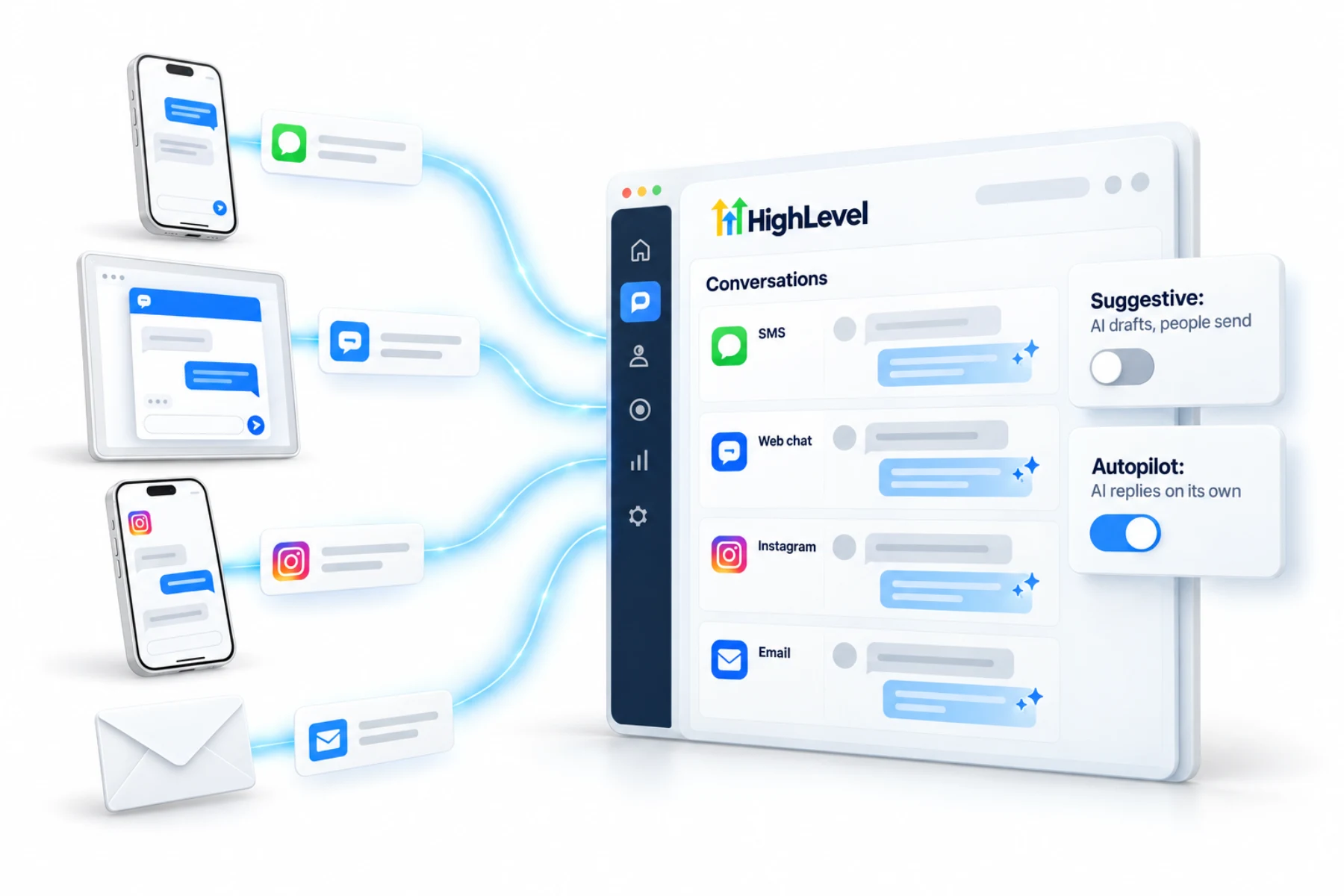
Suggestive
AI drafts, people send
- Replies appear as suggestions for your team
- Best for the first weeks while you tune it
- Good for sensitive industries
Home/HighLevel/AI/Conversation AI
HighLevel AI · Conversation AI
This guide covers GoHighLevel Conversation AI from setup to daily use. Conversation AI is HighLevel's customer facing chat agent. It replies to leads and customers across text, email, web chat, WhatsApp, Facebook and Instagram, answers from what it has been trained on, qualifies, books appointments and keeps conversations moving when your team is busy.
The short answer
HighLevel Conversation AI is an AI agent that replies to contacts across SMS, email, web chat, WhatsApp, Facebook and Instagram. In suggestive mode it drafts replies for your team to approve. On autopilot it replies on its own and works toward a goal such as a booking. It is billed pay per use or through AI Employee plans.
Michael is a sponsored HighLevel affiliate. Links to HighLevel use his partner link at no extra cost to you. HighLevel prices and product facts on this page come from HighLevel's own pricing page and help center, checked on the date above.
Modes
Suggestive
Autopilot
An agent can be set as the primary agent for a channel, and workflows can switch the bot on, off or between modes for specific contacts.
Configuration
Settings
Channels, mode, response timing and limits.
Training
Your website through the web crawler, documents, FAQs and tables.
Voice
Tone and style so replies sound like your business.
Goals
What it is trying to do: book, collect details or hand off.
Rules
What it must and must not say, and when to escalate.
Guide
Create the bot, connect the calendar, set the handoff rule and go live.
The knowledge base web crawler reads interactive pages, including tabs, accordions and content that loads as you scroll, so your existing website is a strong starting point. See AI knowledge bases.
Setup
The full walkthrough is in the Conversation AI build guide.
Cost
| Option | Included | Price per subaccount |
|---|---|---|
| Pay per use | Billed by input and output tokens for the model used | No monthly fee |
| AI Employee Growth | 1,000 agent responses a month | $50 a month |
| AI Employee Unlimited | Unlimited, fair use | $97 a month |
Text and messaging charges are separate. Source: AI Product Pricing, November 2026.
Judgment
Autopilot is the goal for most businesses, and it is not right for every conversation. Some situations are better with a person approving each reply.
You can mix the two. Workflows can switch the bot on, off or between modes for specific contacts, so a complaint tag can move one conversation to a person while everything else stays on autopilot. What AI can and cannot do sets out the line.
Avoid
The channels themselves need to be connected first. The chat widget guide and the WhatsApp guide cover two of the most common.
Measure
Give the bot three numbers and review them weekly: how quickly it replies, how many conversations end in the goal and how many are handed to a person. Then read the conversations behind the numbers. A handoff is not a failure. A conversation that went quiet after a weak answer is.
When bookings are the goal, pair the bot with a clean calendar setup and a short set of qualifying questions. The AI appointment setter and AI lead qualification cover both. If you want the bot quiet at certain times, working hours for Conversation AI answers that question.
If you track reply times, the answer on whether conversation SLAs can count only business hours is worth reading. Plan details are in the GoHighLevel AI plans overview, and a 30 day trial through Michael's link lets you run the bot in suggestive mode on real conversations. If you remember the old AI Agency Assistant plan, see what replaced the AI Agency Assistant plan.
Also weighing Manychat? Read GoHighLevel vs Manychat. For the handoff steps, read how to hand off Conversation AI to a human. New to chatbots in general? Start with AI chatbot for business.

Start every Conversation AI bot in suggestive mode. A week of approving its drafts teaches you exactly what to fix before it talks to customers on its own.
Questions
It is HighLevel's AI agent that replies to contacts across SMS, email, web chat, WhatsApp, Facebook and Instagram. In suggestive mode it drafts replies for your team to approve. On autopilot it replies on its own and works toward a goal such as a booking, answering from what it has been trained on.
In suggestive mode, Conversation AI drafts each reply and your team approves and sends it. On autopilot, it replies on its own and works toward a goal such as a booking. Start in suggestive mode for about a week, fix what you see, then switch to autopilot.
Train Conversation AI through the knowledge base. Add your website with the web crawler, then documents, FAQs and tables for structured data such as prices. Keep facts in the knowledge base and behavior in the bot's instructions, and review conversations for questions it could not answer.
Conversation AI is billed pay per use by tokens, or through an AI Employee plan per subaccount. Growth at $50 a month includes 1,000 responses, and Unlimited at $97 a month is unlimited under fair use. Text and messaging charges are separate from the AI charges.
Yes. Booking is one of the goals you can give a Conversation AI bot. It books on your HighLevel calendars inside the conversation and follows the calendar's availability. Add a reminder workflow after it, so that booked appointments turn into kept appointments.
Start in suggestive mode. Review and approve its drafts for about a week, fix what you see, then switch to autopilot.
No. Text and messaging charges are separate from the AI charges.
Yes. Workflows can switch the bot on, off or between modes for specific contacts.
Next step
Start a trial, build the first system and test it before the first invoice. Usage fees for phone, SMS, email and AI can apply during the trial.
HighLevel has three plans at a flat monthly price, each with unlimited users and contacts. See what each one includes and what it costs.
Compare the PlansStarter, Unlimited and Founder