
First impressions matter. Admins can now configure automated welcome DMs and onboarding steps to greet new members the moment they join, helping them feel at home and guiding their first interactions in the community.
Michael's take
My first take is that this is a modest but useful tweak. It adds a couple of settings rather than a whole new product.
If you already have a community set up, you now get a place in Settings called Welcome Setup where you can turn on an auto DM and a checklist for new members.
I would double check that the @Member tag pulls the right name and that the checklist items actually mark as complete when a member interacts with them.
In a real group I would use the auto DM to thank a new sign up and then point them to a short video and a profile update step so they start posting right away.
I believe tech should reduce friction, not add more pages to click through, and this feels like a small friction reduction.
It’s worth a look for any community admin who wants a smoother start for their members.
What changed
Auto DM to New Members
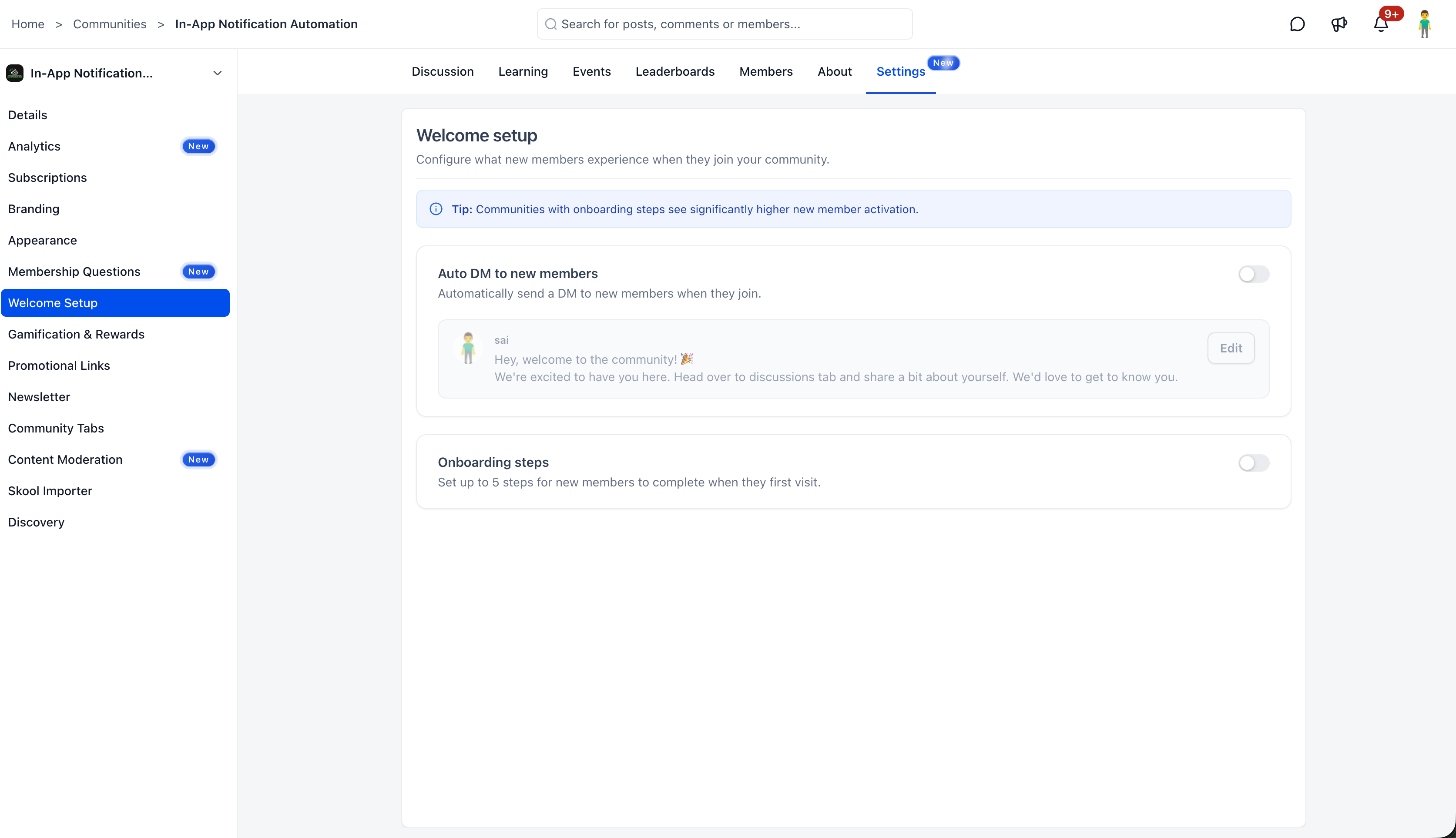
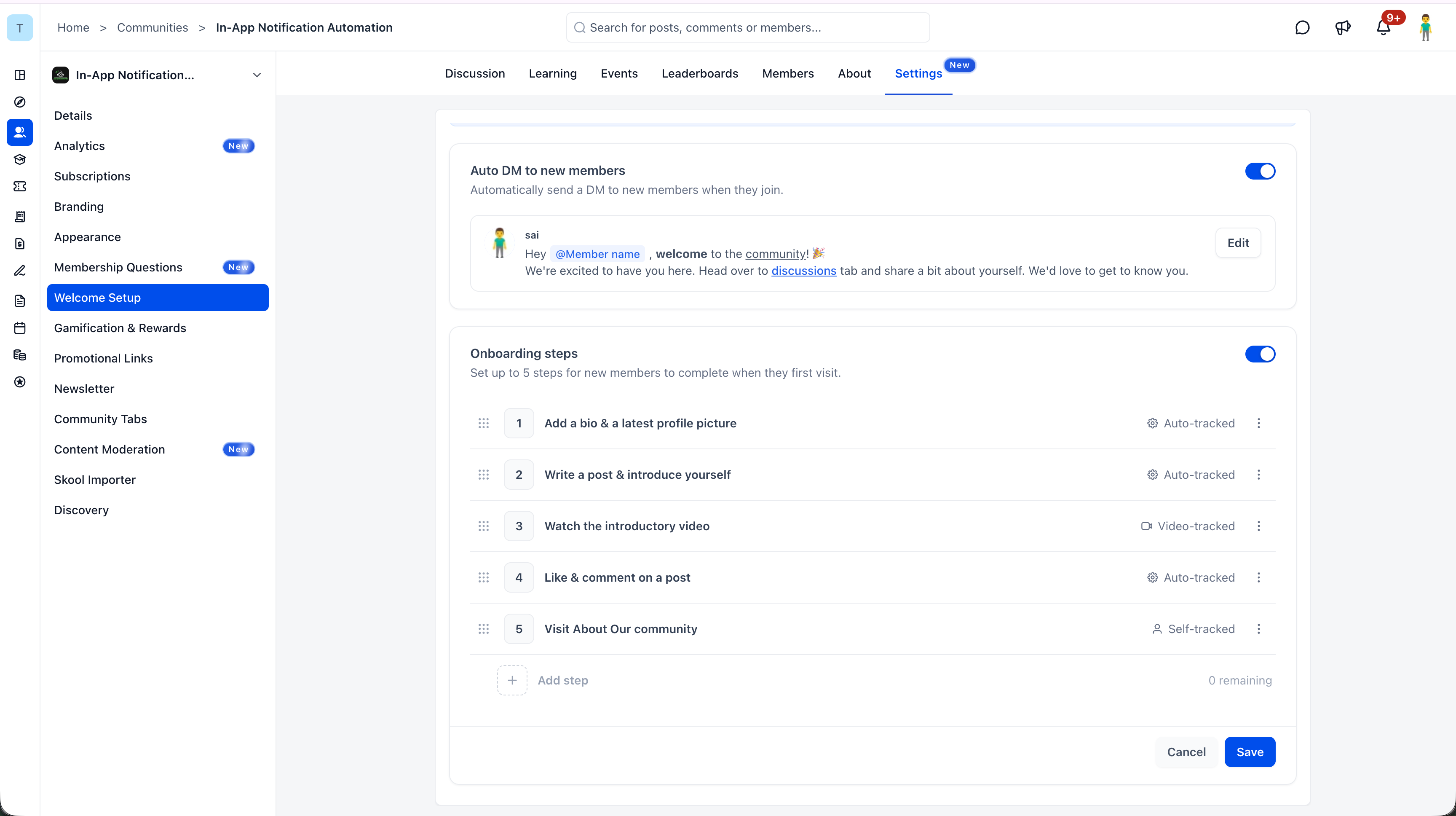
Admins can now send an automatic welcome message to every new member who joins the community. Configure it from Settings > Welcome Setup.
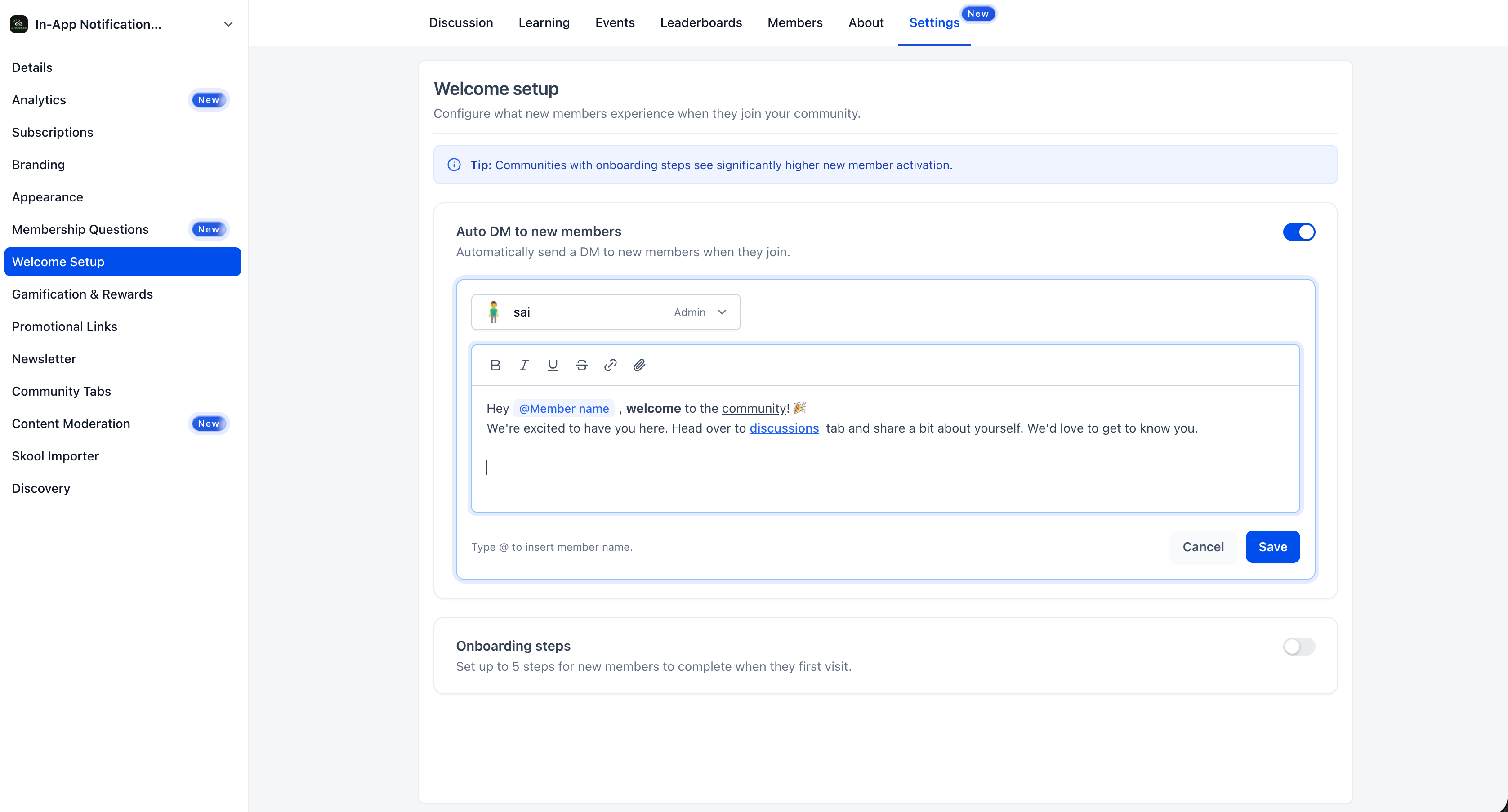
Choose which admin or owner sends the DM. Personalize the message with rich text formatting, bold, italic, underline, strikethrough, links, and attachments. Use @Member name to dynamically insert the new member’s name for a personal touch. Toggle the feature on or off anytime.
onboarding Steps (Up to 5)
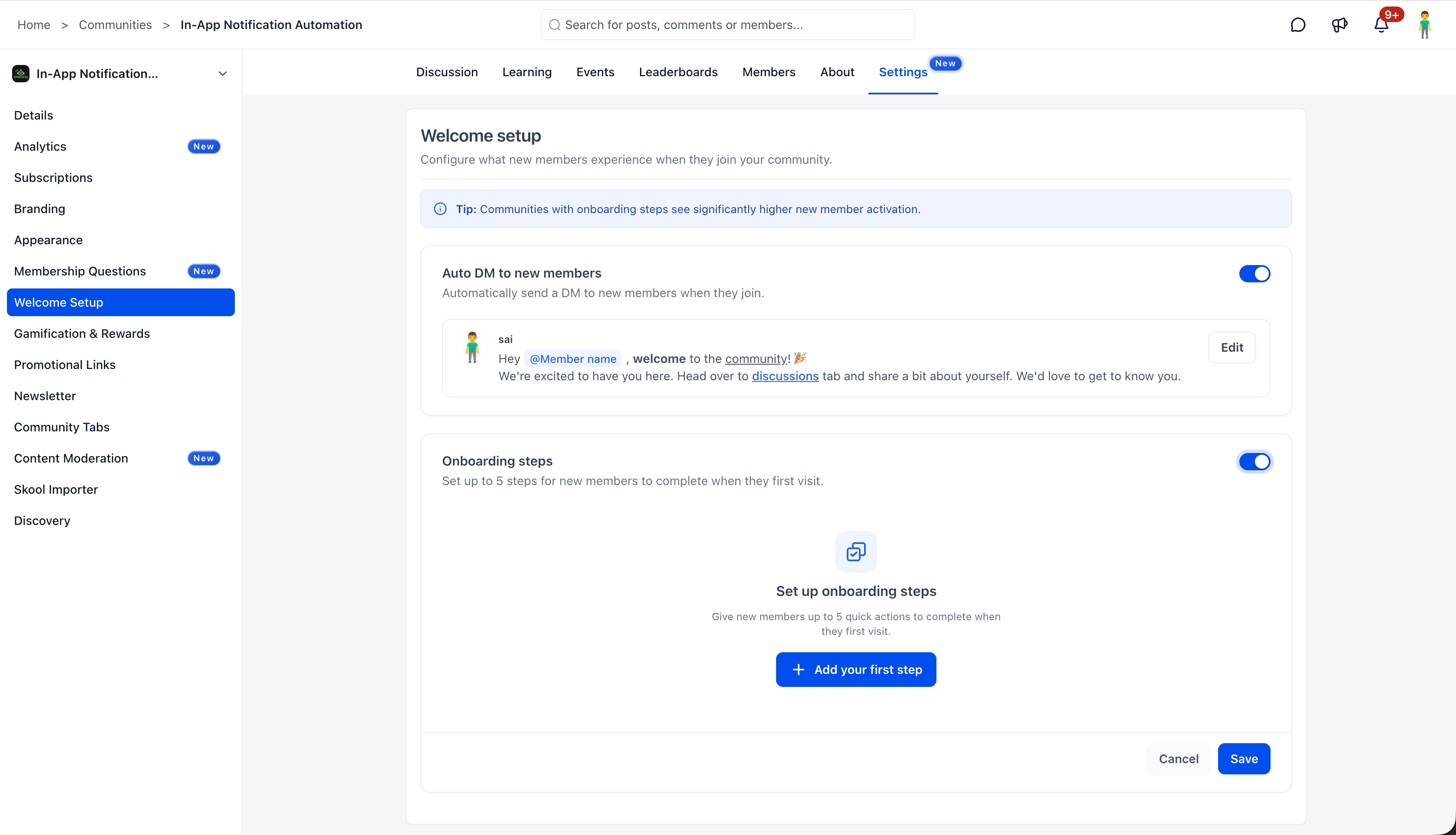
Guide new members through their first actions with up to 5 configurable onboarding steps. When enabled, eligible new members see a Get Started checklist on the community home/feed.
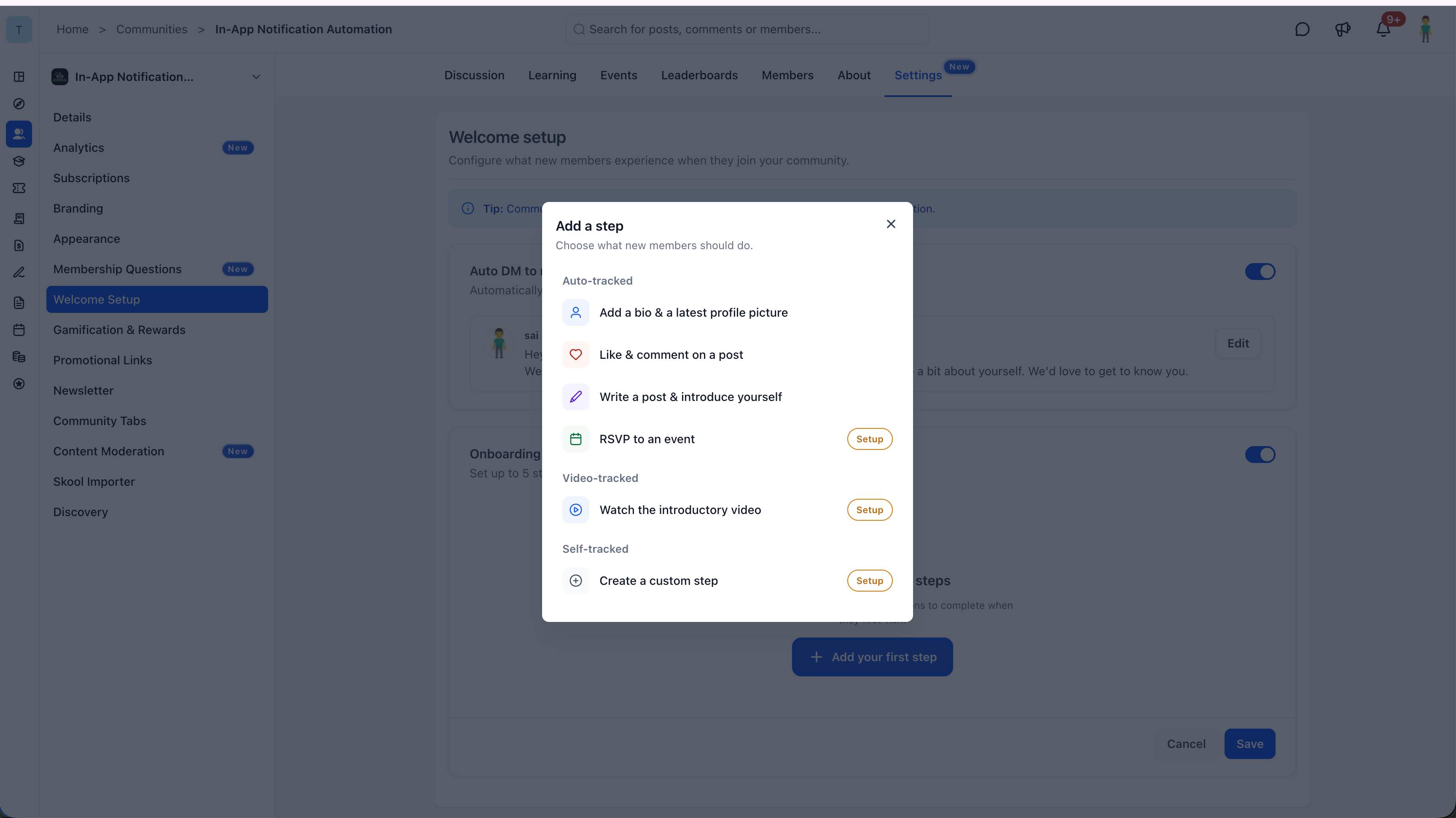
Admins can configure steps including:
- Profile updates
- Post engagement
- Event RSVPs
- Introductory videos
- Custom steps with optional links
Members can complete steps directly from the checklist, track their progress, and dismiss it once they’re done. Steps can be reordered and customized.
How to turn it on
Auto DM
- Navigate to Settings > Welcome Setup.
- Toggle on Auto DM to new members.
- Select which admin or owner will appear as the sender.
- Compose your welcome message using the rich text editor. Type @ to insert the member’s name dynamically.
- Click Save.
onboarding Steps
- On the same Welcome Setup page, toggle on onboarding steps.
- Click + Add your first step.
- Configure up to 5 steps: Choose from profile updates, post engagement, event RSVPs, intro videos, or custom actions.
- Reorder steps as needed.
- Click Save.
Why it matters for Founders
New members who don’t know where to start often disengage before they ever get involved. Without a structured welcome, they land in the community and are left to figure things out on their own.
Welcome Setup solves this with two tools that work together, a warm, personalized DM that greets members immediately, and a guided checklist that walks them through their first key actions. The result is higher activation, faster engagement, and members who feel connected from day one.
Notes and availability
- Auto DM supports rich text formatting, links, mentions, and media attachments.
- The sender can be any admin or owner in the community.
- onboarding steps support up to 5 configurable actions per community.
- Members see the onboarding checklist on the community home/feed and can dismiss it after completing steps.
- Both features can be enabled independently or together.
Questions Founders ask
What did HighLevel release in "AutoDM & new member onboarding in Communities"?
First impressions matter. Admins can now configure automated welcome DMs and onboarding steps to greet new members the moment they join, helping them feel at home and guiding their first interactions in the community.
What should a Founder do with AutoDM & new member onboarding in Communities?
Open Settings > Welcome Setup this week and enable the auto DM with a personalized greeting. Anyone who runs a HighLevel community and wants new members to feel welcomed and know what to do next.
Why does AutoDM & new member onboarding in Communities matter?
New members who don’t know where to start often disengage before they ever get involved. Without a structured welcome, they land in the community and are left to figure things out on their own. Welcome Setup solves this with two tools that work together, a warm, personalized DM that greets members immediately, and a guided checklist that walks them through their first key actions. The result is higher activation, fas
How do I get this feature with setup help?
Start a free HighLevel trial through Michael Reimer's link and the CRM Pros team helps with setup in your first 7 days, with an onboarding call, three live calls every week and the affiliate community included.
Get More InformationOpens in a new tab Published November 9, 2026. Screenshots belong to HighLevel.