
Private channels just got a major upgrade. They’re no longer limited to being hidden and free, admins can now make them visible, paid, or both. Turn any private channel into a revenue stream while giving members a self serve way to join.
Michael's take
The update is modest but useful. It adds visibility and pricing options to private channels that were always hidden and free before.
If you already use private channels, you can now decide whether they appear in the sidebar and you can charge members to join them.
I would spin up a test channel in Test Mode, try both a recurring and a one time price, and verify the payment flow on web and mobile.
In practice you could create a premium support channel, set a monthly fee, and let members enroll themselves without any manual work.
Technology should simplify operations, and giving members a self serve way to access paid content does exactly that.
It’s worth checking out if you already have a Community and are looking for a straightforward revenue stream.
** What’s New?
Visible Private Channels **
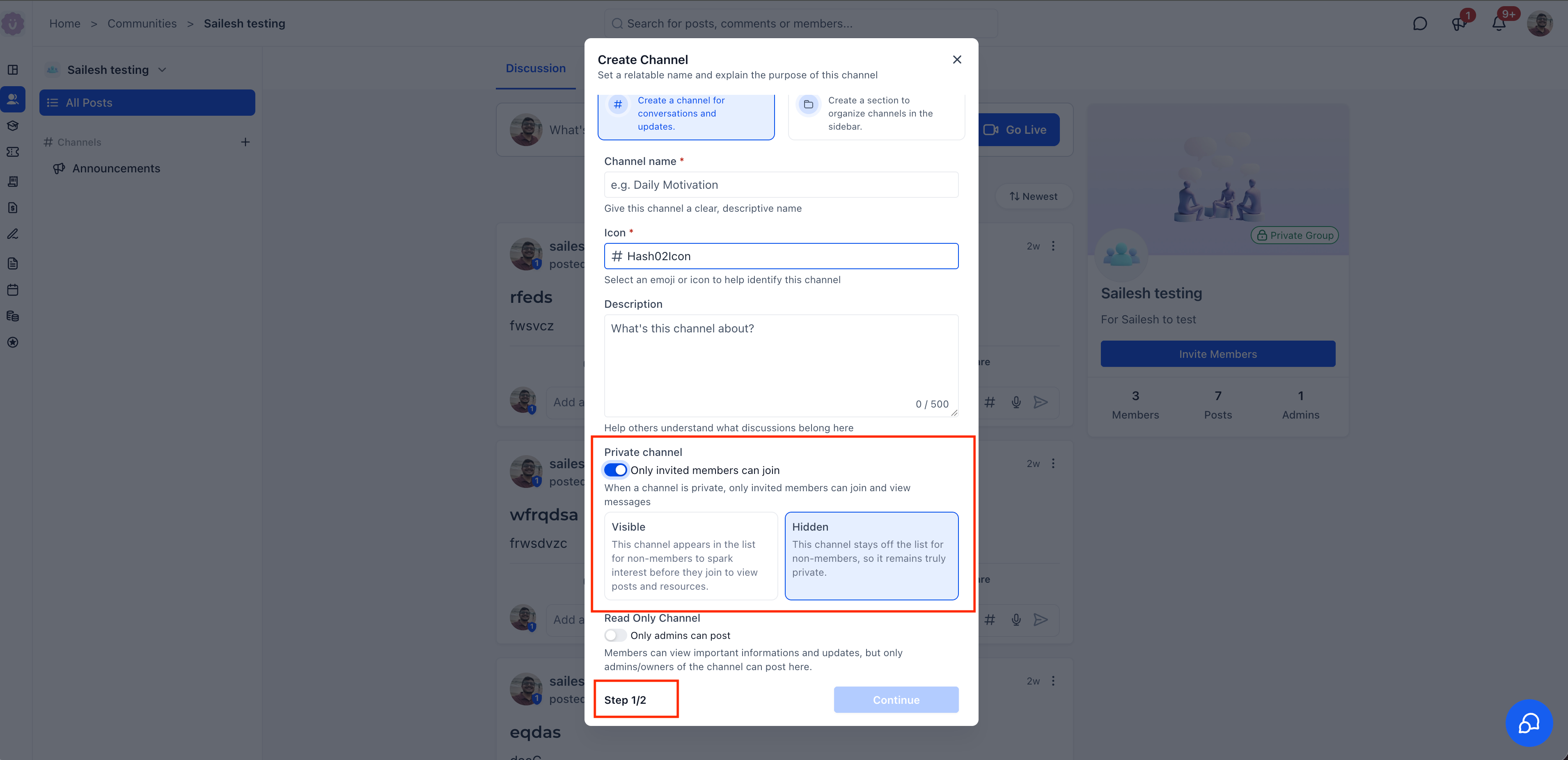
Private channels no longer have to stay hidden. When creating or editing a private channel, admins can now choose between two visibility modes:
- Visible: The channel appears in the sidebar for all members, sparking interest even before they join. Nonmembers can see the channel name and description but can’t access posts until they join.
- Hidden: The traditional behavior. The channel stays off the list for nonmembers, keeping it truly private.
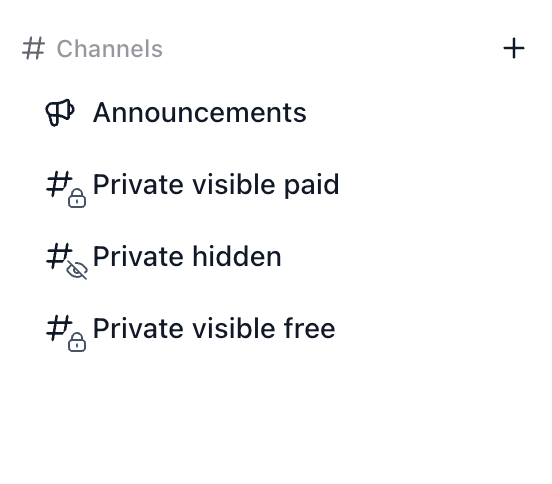
- Visible private channels show up with a lock icon in the sidebar, locked, but impossible to miss.
** Paid Private Channels **
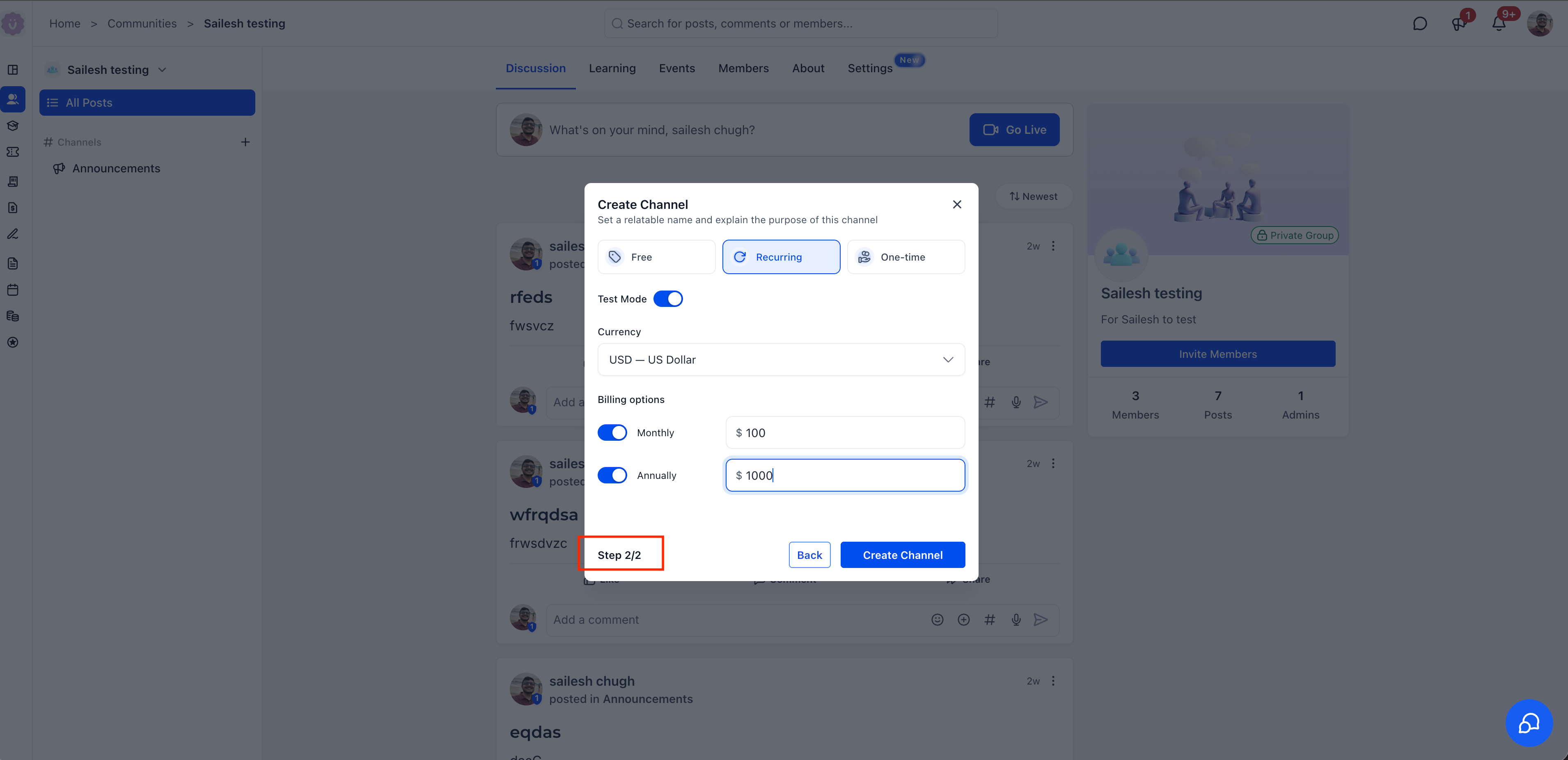
Admins can now charge members to join a private channel. During channel creation (Step 2/2), choose from three pricing modes:
- Free: No charge to join (default).
- Recurring: Charge a monthly and/or annual subscription to access the channel.
- One time, Charge a single payment for permanent access.
Recurring channels support multiple currencies with configurable monthly and annual pricing. A Test Mode toggle lets admins verify the payment flow before going live.
** Self Serve Member Payment Flow **
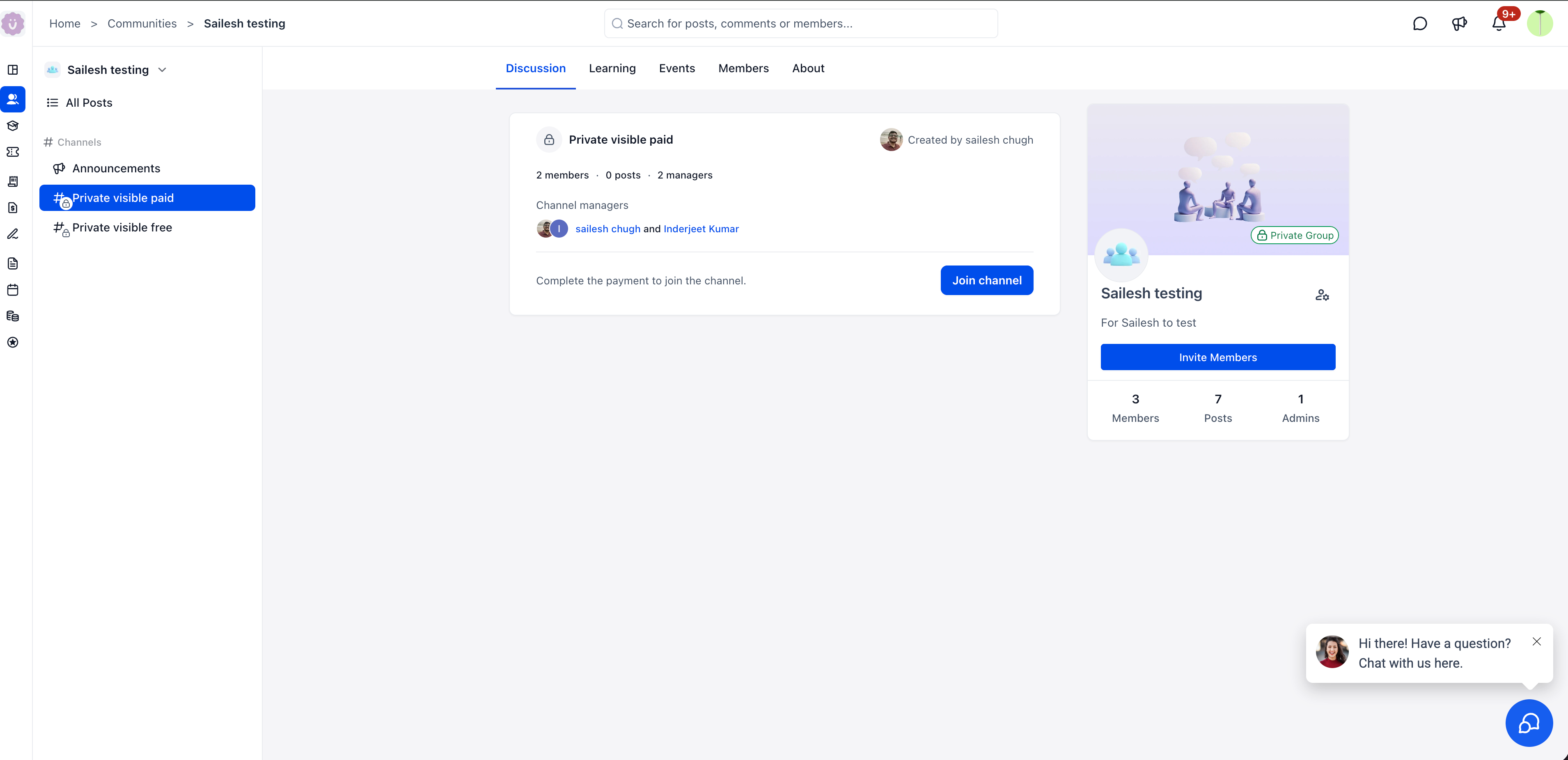
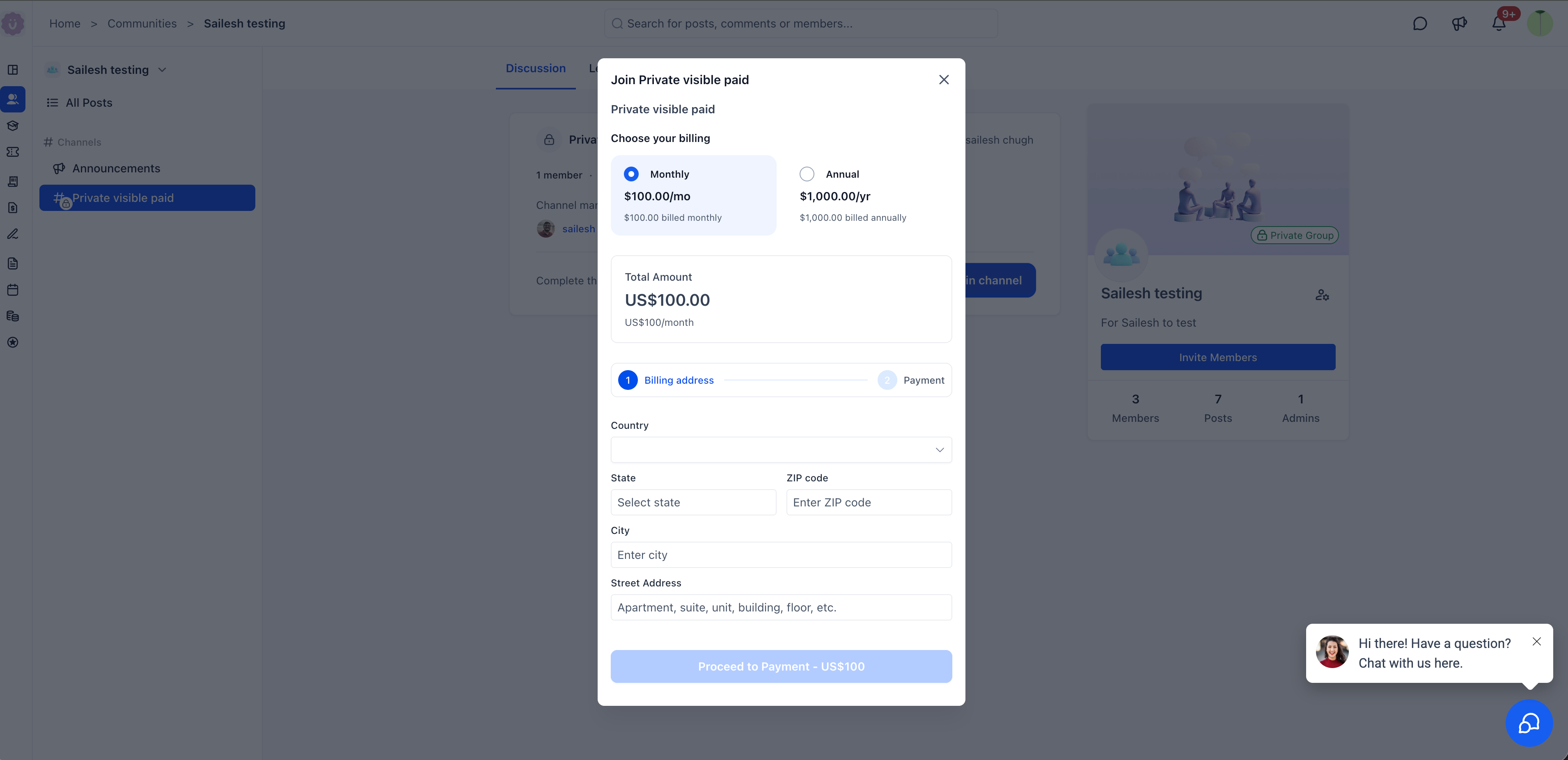
When a member clicks on a visible paid channel, they see the channel details, description, member count, and managers, along with a prompt to complete payment. Clicking Join channel opens the payment flow where members choose their billing cycle, enter billing details, and proceed to payment. No manual adds needed.
** Mobile Support **
Premium Channels are fully supported on the mobile app. Members can view paid channel details, description, activity, and managers, and tap Enroll now to complete payment directly from their phone.
** How to Configure **
- Click the + button next to Channels in the sidebar.
- Select Create a channel for conversations and updates.
- Step 1/2, Set the channel name, icon, and description. Toggle Private channel on, then choose Visible or Hidden. Optionally enable Read Only Channel.
- Step 2/2, Select pricing: Free, Recurring, or One time. For paid channels, configure currency, billing options (Monthly/Annually), and pricing. Optionally enable Test Mode.
- Click Create Channel.
** Why This Matters **
Previously, private channels were always hidden and always free. Admins had no way to showcase exclusive content or charge for channel access, members didn’t even know private channels existed unless they were manually invited.
Premium Channels change this entirely. Visible channels let admins surface exclusive spaces in the sidebar to spark interest, while paid access turns those channels into a direct revenue stream. Members pay and join on their own, no manual invites, no back and forth.
** Notes
**
- Paid channels support recurring (monthly/annually) and one time pricing.
- Multiple currencies are supported.
- Test Mode lets admins verify the payment flow without real charges.
- Read only channels can also be made visible and/or paid.
- Visible paid channels show a lock icon with a hash symbol in the sidebar, distinguishing them from free and hidden channels.
- Available on both web and mobile.
Questions Founders ask
What did HighLevel release in "Paid channels in Communities"?
Private channels just got a major upgrade. They’re no longer limited to being hidden and free, admins can now make them visible, paid, or both. Turn any private channel into a revenue stream while giving members a self serve way to join.
What should a Founder do with Paid channels in Communities?
Create a visible paid private channel in your community and run a quick test payment. Founders and agencies that run Communities and want to monetize exclusive spaces.
How do I get this feature with setup help?
Start a free HighLevel trial through Michael Reimer's link and the CRM Pros team helps with setup in your first 7 days, with an onboarding call, three live calls every week and the affiliate community included.
Get More InformationOpens in a new tab Published November 2, 2026. Screenshots belong to HighLevel.