
01Who this is for
- Sales managers can auto notify reps when a new task is assigned, keeping the team aware of upcoming actions.
- Customer support teams can trigger follow up emails as soon as a support task is logged, ensuring timely communication.
- Project coordinators can update task status automatically, reducing manual effort after task creation.
02Task added triggers, explained
The Task Added trigger starts a workflow each time a new task is created on a contact’s record. It works inside the HighLevel workflow builder and can be combined with any subsequent actions, such as sending emails or updating fields.
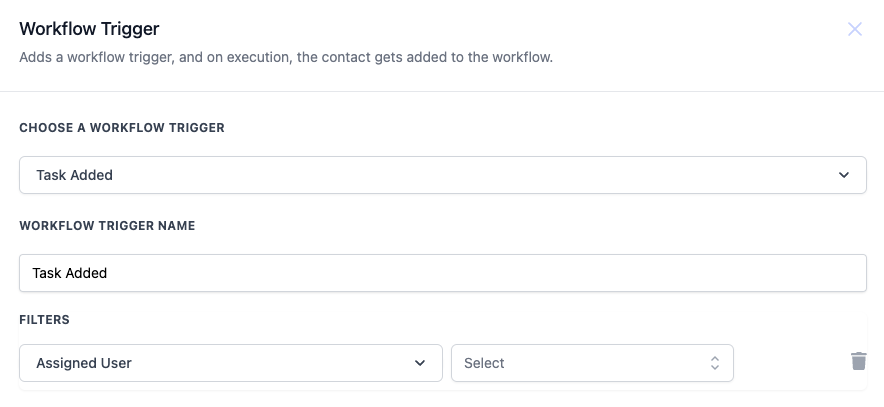
Filters let you decide which tasks should launch the workflow. The only filter offered is Assigned User, where you may pick one or several users. If the filter is left blank, the workflow runs for every new task.
The trigger sits among other workflow triggers in the platform’s automation area. Once configured, any matching task addition automatically runs the defined workflow steps.
03How businesses use task added trigger
- Real estate agency. Create a Task Added trigger that fires when a new property showing task is assigned to an agent. Use the Assigned User filter for each agent, then add actions to email the agent the showing details and to update the task status to "Notified."
- Dental practice. Set up the trigger to activate when a new appointment follow up task is added for the front desk staff. Filter by the staff member’s name, then send an email reminder and change the task status to "Reminder sent."
- SaaS startup. Configure the trigger for tasks that are assigned to the onboarding specialist. When such a task appears, automatically send a welcome email to the new user and mark the task as "Contacted."
04How to set up and use task added trigger in HighLevel
Set up task added trigger
- Open the workflow builder and click to add a new trigger.
- Select the Task Added option from the list of available triggers.
- Enter a descriptive name for the trigger, for example "Task Added."
- Optionally add a filter by choosing Assigned User(s) to limit when the trigger activates.
05What it looks like in HighLevel
06Settings that matter
- Assigned User. Specifies which user(s) must be assigned to the new task for the trigger to fire; you can select one or multiple users.
07Things to know before you rely on it
- The Assigned User filter is optional; leaving it blank causes the workflow to fire for any new task.
- You may select one or multiple users in the Assigned User filter.
08How it connects to the rest of HighLevel
- Workflow automation basics and setup guide Workflow basics
- Getting started with workflow triggers, filters, and actions Workflow creation
Michael's take

Michael ReimerFounder of CRM Pros, HighLevel Commander and Certified Admin
I find the Task Added trigger useful for staying on top of new tasks without having to check manually.
Get More InformationOpens on HighLevelPublished November 2, 2026 · Updated November 16, 2026