
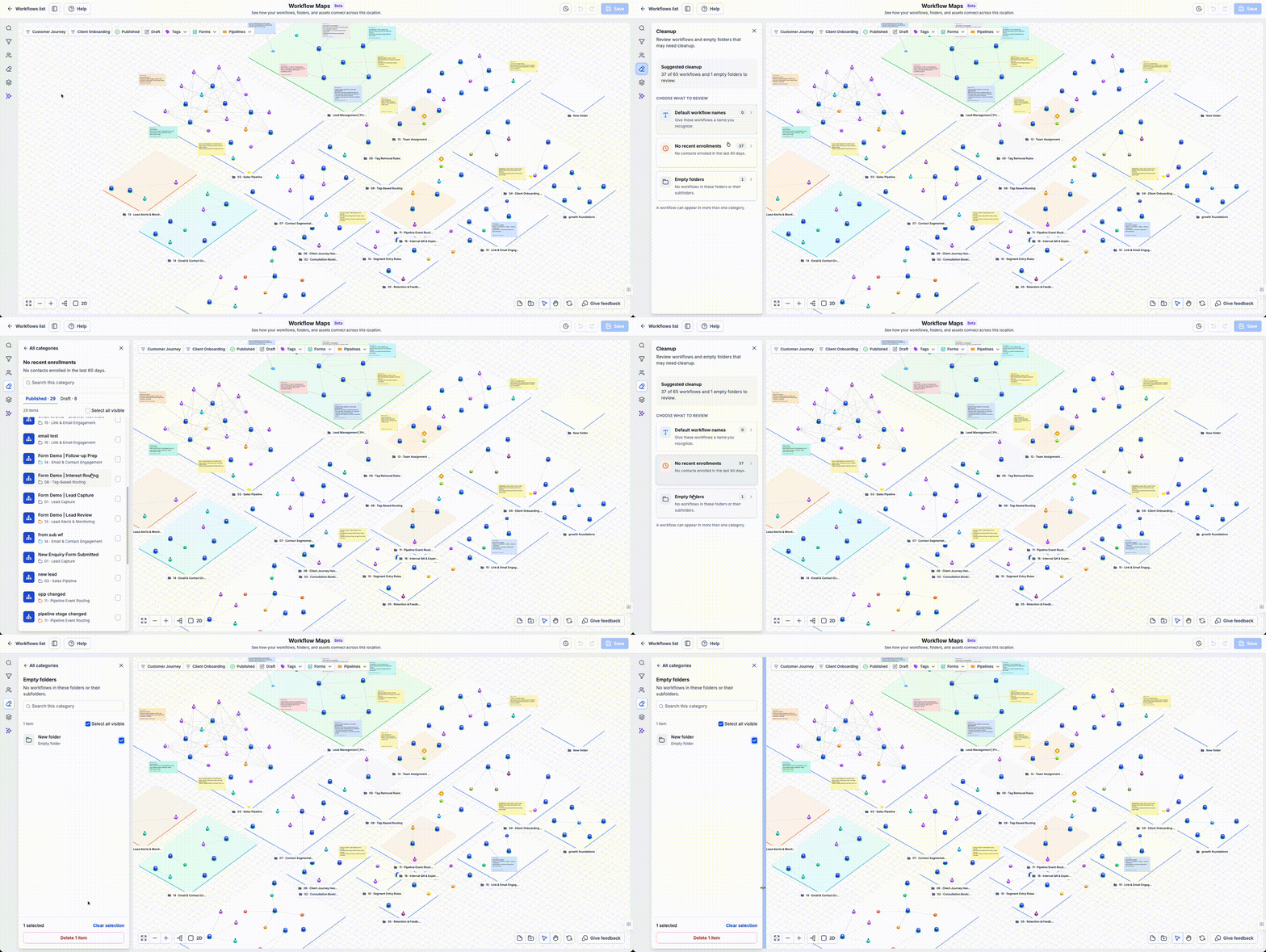
You can now use Cleanup in Workflow Maps to identify workflows and folders worth reviewing, including workflows with default names, workflows with no enrollments in the last 60 days, and empty folders.
Michael's take
My first take is that this is a solid quality of life tweak rather than a headline feature. It gives you a simple way to spot stale or unnamed automations and empty folders. The UI addition sits in the left rail of Workflow Maps and is easy to open.
If you already rely on Workflow Maps, you now have a one click cleanup view. It surfaces workflows with default names and those that haven’t enrolled anyone in the last 60 days. It also lists folders that contain nothing at all.
I would start by running the cleanup scan on a test account. I’d verify that the list matches what I expect to see. I’d also try deleting a few obvious candidates and confirm that nothing breaks downstream.
In a real business I would use this before handing an account to a new client. I would clear out test runs from recent campaigns and delete empty folders that clutter the view. That leaves only the automations that actually drive revenue or service delivery.
I believe tools should help us keep our workspaces tidy, not add more noise. A periodic house keeping step saves time when you need to troubleshoot or expand your automations.
It’s worth checking out for anyone who has built up a library of automations and wants to keep the account understandable.
What changed
You can now useCleanupin Workflow Maps to identify workflows and folders worth reviewing, including workflows with default names, workflows with no enrollments in the last 60 days, and empty folders.
Why it matters for Founders
Over time, test workflows, unfinished experiments, and empty folders make an account harder to understand. Cleanup gives you a starting point for reviewing that clutter and keeping the account organized.
How to turn it on
Go toAutomation > Workflows > Workflow Maps, then openCleanupin the left rail.
- Review default workflow names:Find workflows whose names may need updating so their purpose is easier to recognize.
- Review inactive workflows:Identify workflows with no enrollments in the last60 days.
- Find empty folders:Locate folders that may no longer be needed.
- Inspect the candidates:Review each item’s purpose before deciding what to keep or remove.
- Confirm removals:Choose the items you want to delete and confirm the action.
Common use cases
- Review test workflows after a campaign or experiment.
- Prepare an account for a client or team handover.
- Run a regular housekeeping review across a growing automation setup.
Notes and availability
Additional notes
- A workflow with no recent enrollments may still be needed for a seasonal or occasional process.
- Cleanup identifies candidates for review. Deletion requires confirmation and follows your access permissions.
- Check an item’s purpose and dependencies before removing it.
Preview
Questions Founders ask
What did HighLevel release in "Workflow Maps: Clean up workflows and empty folders"?
You can now use Cleanup in Workflow Maps to identify workflows and folders worth reviewing, including workflows with default names, workflows with no enrollments in the last 60 days, and empty folders.
What should a Founder do with Workflow Maps: Clean up workflows and empty folders?
Open Workflow Maps, launch Cleanup, and review the list of default named, inactive, and empty items this week. any agency owner or Founder who uses HighLevel automations and wants a cleaner account view.
How do I turn on Workflow Maps: Clean up workflows and empty folders in HighLevel?
In HighLevel: Review default workflow names: Find workflows whose names may need updating so their purpose is easier to recognize. Then Review inactive workflows: Identify workflows with no enrollments in the last 60 days. Then Find empty folders: Locate folders that may no longer be needed. Then Inspect the candidates: Review each item’s purpose before deciding what to keep or remove. Then Confirm removals: Choose the items you want to delete and confirm the action.
Why does Workflow Maps: Clean up workflows and empty folders matter?
Over time, test workflows, unfinished experiments, and empty folders make an account harder to understand. Cleanup gives you a starting point for reviewing that clutter and keeping the account organized.
How do I get this feature with setup help?
Start a free HighLevel trial through Michael Reimer's link and the CRM Pros team helps with setup in your first 7 days, with an onboarding call, three live calls every week and the affiliate community included.
Get More InformationOpens in a new tab Published November 10, 2026. Screenshots belong to HighLevel.