
01Who this is for
- Founders who need to protect outbound SMS spend by filtering out invalid numbers before messages are sent.
- Marketing managers who want to segment contacts based on whether they can receive SMS for multi channel campaigns.
02Number validation triggers, explained
Number Validation is a workflow trigger that fires when HighLevel validates a phone number during the preparation of the first outbound SMS. The validation confirms that the destination is a real number and can receive SMS. The result, valid, invalid, or non SMS capable, can be used in a workflow to decide the next steps.
The trigger resides in the workflow builder alongside other triggers. It relies on the Number Intelligence feature, which also provides Spam Detection and Name Lookup. The trigger does not evaluate consent, nor does it activate on later SMS delivery errors; those require separate messaging error triggers.
To use the trigger, you first enable Number Intelligence at the subaccount level, then add the Number Validation trigger to a workflow and filter on the desired validation result using the Number is filter.
03How businesses use the number validation trigger
- Ecommerce store. Add the Number Validation trigger to a checkout follow up workflow. If the number is SMS capable, continue with order status texts. If not, send an email instead, ensuring customers still receive updates.
- Dental practice. Create a workflow that notifies staff when a patient’s phone number fails validation. The notification prompts the team to verify the contact information before sending appointment reminders.
- Real estate agency. Use the trigger to tag leads whose numbers are invalid. A separate workflow then routes those leads to a call center outreach path, preventing wasted SMS attempts.
04Before you start
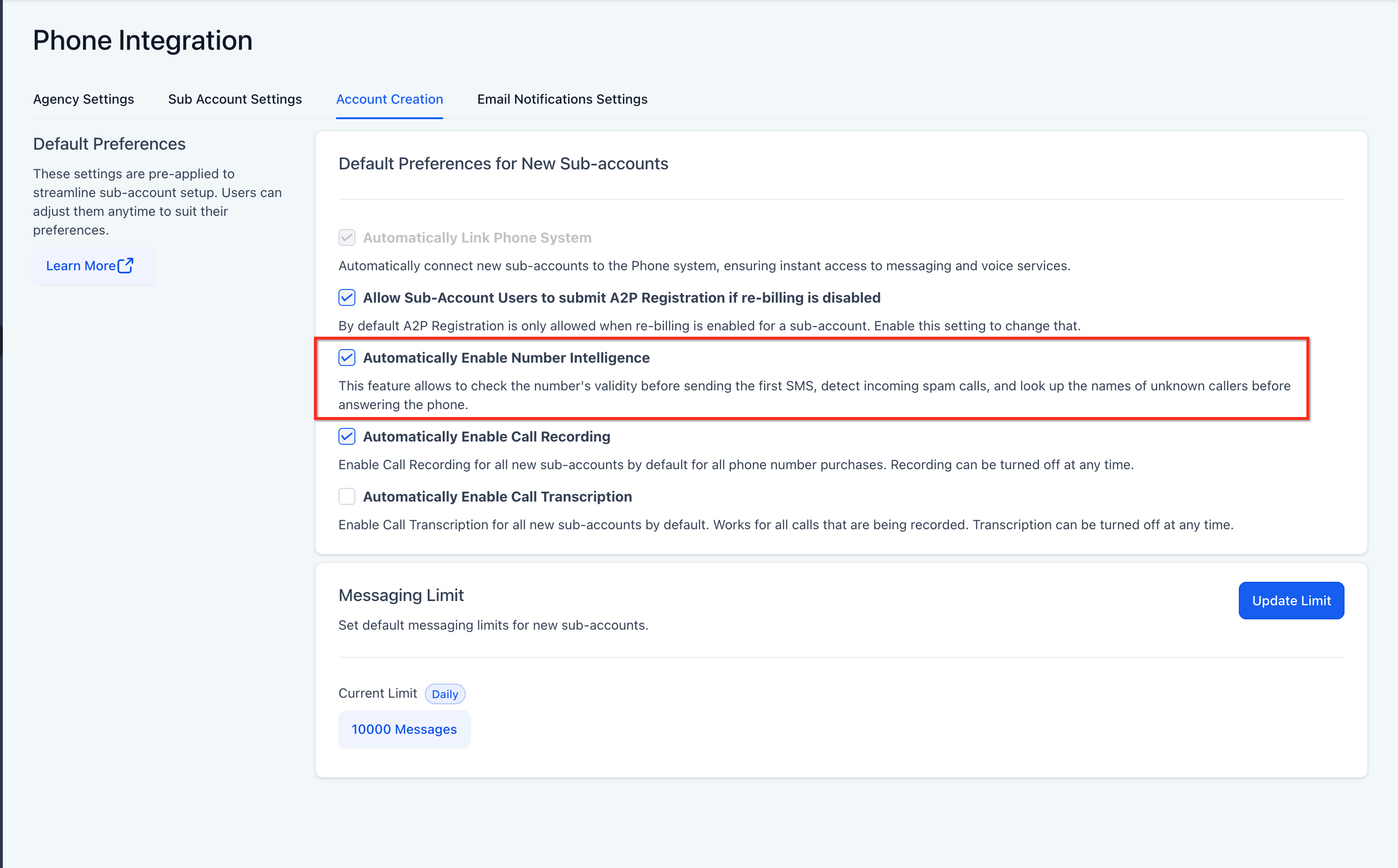
- Number Intelligence must be enabled in the subaccount’s Phone System settings before the Number Validation trigger can evaluate numbers.
05How to set up and use the number validation trigger in HighLevel
Enable Number Intelligence
- Navigate to Settings > Phone System.
- Open Additional Settings.
- Locate the Number Intelligence option.
- Enable the feature.
Configure the Number Validation trigger
- Go to Automation > Workflows.
- Create a new workflow or open an existing one.
- Click Add New Trigger.
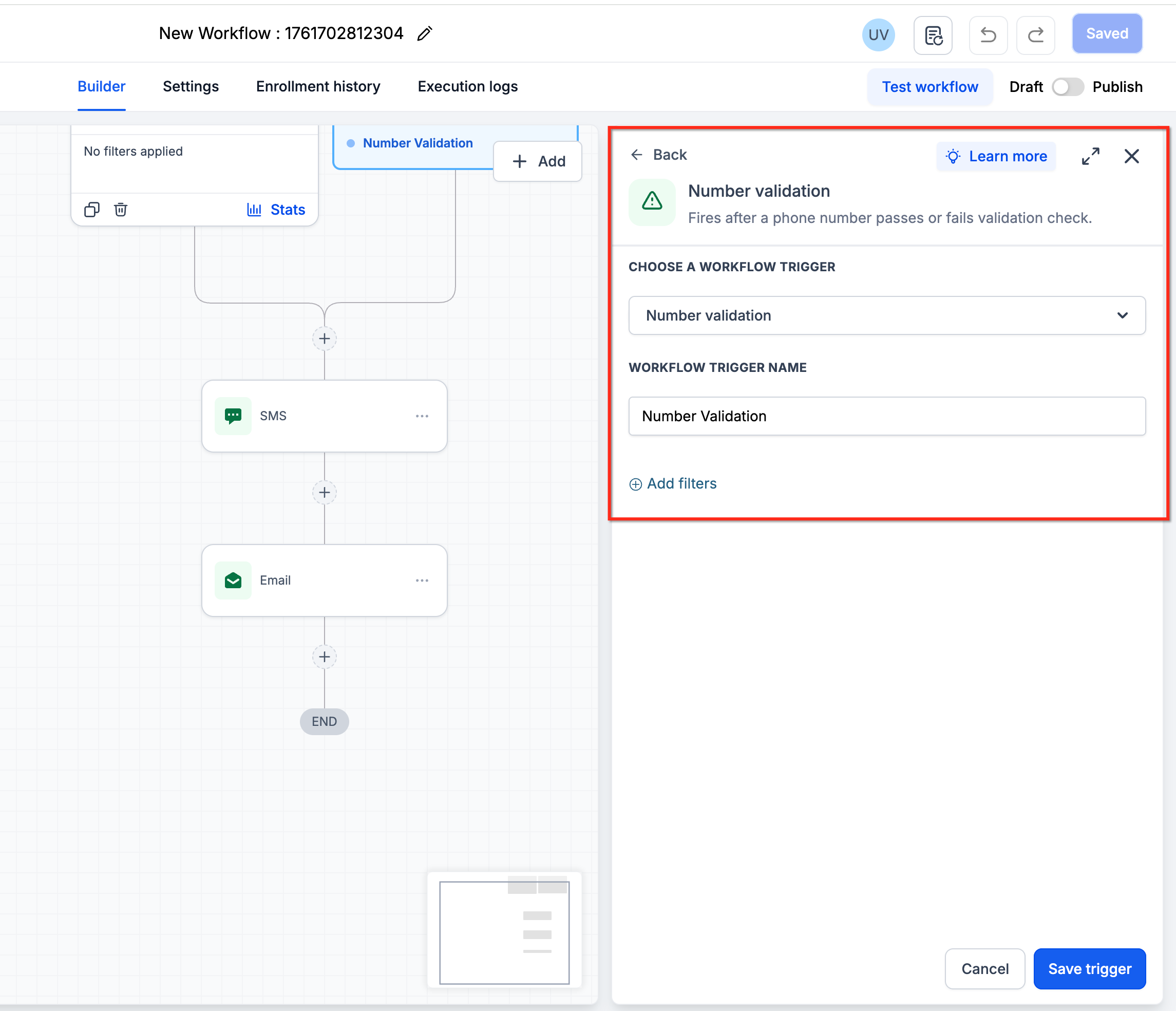
- Search for and select Number Validation.
- Add the Number is filter.
- Select the desired validation result from the displayed options.
- Save the trigger.
- Add workflow actions that should run when that validation result occurs.
- Test the workflow.
- Publish the workflow when it behaves as intended.
06What it looks like in HighLevel
07Settings that matter
- Number Intelligence. Controls whether Number Validation, Spam Detection, and Name Lookup are active for the subaccount.
- Automatically Enable Number Intelligence. Sets the default for newly created subaccounts to have Number Intelligence turned on automatically.
- Number is. A filter in the workflow builder that lets you select a specific validation result to trigger the workflow.
08Things to know before you rely on it
- Number Validation, Spam Detection, and Name Lookup are enabled or disabled together; they cannot be managed individually.
- Enabling Automatically Enable Number Intelligence only applies to new subaccounts and does not affect existing ones.
- The trigger runs only before the first outbound SMS to a number, not for each subsequent SMS.
- The trigger does not fire on Twilio or other provider delivery errors; a separate messaging error trigger is required for that.
- Number Validation does not determine consent or opt in status.
- Do not delete a contact solely because its number is invalid; the contact may still be reachable through another appropriate channel.
09How it connects to the rest of HighLevel
- HighLevel workflow creation: triggers, filters, actions Workflow creation guide
- HighLevel workflow automation: basics and set up guide Automation basics
- Understanding HighLevel Workflow Pro Plan pricing tiers Pro plan pricing
Michael's take

In my experience, adding the Number Validation trigger gives an extra safety check before sending SMS.