
01Who this is for
- Marketers who use chat widgets to capture leads and need to prevent wasted SMS spend and email bounces.
- Business owners who embed the chat widget on their website and want to keep the form simple without CAPTCHAs.
02Chat Widget Spam Protection, explained
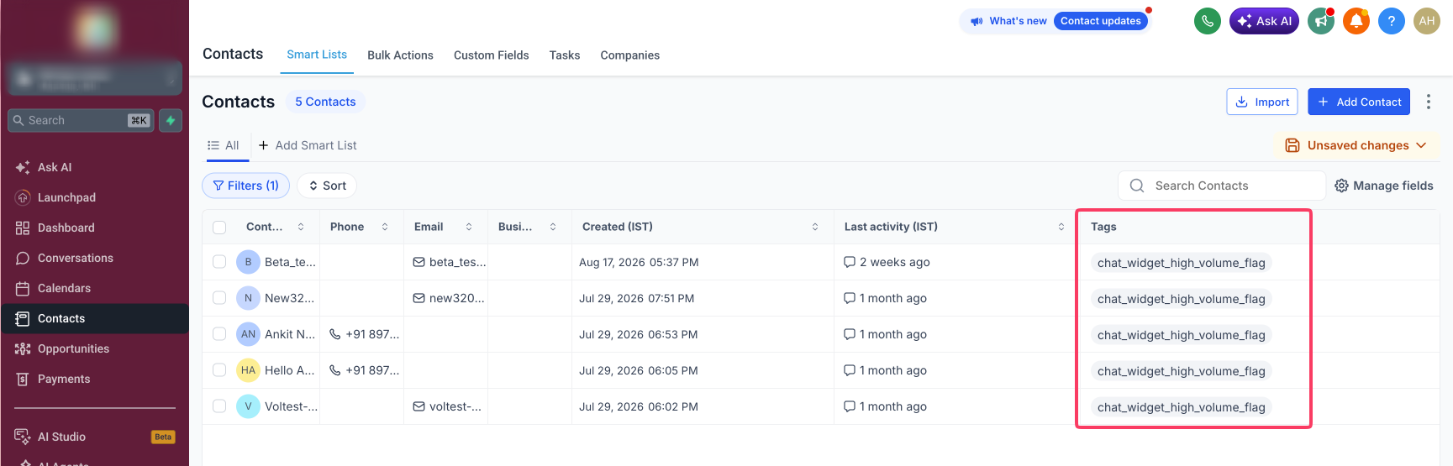
The feature watches incoming chat widget submissions on the server side. When a pattern matches spam or bot behavior, the contact is created, tagged with chat_widget_high_volume_flag, and the selected outbound channels are paused. Outbound SMS, email, or both can be stopped while inbound calls and messages remain active.
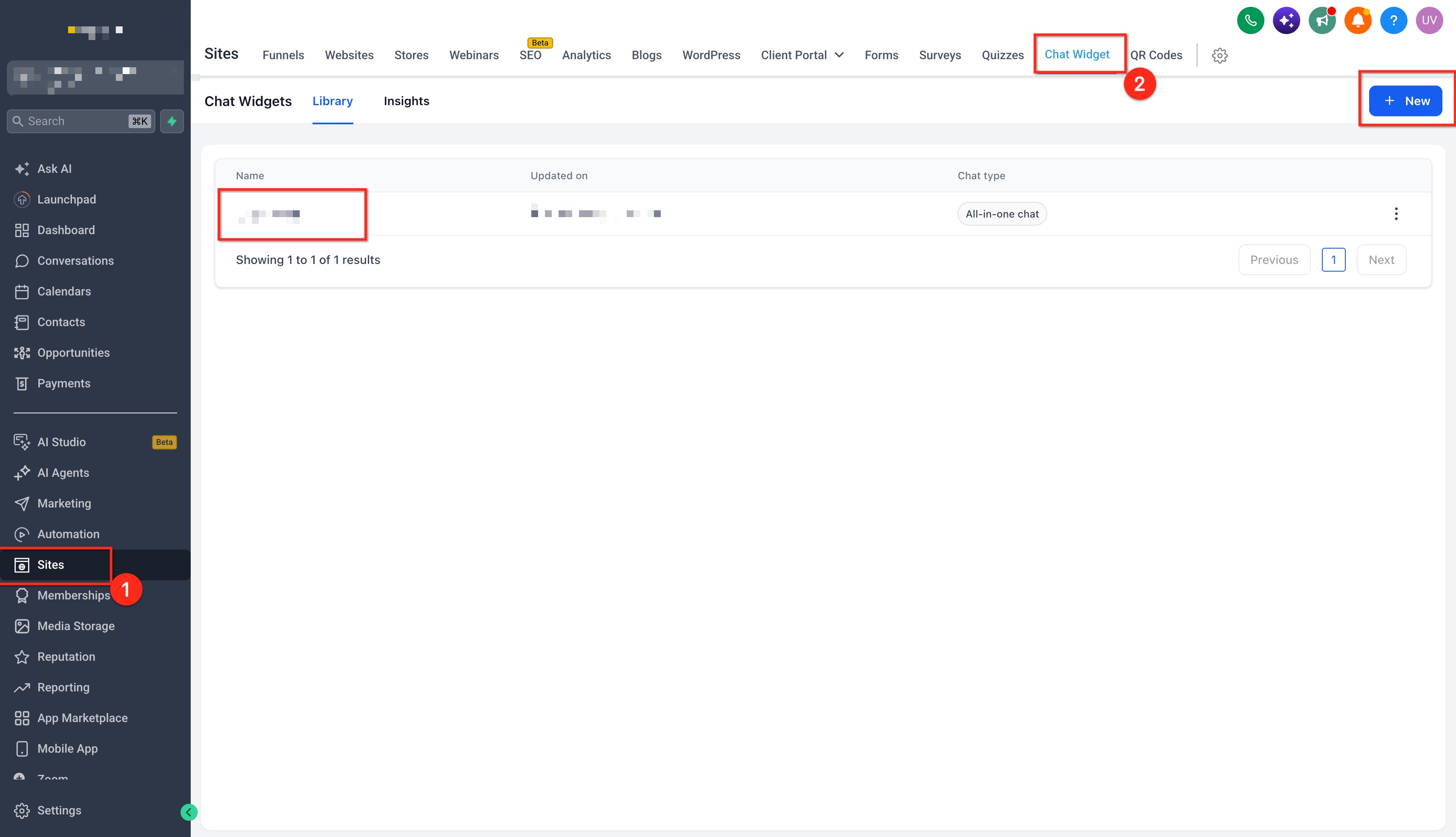
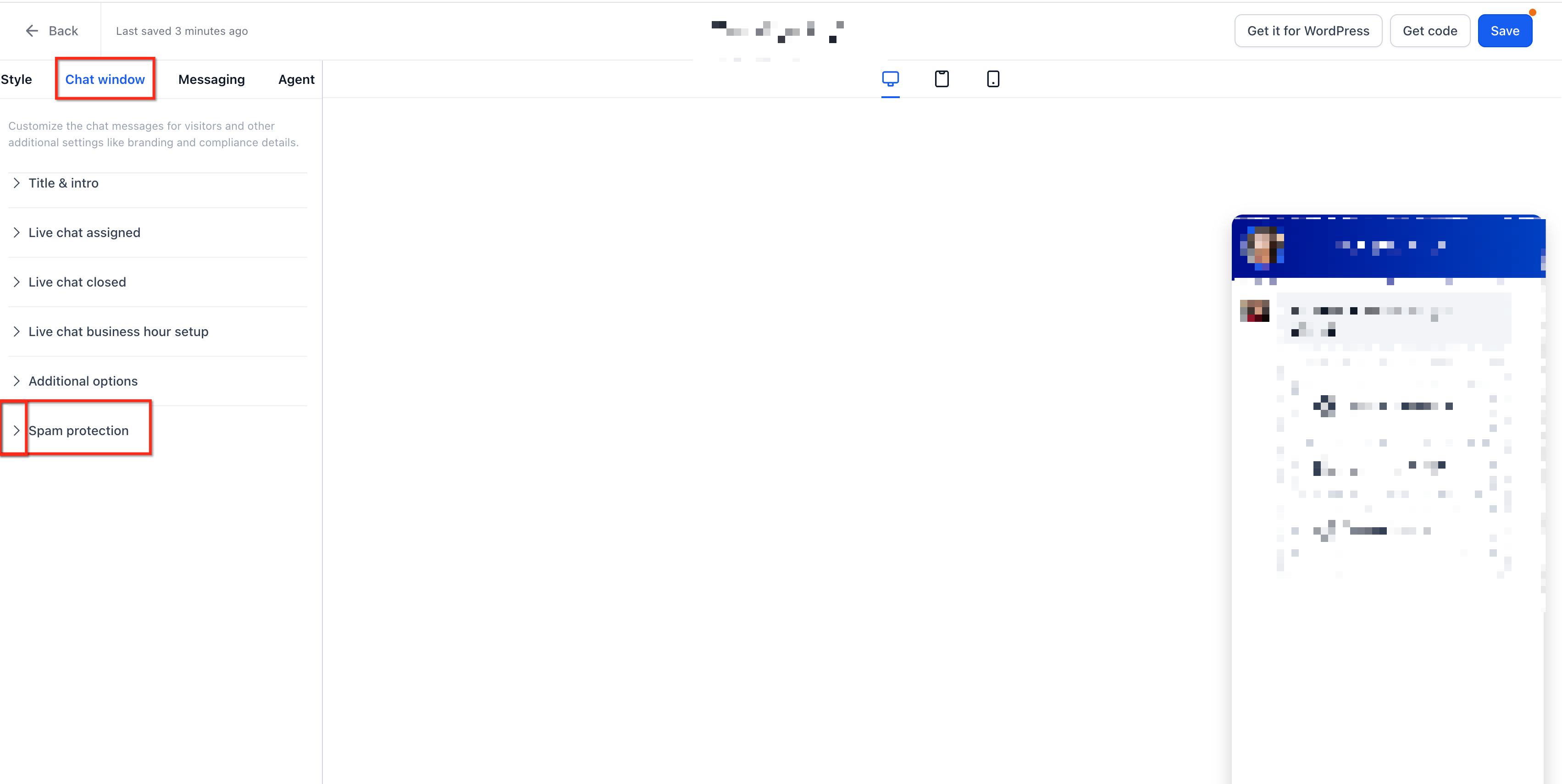
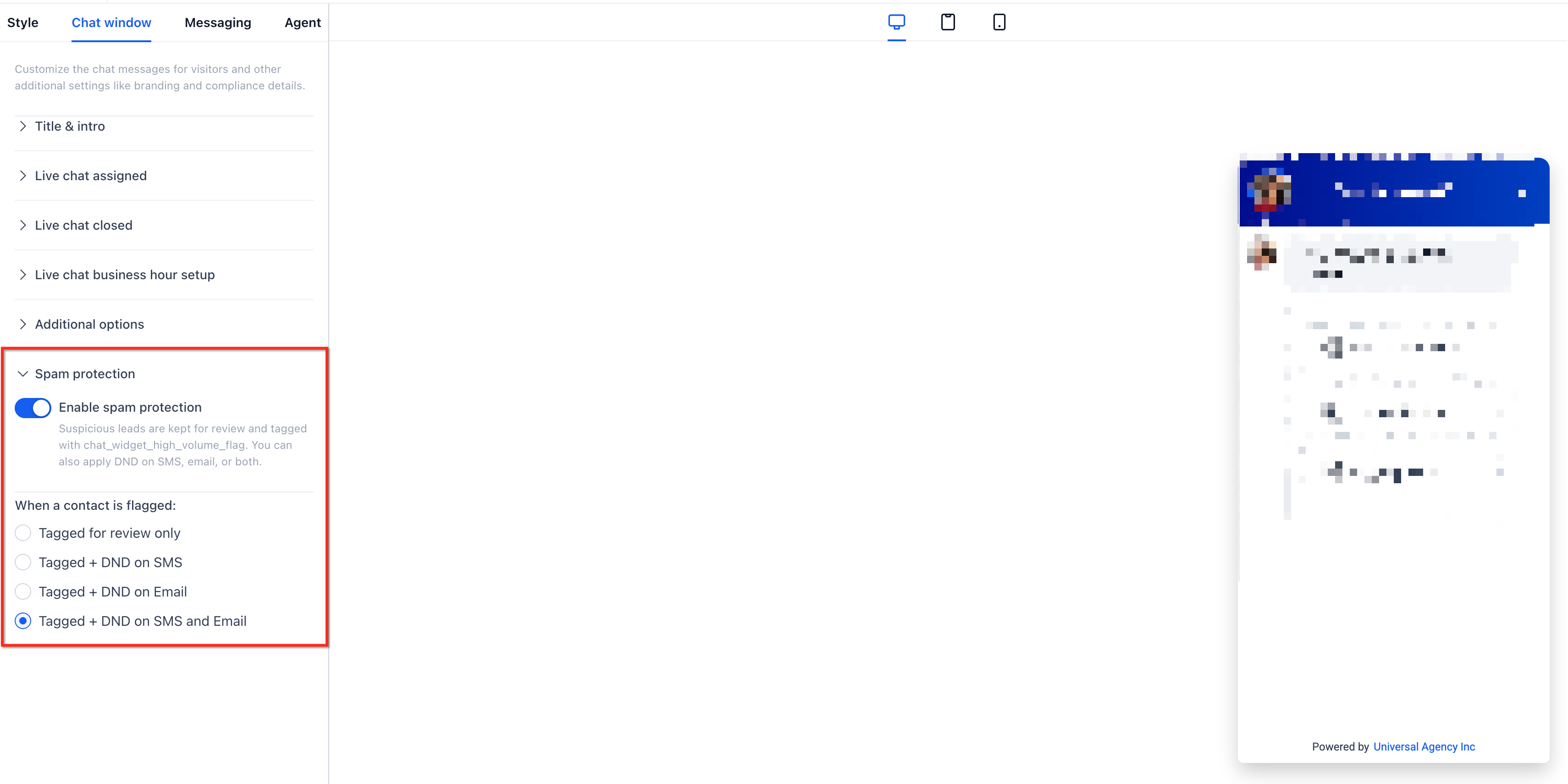
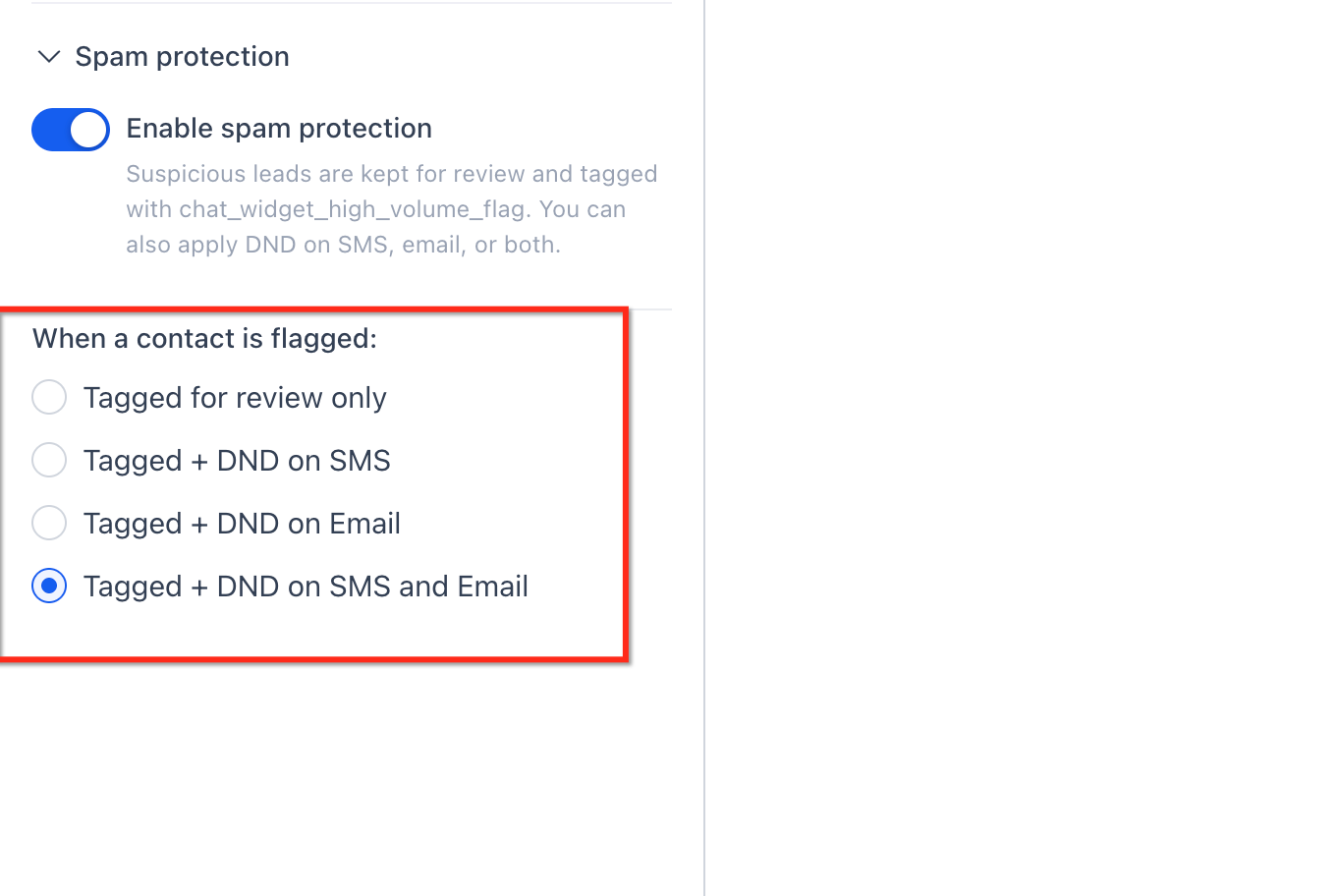
Spam protection settings are accessed per widget in the Sites > Chat Widget builder. A toggle turns the protection on or off, and a dropdown lets you pick one of four options: Tag only, Pause SMS, Pause Email, or Pause Both. The default for new widgets is Pause Both; existing widgets start with the toggle off.
All changes take effect immediately for new submissions. The contact’s activity log records the reason for the pause, providing a clear audit trail.
03How businesses use Chat Widget Spam Protection
- SaaS startup. The team enables Spam Protection on the chat widget that gathers trial sign up requests. They choose Pause Both to stop SMS and email to any flagged leads, then periodically filter contacts by the tag to restore any legitimate trial sign ups.
- Ecommerce retailer. On the sales inquiry widget, the retailer selects Pause Email to protect sender reputation while still allowing SMS follow up. Flagged contacts are reviewed weekly, and the email pause is removed for true customers.
- Local service provider. The provider activates Tag only on a contact request widget so they can see suspicious entries without blocking any outreach. They later decide whether to pause messages based on manual review.
04How to set up and use Chat Widget Spam Protection in HighLevel
Enable spam protection on a chat widget
- Navigate to Sites > Chat Widget and open the builder for the widget you want to adjust.
- In the builder sidebar, locate the Spam Protection section and expand it.
- Switch the Spam Protection toggle to the on position.
- Select the desired protection level from the four available options.
- Click Save to record the changes; protection starts for new submissions right away.
- Note: Existing widgets default to OFF; new widgets are created with Pause Both selected.
Review contacts flagged by spam protection
- Open Contacts and apply a filter for the tag chat_widget_high_volume_flag.
- Open each filtered contact to examine the submitted information and check the activity log for the DnD entry.
- If the contact is valid, remove the DnD setting for the paused channel(s) and delete the spam tag.
- For confirmed junk, select the contacts in bulk and delete them from the account.
05What it looks like in HighLevel
06Settings that matter
- Spam Protection toggle. Turns the automatic detection feature on or off for the selected widget.
- Protection Level. Determines whether flagged leads are only tagged, or if outbound SMS, email, or both are paused.
07Things to know before you rely on it
- New widgets are created with Spam Protection enabled and the Pause Both option selected; existing widgets start with the toggle off.
- Only the outbound channels you choose are paused; inbound calls, replies, and other DND settings stay unchanged.
- The feature does not add CAPTCHAs or extra form fields, so the visitor experience is not altered.
08How it connects to the rest of HighLevel
- How to install the HighLevel chat widget on your site Install chat widget
- Send chat widget leads directly to WhatsApp WhatsApp integration
- Add the HighLevel chat widget to a Shopify store Shopify chat widget
Michael's take

Spam Protection feels like a small convenience that can quickly become valuable for anyone dealing with wasted texts or email bounces. It runs quietly behind the scenes, so you keep the smooth chat experience while the system watches for bot like patterns.
If you run a lead gen site that gets a burst of form fills during product launches, this feature lets you block noisy bots without losing a hot prospect. I’d enable it on the launch widget, set the default to Pause Both, and then check after the event to make sure the real leads got through.