
01Whitelabel communities, explained
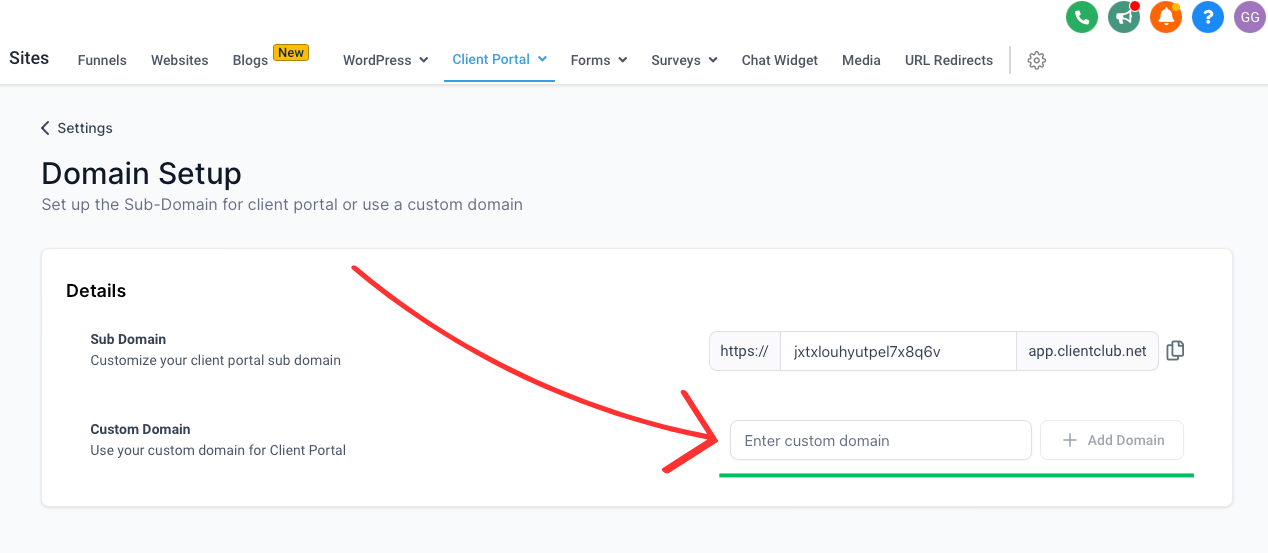
A whitelabel community lives inside a Client Portal but is accessed through a custom domain you add in Community Settings > Domains, making it appear under your own domain.
The community runs inside a subaccount, so it stays separate from other client work.
02How businesses use whitelabel community
- Client Portal integration. A community can be added to a Client Portal and accessed via a custom domain or subdomain such as community.yourdomain.com.
03How to set up and use whitelabel community in HighLevel
Create whitelabel community
- Log in to HighLevel.
- Navigate to the subaccount where the community will live.
- Go to Membership > Communities.
- Open Community Settings > Domains.
- Add a custom domain or subdomain, for example community.yourdomain.com.
- Update DNS settings to point to HighLevel’s servers as instructed.
04What it looks like in HighLevel
05Settings that matter
- Community Settings > Domains. Allows you to add a custom domain that will host the community inside a Client Portal, making it fully white labeled.
Michael's take

Michael ReimerFounder of CRM Pros, HighLevel Commander and Certified Admin
Whitelabel community is a niche feature; most small businesses will skip it.
Skip it if you don’t need a custom domain or don’t run a Client Portal.
Get More InformationOpens on HighLevelPublished November 2, 2026 · Updated November 3, 2026