
01Who this is for
- Course creators who want interactive lessons to guide learners from content to action.
- Marketing teams that need to reuse existing funnel pages for education without rebuilding them.
02Funnels in Courses, explained
The feature embeds a full funnel page as a standalone lesson inside a HighLevel course module or sub module. When the lesson loads, the funnel appears inside the course player and behaves exactly as it would on its own site, including forms, pop ups, and multi step flows.
Funnel lessons live alongside other lesson types in the course outline, which you manage under Memberships > Courses > Products. The funnel pages themselves are stored under Sites > Funnels (or Funnels & Websites AI). Access controls, drip schedules, and prerequisite rules from the course still apply to the embedded funnel.
Learners stay in the same interface, can switch to full screen mode, and any submissions or clicks are recorded in the normal funnel analytics area under Sites > Funnels.
03How businesses use funnels in Courses
- Coaching business. Add a booking funnel as a lesson so clients can schedule a strategy call directly after watching a video. The coach opens the lesson, selects the existing booking page, and publishes it. Learners complete the form without leaving the course.
- Ecommerce brand. Insert an order form funnel into a product training course. The brand chooses the checkout page from the funnel list, embeds it as a lesson, and publishes. Customers can place an order while progressing through the training.
- Online certification program. Include an application funnel as a lesson for advanced certification enrollment. The program creator selects the application page, adds it to the appropriate module, and saves. Applicants fill out the form inside the course and their submission is captured.
04Before you start
- At least one course must exist under Memberships > Courses > Products.
- A published funnel page must exist under Sites > Funnels (or Funnels & Websites AI).
- The user must have permission to edit courses and funnels in the subaccount.
05How to set up and use funnels in Courses in HighLevel
Enable Funnels in Courses via Labs
- Switch to Agency View.
- Navigate to Agency Settings > Labs.
- Locate the toggle for Funnels in Courses.
- Turn the toggle on for the desired subaccounts.
Add a funnel lesson to a course
- Switch to the subaccount where the course lives.
- Go to Memberships > Courses > Products.
- Open the specific course and select the Outline or Syllabus view.
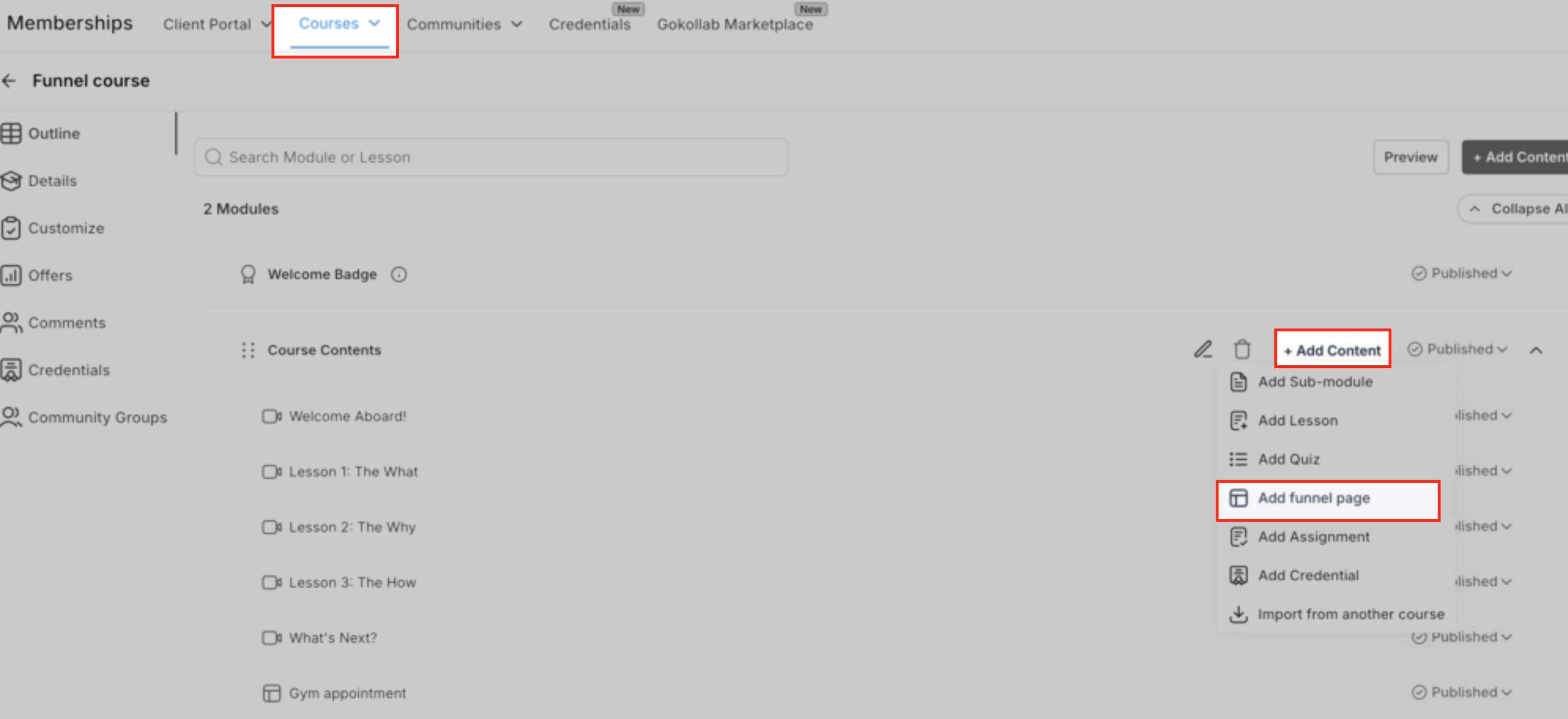
- In the chosen module or sub module, click Add Content.
- Choose the Funnel lesson type from the content options.
- Enter a clear lesson title.
- Select the desired funnel from the dropdown list.
- Choose the exact funnel page to embed.
- Click Add or Save and confirm the lesson appears in the correct position.
Configure and publish the funnel lesson
- Click the newly added funnel lesson to open the edit modal.
- Review the preview to confirm the correct page is shown.
- Optionally open the page in the Funnel builder to adjust design or CTAs.
- Set or update the thumbnail image for the lesson.
- Click Save & Publish to make the lesson live for learners.
Publish and test your course
- Make sure the course and its offer are published.
- Enroll a test learner (or your own learner account) in the course.
- Open the funnel lesson from the course player.
- Test form submission, button navigation, full screen mode, and any payments or bookings.
- Verify funnel analytics remain under Sites > Funnels and that course progress updates after the lesson.
06What it looks like in HighLevel
07Settings that matter
- Funnels in Courses toggle. Enables or disables the ability to add funnel pages as lessons within courses for selected subaccounts.
08Things to know before you rely on it
- The feature is rolling out gradually through Labs; it may not be visible until Labs are enabled for your account.
- Standard funnel elements such as forms, pop ups, timers, and show hide interactions work as expected; custom scripts or heavy third party embeds should be tested for compatibility.
- No additional cost is required beyond the plan that already includes Funnels and Courses.
09How it connects to the rest of HighLevel
- Learn how to build and launch courses in HighLevel. Course builder guide
- Generate password free access links for course members. Magic links
- See pricing options for plans that include Courses and Funnels. HighLevel pricing
Michael's take

Embedding a funnel directly into a lesson can feel risky if the funnel wasn’t built with a learning flow in mind. Make sure the page works cleanly inside the course player and that any custom code behaves on both desktop and mobile before you launch it to students.
When it works, the payoff is huge. Learners can act on what they just learned without leaving the environment, which keeps momentum high and reduces friction on conversions.