
01Who this is for
- Course creators, they can avoid scheduling errors by enforcing valid drip delays.
- Membership site owners, they can verify learner experience by previewing both locked and unlocked lesson states.
- Online educators, they gain confidence that imported Kajabi courses retain full structure and hidden content.
02Course preview and drip scheduling improvements, explained
HighLevel now prevents invalid drip values from being saved; values such as 0 are blocked. This validation occurs when an admin saves the drip configuration for a lesson or category.
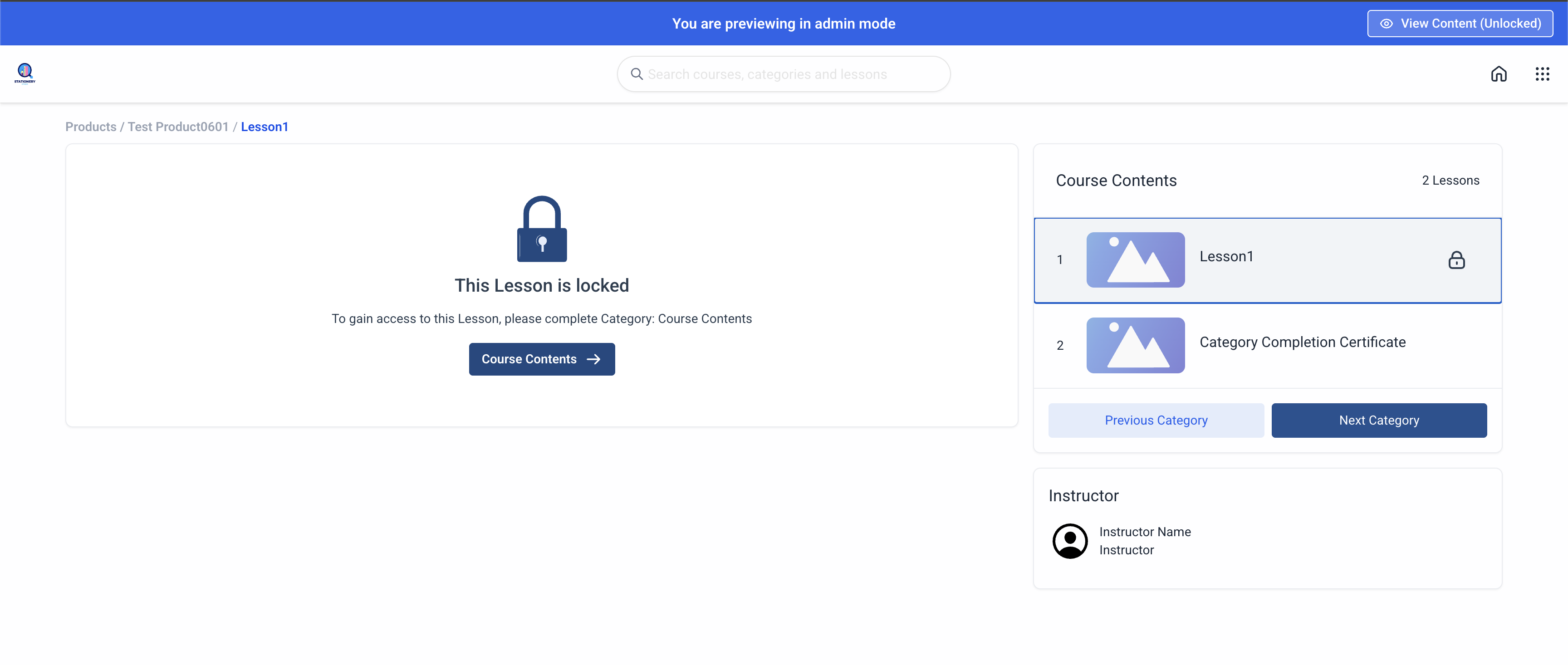
The platform also adds a preview toggle inside Admin Mode for courses using the Neo Classic Theme. The toggle lets admins see how a lesson appears to a learner (locked) and how it looks when fully unlocked, with navigation updating correctly in each view.
Both features are accessed from the course product area of the platform. Drip Settings are edited per lesson or category, while the preview toggle is available after entering Preview Mode on a Neo Classic Theme course.
03How businesses use course preview and drip scheduling improvements
- Fitness coaching program. The coach sets a drip delay of 2 days for each new workout module, ensuring participants receive content on a schedule. In Admin Mode, the coach uses the preview toggle to confirm that locked modules hide videos while the unlocked view shows the full workout page.
- Digital marketing academy. Staff import a large Kajabi course and rely on the improved import to keep nested lessons intact. They then validate each lesson’s drip delay is greater than zero, preventing accidental immediate releases.
- Software training portal. Administrators open a course built with the Neo Classic Theme, enter Preview Mode, and toggle between locked and unlocked states to verify that navigation links point to the correct next lesson for both learners and internal reviewers.
04The numbers and rules that matter
- Drip values such as 0 are blocked.
- Only drip delay values greater than 0 can be saved.
05How to set up and use course preview and drip scheduling improvements in HighLevel
Configure drip settings
- Open the desired course product.
- Select the lesson or category you want to adjust.
- Open the Drip Settings panel.
- Enter a drip delay number that is greater than zero.
- Save the changes.
Preview locked and unlocked lessons
- Navigate to Products > Courses.
- Open a course that uses the Neo Classic Theme.
- Enter Preview Mode.
- Click the View Content (Unlocked) toggle in the top right corner.
- Switch between the locked learner view and the full unlocked admin view.
06What it looks like in HighLevel
07Settings that matter
- Drip Settings. Controls the number of days to wait before a lesson or category becomes available to learners.
- View Content (Unlocked) toggle. Switches the preview between a locked learner perspective and a fully unlocked admin perspective.
08Things to know before you rely on it
- Drip values such as 0 are blocked and cannot be saved.
- Only positive drip delay numbers are accepted in course settings.
- The preview toggle is available only in the Neo Classic Theme.
- Invalid scheduling values are not stored in the system.
09How it connects to the rest of HighLevel
- How to build a course in HighLevel Course builder
- Migrate Kajabi courses into HighLevel Kajabi importer
- HighLevel pricing and plans Pricing
Michael's take

Getting a course right starts with seeing exactly what a learner will see. The preview toggle in the Neo Classic Theme allows admins to switch between locked and unlocked lesson views, so you can verify navigation or drip settings before publishing. The first setting I would get right is the drip delay. Make sure every value is greater than zero.
Once the drip values are clean, I would run a quick preview of a locked lesson, toggle to the unlocked view, and walk through the navigation flow. It lets you verify the import from Kajabi and the learner experience before you open the doors.