
01Who this is for
- Agency owners building AI driven funnels, because agents can update contacts and send messages automatically.
- Small business Founders who need instant follow up communication, as agents can tag leads and fire SMS without manual steps.
- Sales teams that want real time record updates, letting AI tag hot leads and notify reps right away.
02Actions Platform, explained
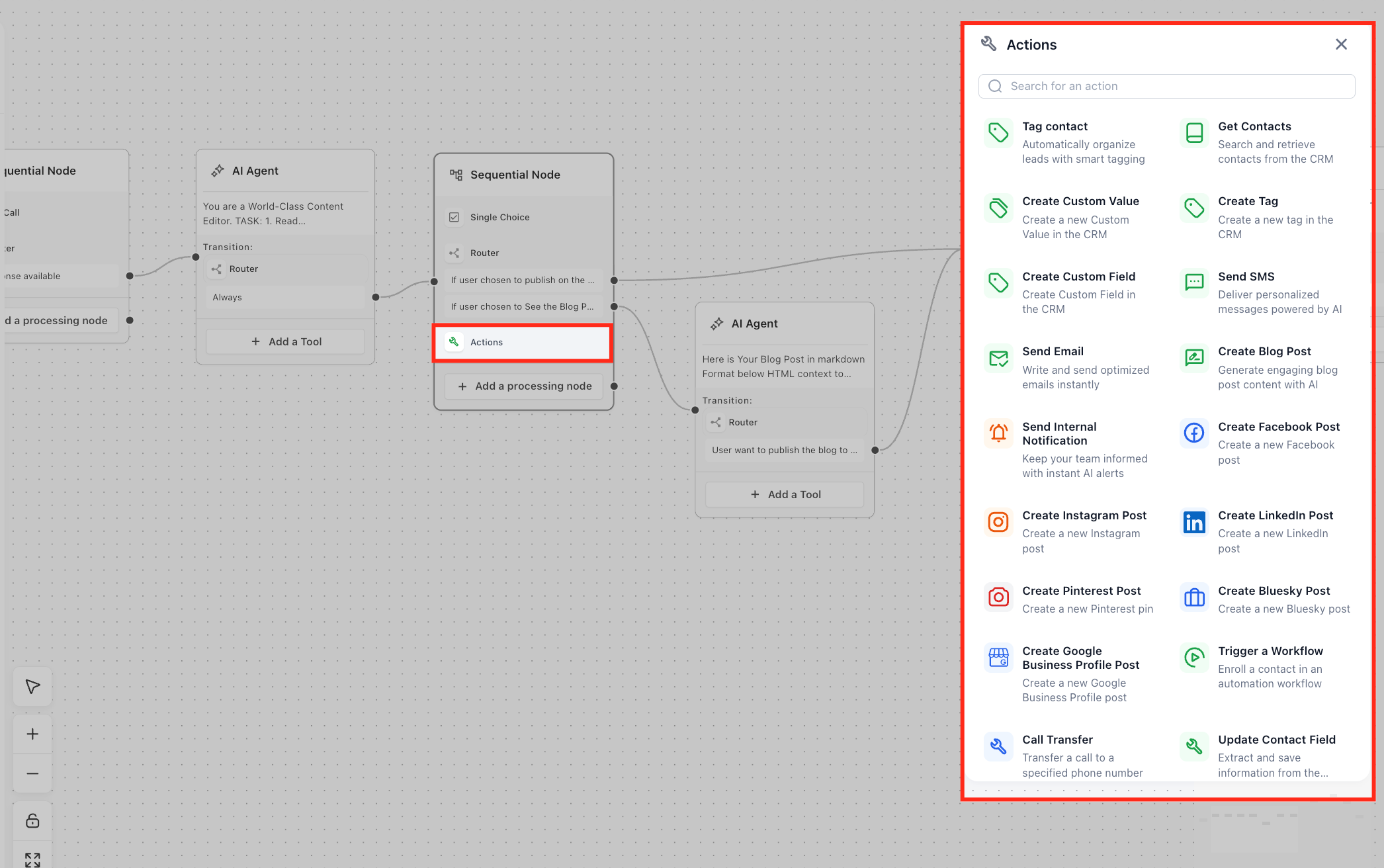
The Actions Platform provides a library of built in HighLevel actions that AI agents can call while a conversation runs. Agents can send SMS or email, apply or create tags, set custom fields, and generate internal notifications, all without external code.
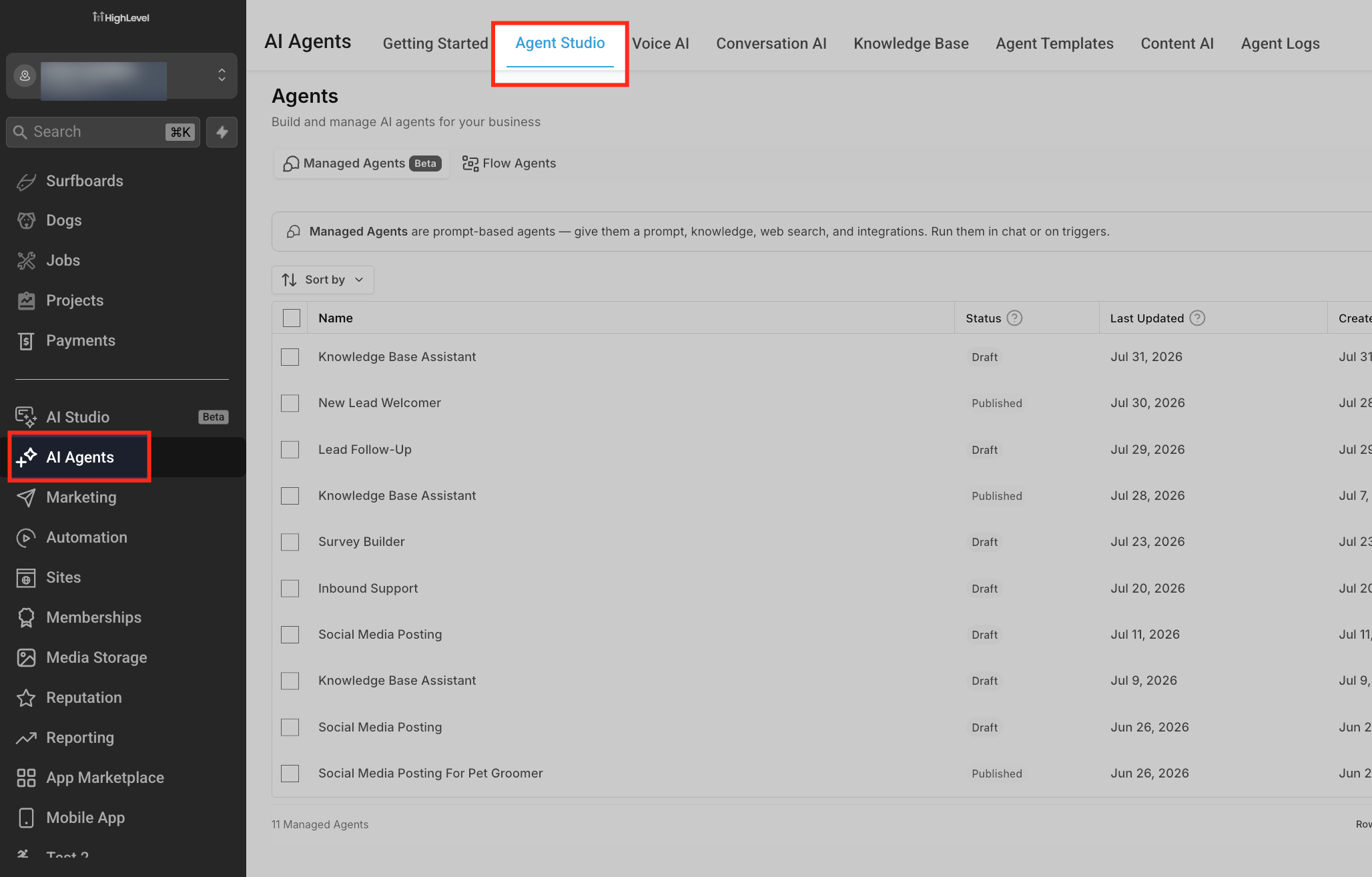
These actions run inside Agent Studio’s visual flow builder. When an agent reaches a node configured for an action, the platform executes the selected CRM operation in real time and logs the result in the contact timeline. The feature lives under AI Agents > Agent Studio in the left navigation.
03How businesses use actions platform
- Dental practice. After a patient books an appointment through chat, the agent tags the contact as New Patient, creates a custom field for the appointment type, and sends a confirmation SMS using the practice’s existing phone setup.
- Real estate agency. When a prospect asks for a property tour, the agent adds a Tour Requested tag, updates a custom field with the property ID, and emails the listing details using a pre built email template.
- Online course provider. Upon completing a quiz, the agent records the score in a custom field, tags the learner for High Performer, and sends an internal notification to the instructor for follow up.
04The numbers and rules that matter
- Built in HighLevel actions include Send SMS, Send Email (with templates), Tag a contact, Create new tags, Create Custom Fields and Custom Values, Send internal notifications, Generate content like blog and Facebook posts.
- SMS usage follows your existing Phone System pricing and A2P compliance rules.
05Before you start
- Access to AI Agents > Agent Studio in the appropriate subaccount.
- SMS Phone and email settings already configured in HighLevel.
- Agency admin or user permissions that allow Agent Studio usage.
06How to set up and use actions platform in HighLevel
Set up actions for agents
- Verify that you have Agent Studio access and that SMS and email settings are functional.
- Navigate to AI Agents > Agent Studio and either create a new agent or open an existing one.
- On the canvas, decide the exact point where the agent should perform a HighLevel action.
- Insert a node capable of performing an action and select the desired operation, such as Send SMS or Tag Contact.
- Map conversation variables and custom values to the action’s fields, like inserting the contact’s name into an SMS message.
- Configure the appropriate trigger on the Start node or add an Invoke Agent Studio Agent action in a workflow.
- Use the built in testing tools to simulate the trigger and confirm that the selected actions execute correctly.
- Publish the agent and monitor execution logs, contact timelines, and workflow records to ensure ongoing accuracy.
07What it looks like in HighLevel
08Settings that matter
- Send SMS. Allows the agent to send a text message to the current contact using the account’s existing phone or Twilio configuration.
- Send emails (with templates). Enables the agent to send a transactional or nurturing email, optionally based on a predefined email template.
- Tag a contact. Applies an existing tag to the contact record, supporting downstream workflow or segmentation logic.
- Create new tags in HighLevel. Permits the agent to generate a brand new tag when needed, provided the behavior is enabled.
- Create custom fields and custom values. Lets the agent store captured data as permanent custom fields or values on the contact record.
- Send internal notifications. Triggers an internal alert to designated team members when a specific event occurs in the agent flow.
09Things to know before you rely on it
- Actions run per trigger or per agent execution; they are not intended for bulk record updates.
- SMS and email charges follow the existing phone system and email provider pricing; the Actions Platform does not modify those costs.
- Availability is limited to subaccounts where Agent Studio is enabled for agency admins or authorized users.
- Creating or updating contacts in large batches should still rely on standard workflows or import tools.
10How it connects to the rest of HighLevel
- Learn how to create, test, and publish flow agents that can use the Actions Platform. Create and publish agents
- Set up real time triggers that start agents and therefore activate Actions Platform operations. Configure triggers
- Use the AI router tool to decide which action an agent should take based on conversation context. AI routing integration
Michael's take

The Actions Platform turns your Agent Studio bots into work horse assistants that can tag leads, fire off SMS, and even draft blog outlines without writing any code. It’s a quick way to give your existing CRM a conversational front end while keeping everything recorded in the same contact timeline.
If I were building a new lead capture flow, I’d hook a form submission trigger to an agent that tags the contact, updates a custom “Interest Level” field, and sends an instant confirmation SMS. That gives the lead immediate feedback and stores the data in the contact record.