
We've upgraded Image Generation to deliver better quality visuals for social media, advertisements, product images, and marketing creatives.
Michael's take
My first take is that this is a quality upgrade rather than a brand new capability. It sharpens the output without adding a whole new workflow.
If you already have Managed Agents set up, you can swap the image model to GPT Image 2.6 for Medium and High quality directly in Agent Studio. Low quality stays on the older model for fast drafts.
I would run a side by side test of a Low, Medium and High request and verify that the text on the image is legible and the details are cleaner. I’d also glance at the new cost comparison to see the price impact.
In practice I could ask an agent to pull a product photo, add a headline and output a 1:1 image for a social post. The sharper text means I avoid a manual fix in Photoshop before publishing.
Technology should give you the result you need without extra steps. A clearer image out of the box saves time and reduces rework.
Definitely worth checking out if you rely on Managed Agents for marketing creatives.
What changed
Managed Agents now create sharper, more detailed images with cleaner text using GPT Image 2.6!
We've upgraded Image Generation to deliver better quality visuals for social media, advertisements, product images, and marketing creatives.
Improved Image Quality
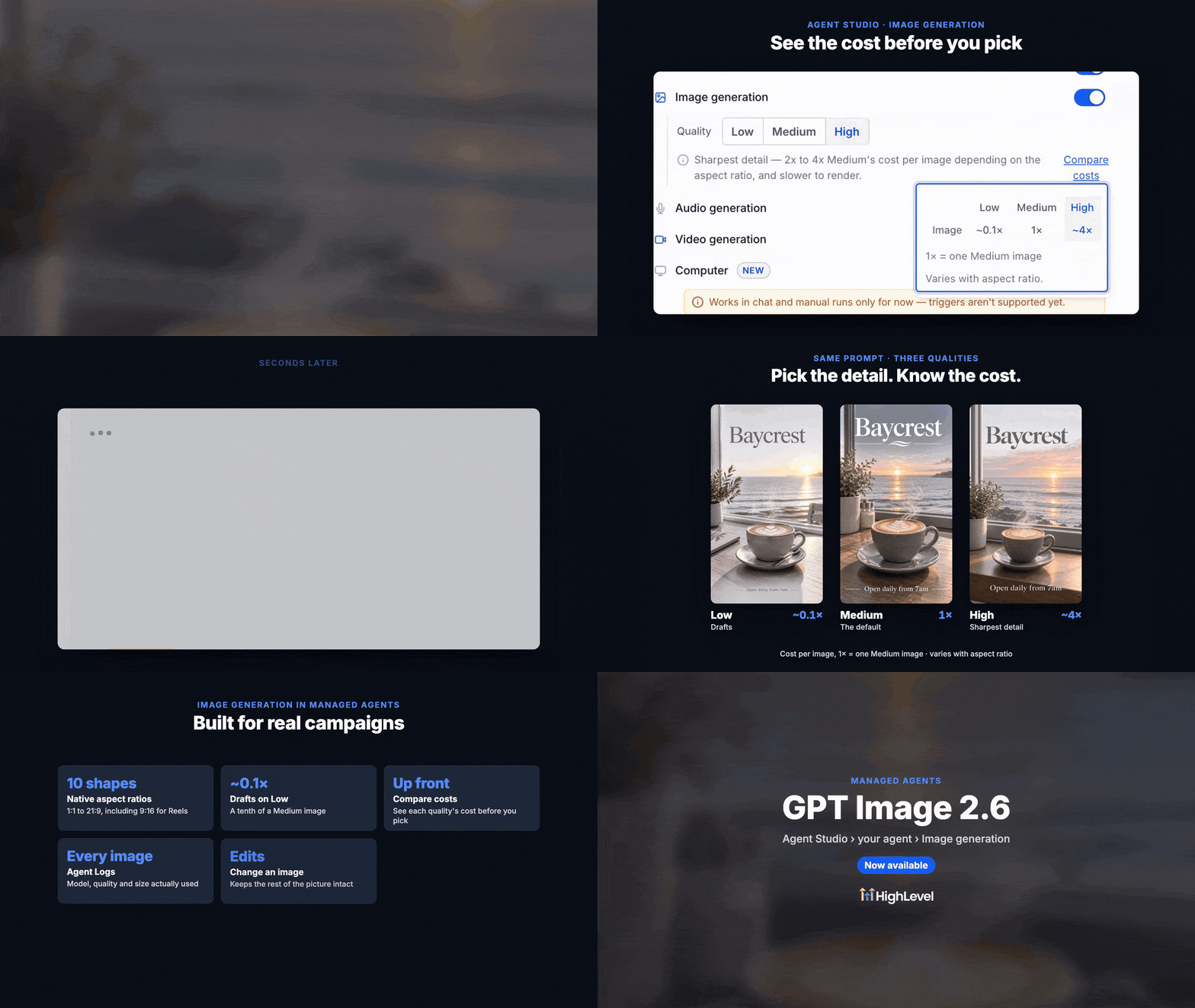
Medium & High quality now use GPT Image 2.6 for sharper details and clearer text.
Low continues using GPT Image 2.5 for faster, cost effective drafts.
Supports multiple aspect ratios, including 1:1, 9:16, 16:9, and 21:9.
Compare Image Generation Costs
New Compare costs option in Agent Studio.
Easily compare Low (~0.1×), Medium (1×), and High (~4×) relative costs.
Choose the right balance between quality and cost.
Better Execution Visibility
Agent Logs now show the model, quality, and size used for each image.
Activity automatically refreshes when background executions finish.
How to turn it on
Go to AI Agents > Agent Studio > Managed Agents.
Open your agent and enable Image Generation.
Select Low, Medium, or High quality and use Compare costs to review pricing.
Ask your agent to generate an image!
Why it matters for Founders
Sharper visuals for ads, social media, and marketing.
Clearer text with fewer manual corrections.
Transparent costs with flexible quality options.
Automatic upgrade for existing agents, with quality preferences preserved.
Sharper Images. Better Quality. Smarter Costs.
Questions Founders ask
What did HighLevel release in "Sharper Image Generation in Managed Agents with GPT Image 2.6!"?
We've upgraded Image Generation to deliver better quality visuals for social media, advertisements, product images, and marketing creatives.
What should a Founder do with Sharper Image Generation in Managed Agents with GPT Image 2.6!?
Open a Managed Agent in Agent Studio, enable Image Generation, select Medium quality and generate a test image to compare the result. Founders and agency owners who already use Managed Agents for image creation and want higher quality visuals.
Why does Sharper Image Generation in Managed Agents with GPT Image 2.6! matter?
Sharper visuals for ads, social media, and marketing. Clearer text with fewer manual corrections. Transparent costs with flexible quality options. Automatic upgrade for existing agents, with quality preferences preserved. Sharper Images. Better Quality. Smarter Costs.
How do I get this feature with setup help?
Start a free HighLevel trial through Michael Reimer's link and the CRM Pros team helps with setup in your first 7 days, with an onboarding call, three live calls every week and the affiliate community included.
Get More InformationOpens in a new tab Published November 16, 2026. Screenshots belong to HighLevel.