
We've enhanced HighLevel Ad Manager to allow users to request policy exemptions for eligible Google Ads policy violations directly from the campaign builder.
Michael's take
My first impression is that this is a modest quality of life upgrade. It does not add new reporting or targeting. It simply gives you a way to deal with certain policy blocks without leaving the platform.
If you already build Google Ads in Ad Manager you will now see a Request Exemption button when a policy error is eligible. You can click it, acknowledge the policy, and let the system submit the request and try to publish again.
I would test that the button only appears on eligible violations and not on other errors. I would also verify that the request actually goes through and that the campaign status updates correctly after the request.
In practice I would use this when a trademark or claim error stops a promotion. I would open the error modal, confirm the details, and hit Request and Publish. If the exemption is granted the ad goes live without me having to copy the campaign into Google’s interface.
I believe tools should remove friction, not add more steps. A single click to ask Google for an exemption feels like a sensible reduction of hassle.
It is worth checking out if you already run Google Ads from HighLevel and have run into policy blocks.
What changed
We've enhancedHighLevel Ad Managerto allow users to request policy exemptions for eligible Google Ads policy violations directly from the campaign builder.
Previously, users encountering these violations were blocked from publishing their campaigns. Now, they can request an exemption and retry publishing without leaving HighLevel Ad Manager.
How to turn it on
- Policy Violation Detection:When Google flags a policy violation during publishing, Ad Manager identifies whether the violation is eligible for an exemption.
- Request Exemption:An actionableRequest Exemptionoption appears alongside eligible policy errors in the campaign's error section.
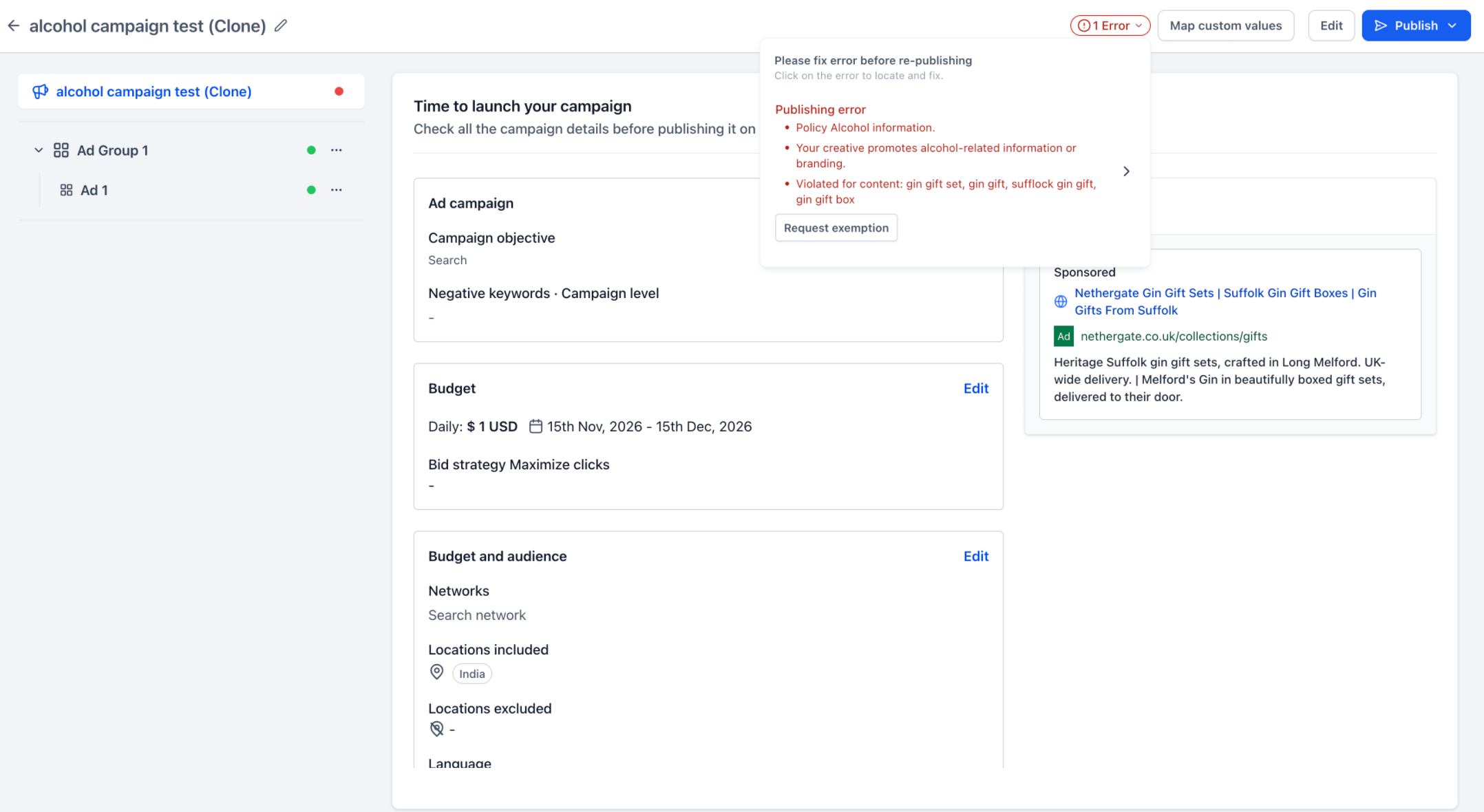
- Review & Confirm:Clicking the ‘Request Exemption’ option opens a modal displaying the policy violation details and a confirmation checkbox to acknowledge Google’s advertising policies.
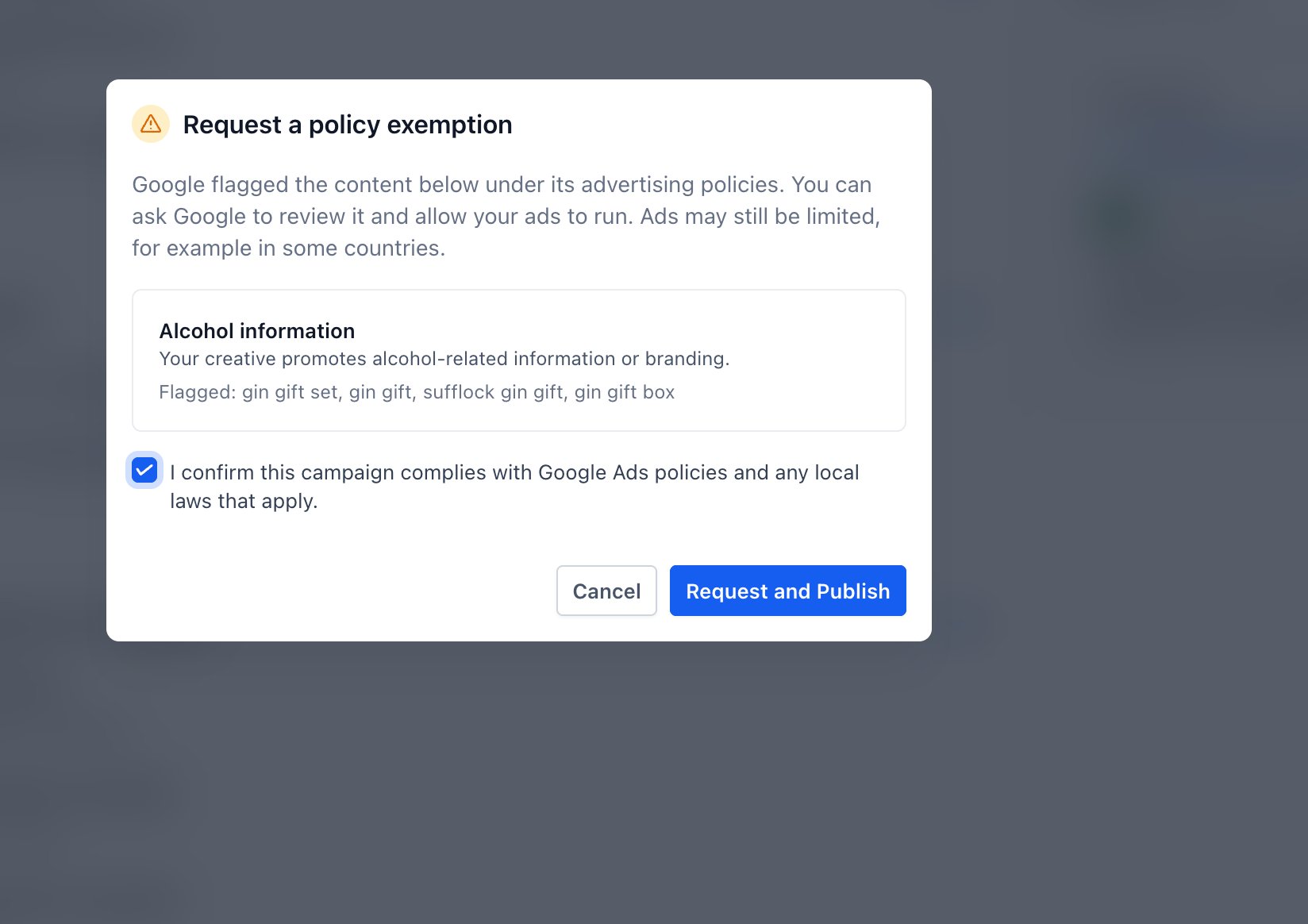
- Request and Publish:Once confirmed, users can clickRequest and Publishto submit the exemption request and automatically retry publishing their campaign.
- Publishing Status:The campaign follows the usual publishing process, with the exemption applied to the eligible policy violation.
Why it matters for Founders
- Fewer Publishing Blockers:Resolve eligible Google Ads policy violations without leaving Ad Manager.
- Simplified Experience:Request exemptions and retry publishing through a single action.
- Greater Transparency:Understand the specific policy violation and available resolution before proceeding.
Notes and availability
- Available forGoogle Ads campaignswhen Google identifies a policy violation as eligible for exemption.
- The exemption option appears only for eligible policy violations, not unrelated publishing errors.
- Requesting an exemption does not resolve other validation or publishing errors in the campaign.
- Campaign publishing remains subject to Google's advertising policies and standard review process.
Questions Founders ask
What did HighLevel release in "Ad Manager Enhancement: Google Ads Policy Exemption Requests"?
We've enhanced HighLevel Ad Manager to allow users to request policy exemptions for eligible Google Ads policy violations directly from the campaign builder.
What should a Founder do with Ad Manager Enhancement: Google Ads Policy Exemption Requests?
Open a campaign that shows an eligible policy error and try the Request Exemption flow. Founders and agency owners who run Google Ads campaigns from HighLevel.
How do I turn on Ad Manager Enhancement: Google Ads Policy Exemption Requests in HighLevel?
In HighLevel: Policy Violation Detection: When Google flags a policy violation during publishing, Ad Manager identifies whether the violation is eligible for an exemption. Then Request Exemption: An actionable Request Exemption option appears alongside eligible policy errors in the campaign's error section. Then Review & Confirm: Clicking the ‘Request Exemption’ option opens a modal displaying the policy violation details and a confirmation checkbox to acknowledge Google’s advertising policies. Then Request and Publish: Once confirmed, users can click Request and Publish to submit the exemption request and automatically retry publishing their campaign. Then Publishing Status: The campaign follows the usual publishing process, with the exemption applied to the eligible policy violation.
Why does Ad Manager Enhancement: Google Ads Policy Exemption Requests matter?
Fewer Publishing Blockers: Resolve eligible Google Ads policy violations without leaving Ad Manager. Simplified Experience: Request exemptions and retry publishing through a single action. Greater Transparency: Understand the specific policy violation and available resolution before proceeding.
How do I get this feature with setup help?
Start a free HighLevel trial through Michael Reimer's link and the CRM Pros team helps with setup in your first 7 days, with an onboarding call, three live calls every week and the affiliate community included.
Get More InformationOpens in a new tab Published November 17, 2026. Screenshots belong to HighLevel.