
01Who this is for
- Ecommerce owners can automatically send order confirmations and update inventory without manual steps.
- Subscription service managers can tag customers for loyalty programs as soon as a qualifying order is placed.
- Retail merchants can trigger follow up emails based on the total value of a cart to personalize communication.
02Order placed triggers, explained
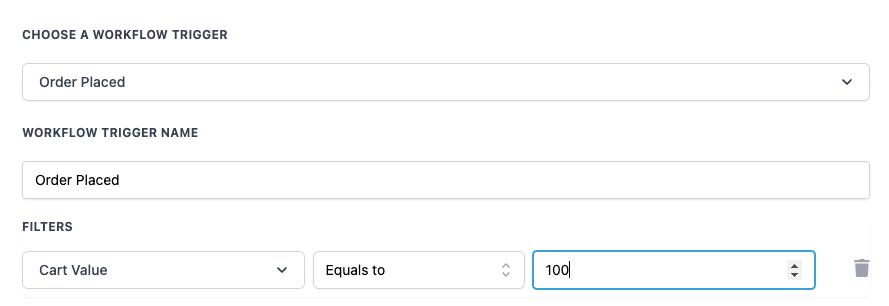
The Order Placed trigger is part of the workflow builder in HighLevel. When a purchase is recorded, the trigger becomes active and runs any actions attached to the workflow. Optional filters let you limit activation to orders that meet specific criteria such as a minimum cart value. The Cart Value filter checks the total amount of items in the cart, and the Operator filter lets you choose comparison types like Equals to, Greater than, or Less than. You select this trigger while creating or editing a workflow, alongside other triggers such as Opportunity Created or Pipeline Stage Changed.
03How businesses use order placed trigger
- Online boutique. Set the Order Placed trigger with a Cart Value filter of Greater than or Equal to $150 (per HighLevel's help center, checked November 2026). Attach an action to send a thank you email that includes a discount code. This ensures high value shoppers receive a special offer right after purchase.
- Digital product seller. Configure the trigger without filters to fire for every sale. Add an action that updates the customer profile with a tag indicating they have bought a digital product, enabling later segmentation.
- Service based business. Use the Operator filter to target orders where the Cart Value equals zero, representing free consultations. Trigger an automated email confirming the scheduled appointment.
04How to set up and use order placed trigger in HighLevel
Configure Order Placed trigger
- Open the workflow builder and select Order Placed from the trigger list.
- Enter a descriptive name for the trigger, such as Order Placed.
- Add optional filters like Cart Value and choose an Operator to define when the workflow should run.
- Save the trigger and attach the desired actions.
05What it looks like in HighLevel
06Settings that matter
- Cart Value. Specifies the total monetary amount of items in the customer's cart; used to filter which orders activate the workflow.
- Operator. Determines the comparison method for the Cart Value filter, such as Equals to, Greater than, or Less than.
07How it connects to the rest of HighLevel
- Set up an order form submission trigger for related workflows Order form submission trigger
- Compare order placed with order submitted triggers Order vs submitted triggers
- Learn workflow basics and how triggers fit together Workflow basics
Michael's take

The Order placed trigger can automate thank you emails and add loyalty tags to customer profiles.
If you rarely run promotions or your sales are low volume, the extra setup may not justify the effort. In such cases, a simple manual email after each order could be just as effective.