
01Who this is for
- Team members receive notifications when a note is changed so they can review updates promptly.
- Staff can have tasks automatically created when a note is edited to ensure follow up actions are taken.
02Note changed triggers, explained
The Note Changed trigger starts a workflow each time a contact’s existing note is edited. It lets you react to note updates by sending internal notifications, creating tasks, or logging the change.
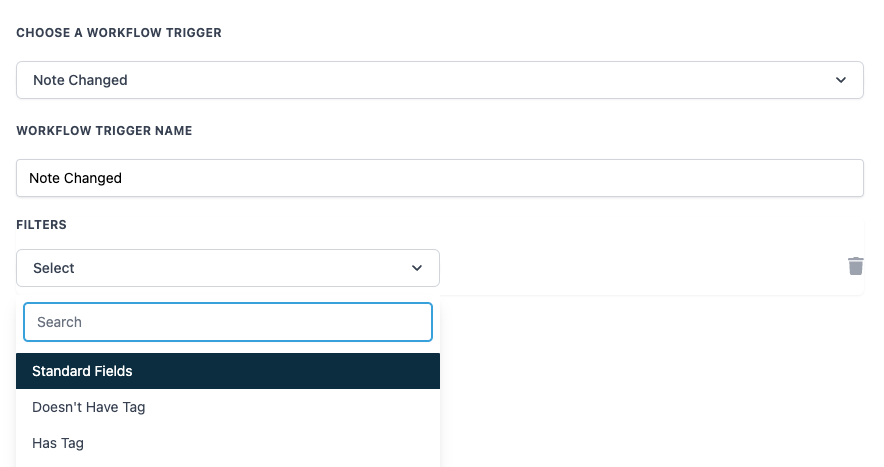
The trigger is configured inside the workflow builder. You give the trigger a name and can add optional tag filters, Has Tag to fire only for contacts with a certain tag, or Doesn't Have Tag to exclude contacts with a tag. When the conditions match, the workflow actions you defined run automatically.
03How businesses use the note changed trigger
- Send notification. When a note is edited, the trigger can send an internal notification to a designated team member to review the changes.
- Create task. The trigger can automatically create or update a task for a team member to follow up based on the edited note content.
- Log change. Each time a note is changed, the trigger can record the modification in a log for future reference.
04How to set up and use the note changed trigger in HighLevel
Configure the Note Changed trigger
- In the workflow builder, select the Note Changed trigger from the trigger list.
- Enter a descriptive value in the Workflow Trigger Name field.
- Optionally, add a Has Tag filter to limit the trigger to contacts that have a specific tag.
- Optionally, add a Doesn't Have Tag filter to exclude contacts that possess a specific tag.
- Save the workflow to activate the configured trigger.
05What it looks like in HighLevel
06Settings that matter
- Workflow Trigger Name. Provides an identifier for the trigger so you can recognize it easily within the workflow.
- Doesn't Have Tag. Ensures the workflow only runs when the contact does not carry the selected tag.
- Has Tag. Ensures the workflow only runs when the contact already has the selected tag.
07Things to know before you rely on it
- The Workflow Trigger Name field must be filled in; it is the only mandatory setting.
- Has Tag and Doesn't Have Tag filters are optional and can be used together or separately.
- The trigger activates only when an existing note is edited, not when a new note is created.
08How it connects to the rest of HighLevel
- Related trigger: when a new contact is added Contact Created trigger
- Related trigger: when any contact field changes Contact Changed trigger
- Learn the fundamentals of building workflows Workflow basics
Michael's take

The biggest mix up is treating a note edit like a new contact creation. The trigger only cares about changes to an existing note, so if you’re trying to catch new leads, this won’t fire. Instead, point the trigger at scenarios where a note already exists and you need the team to react when someone updates it.
I’d set it up with a clear name, add a tag filter for the specific client type, and then attach a notification to the account manager. That way the manager gets a heads up the moment the note is altered and can act right away.