
01Who this is for
- Marketers who need to segment contacts by interaction levels for targeted campaigns.
- Founders of education focused businesses who want to engage highly active leads in their niche.
- Customer support teams looking to prioritize follow ups with contacts showing strong engagement.
02Contact engagement score triggers, explained
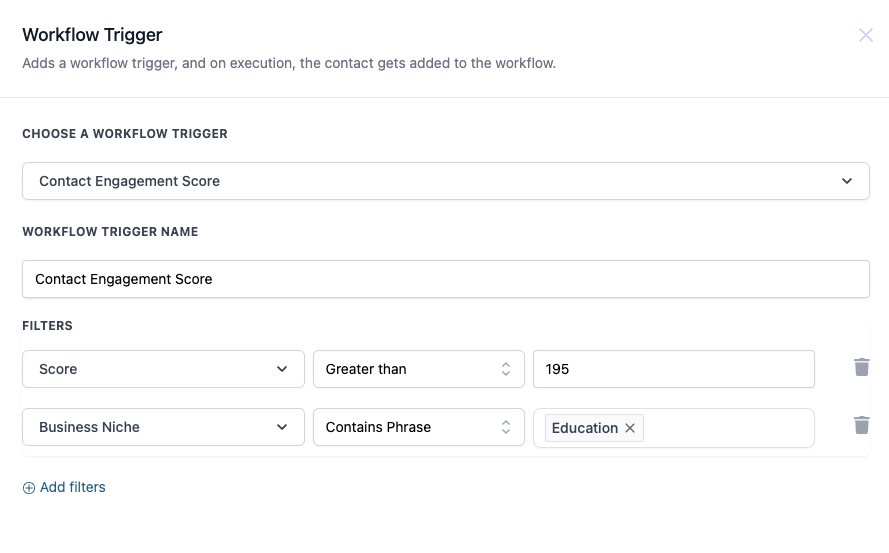
The Contact Engagement Score trigger lets you specify a numeric score condition and, optionally, a business niche. When a contact meets all the selected filters, HighLevel adds them to the workflow where you can define subsequent actions.
The trigger appears in the workflow builder’s list of trigger options. After selecting it, you assign a name, choose one or more filter fields, pick an operator, enter a value, and save the configuration. The workflow then runs automatically for any contact that matches the criteria.
03How businesses use contact engagement score
- Educational institution. Create a workflow that uses the Contact Engagement Score trigger with a Score greater than a set value and Business Niche containing "Education". When a prospect meets both conditions, the workflow sends enrollment related emails.
- Healthcare clinic. Set the trigger to fire when the Score is greater than a threshold, without a niche filter. Qualified contacts are entered into a workflow that delivers health tip newsletters.
- SaaS startup. Configure the trigger with a Score greater than or equal to a target number. Contacts that satisfy the condition enter a workflow that initiates a product demo sequence.
04The numbers and rules that matter
- Operators include Equals to, Greater than, Greater than or Equal to, Less than, Less than or Equal to, Is empty, Is not empty, Contains Phrase, Does not contain Phrase.
05How to set up and use contact engagement score in HighLevel
Configure the Contact Engagement Score trigger
- Open the workflow builder and select the "Contact Engagement Score" trigger from the list.
- Enter a descriptive name for the trigger, such as "High Engagement Contacts".
- Choose "Score" from the filter dropdown menu.
- Select an operator, for example "Greater than".
- Enter the numeric threshold value that defines the trigger condition.
- Optionally add a "Business Niche" filter and choose an operator such as "Contains Phrase".
- Click Save to store the trigger configuration.
06What it looks like in HighLevel
07Settings that matter
- Score. The contact's engagement score; this field must be set to filter contacts based on numeric criteria.
- Business Niche. The category of the contact's business, such as Education or Healthcare; this field is optional.
08Things to know before you rely on it
- Score is a mandatory field for the trigger.
- Business Niche is optional and can be left empty.
- Operators include Equals to, Greater than, Greater than or Equal to, Less than, Less than or Equal to, Is empty, Is not empty, Contains Phrase, and Does not contain Phrase.
09How it connects to the rest of HighLevel
- Learn how to start building workflows with triggers, filters, and actions. Workflow basics
- See how to set up a Contact Tag trigger for alternative segmentation. Contact Tag trigger
- Review HighLevel pricing and plan options for workflow access. Pricing
Michael's take

Michael ReimerFounder of CRM Pros, HighLevel Commander and Certified Admin
The Contact Engagement Score trigger is useful when you need to act on a contact’s activity level. Teams that don’t rely on score based segmentation can skip it.
Get More InformationOpens on HighLevelPublished November 2, 2026 · Updated November 16, 2026