
01Who this is for
- Businesses that rely on automated workflows to manage contact segmentation.
- Teams that need to keep contact tags up to date based on engagement or status changes.
02Remove contact tags, explained
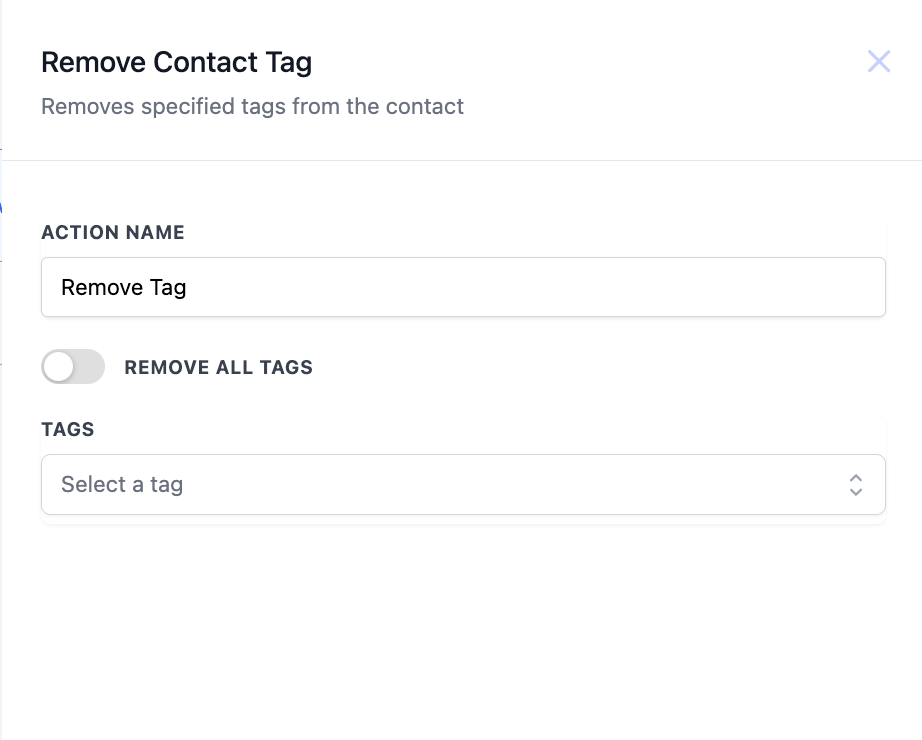
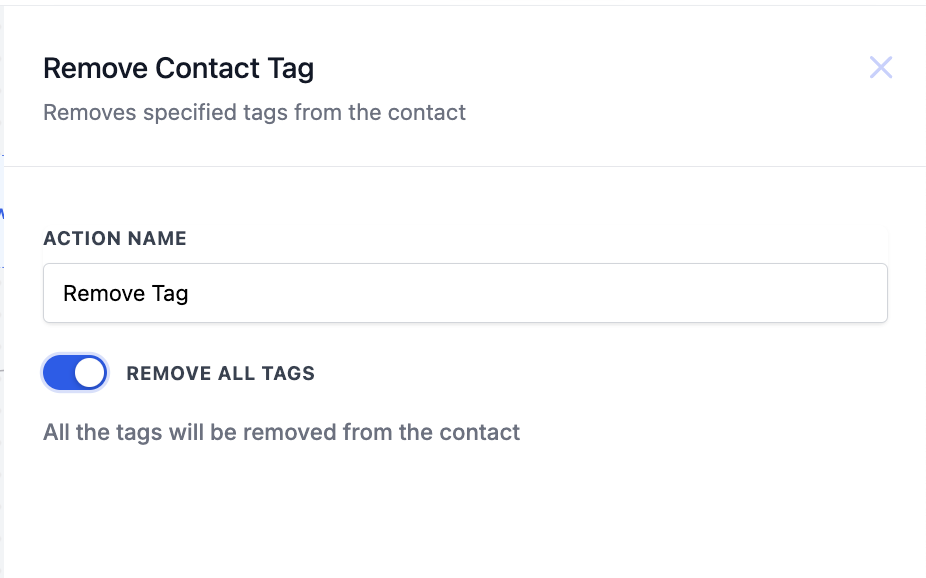
The Remove Contact Tag action deletes one or more selected tags from a contact’s record. You can also activate a toggle to strip every tag, which disables the individual tag selector. The action updates the contact right away when the workflow runs.
It appears in the workflow builder under the list of available actions. After adding the action, you set a name, choose tags from the dropdown, or turn on the Remove All Tags option. The action can be combined with any trigger that fits the business need.
The action lives within the HighLevel platform under Workflows > Actions and interacts directly with the contact’s stored data, ensuring tag information stays current for subsequent workflow steps.
03How businesses use remove contact tag
- Webinar attendance tracking. When a contact does not attend a scheduled webinar, a trigger runs the Remove Contact Tag action to delete the "Interested" tag, preventing further webinar related emails.
- Appointment management. If an appointment is canceled or rescheduled, the Appointment Status Changed trigger removes the "Appointment Booked" tag so the contact’s status reflects the change.
- Survey response handling. When a survey indicates a contact is no longer interested, the Survey Submitted trigger removes interest related tags to keep the segmentation accurate.
04How to set up and use remove contact tag in HighLevel
Configure Remove Contact Tag action
- Enter a descriptive name for the action in the Action Name field.
- Open the Tags dropdown and select the tag or tags you want to delete.
- If you need to erase all tags, switch on the Remove All Tags toggle; the Tags field will then become unavailable.
05What it looks like in HighLevel
06Settings that matter
- Tags. Specifies which individual tags should be removed from the contact’s profile; multiple selections are allowed.
- Remove All Tags. When turned on, deletes every tag attached to the contact and disables the Tags selection field.
07Things to know before you rely on it
- When the Remove All Tags toggle is activated, the Tags field cannot be accessed.
- The Remove All Tags option is optional; it does not have to be used.
08How it connects to the rest of HighLevel
- Add a contact tag in a workflow Add Contact Tag
- Set up a Do Not Disturb contact action DND Contact
- Learn workflow basics and how to start building automations Workflow basics
Michael's take

When contacts start slipping out of a segment. Like a webinar nonattendee or an unsubscribe reply. You need a clean way to pull their tags off. The quickest fix is making sure the Remove All Tags toggle is set correctly; if you only need a single tag gone, pick it in the dropdown.
If I were setting this up, I’d first test the action on a test contact to verify the tag disappears as expected, then roll it into the live workflow.