
01Who this is for
- Affiliate program managers, can log manual sales and ensure affiliates receive correct commissions.
- Marketing teams running affiliate campaigns, gain a single action to capture offline or manual transactions.
- Small business owners with limited technical resources, use the toggle to avoid building separate workflow branches for each affiliate.
02Add manual sales for an affiliate, explained
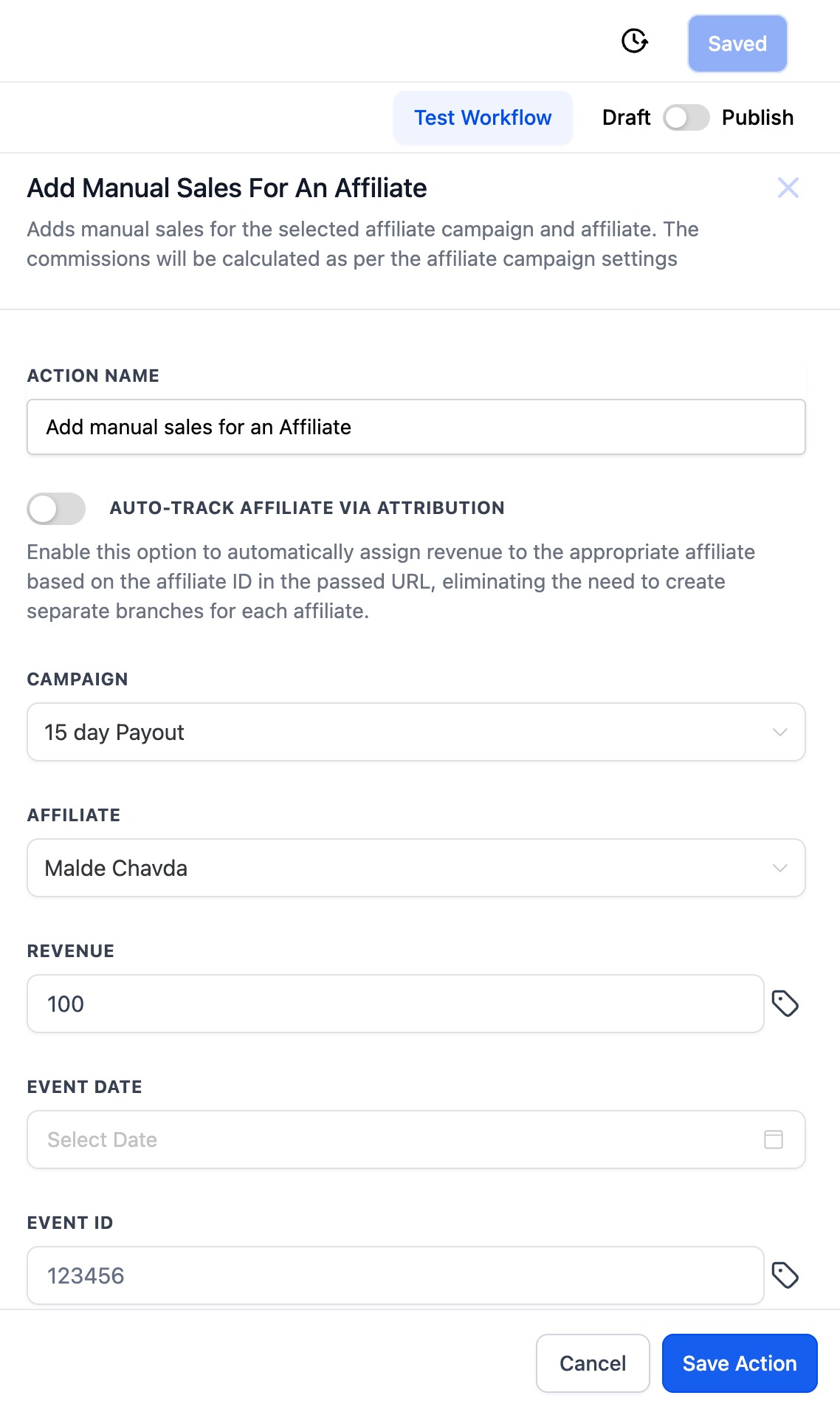
The action records a sale’s revenue and links it to an affiliate that belongs to a specified affiliate campaign. After the action runs, the platform calculates the commission using the campaign’s default commission settings and assigns it to the selected affiliate.
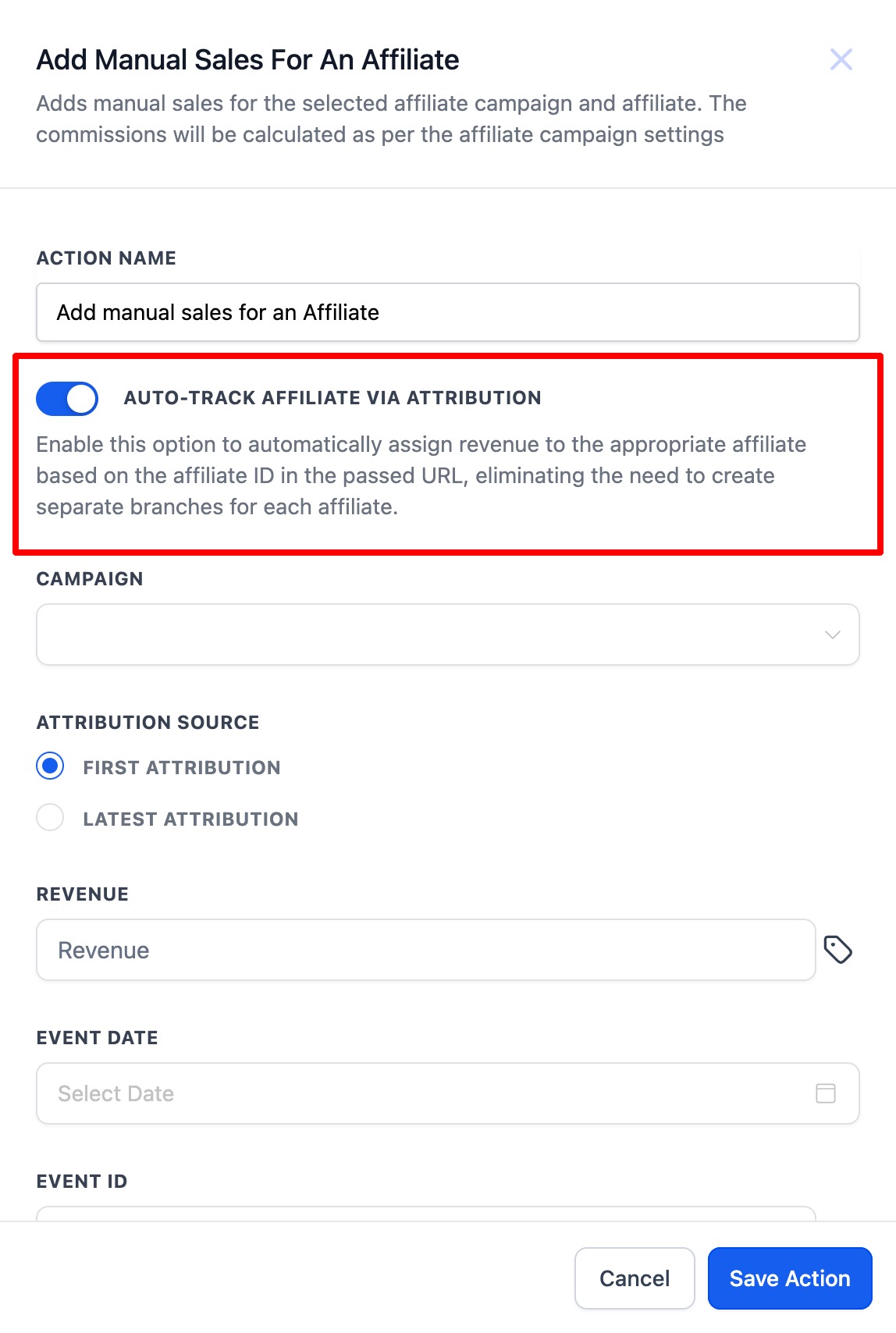
When the AUTO TRACK AFFILIATE VIA ATTRIBUTION toggle is enabled, the system reads the affiliate ID from the URL and automatically assigns the sale, removing the need for separate workflow branches. You can also choose whether the attribution uses the first recorded interaction or the most recent one.
This action is available within the Workflows area of HighLevel. It appears as a selectable action when building a workflow, alongside other actions such as Add Contact Tag or Update Contact Field.
03How businesses use add manual sales for an affiliate
- Online course platform. The platform can add a manual sale whenever a student purchases a course through an affiliate link. By enabling auto track attribution, the sale is automatically matched to the affiliate whose URL was used, and the commission is calculated without extra workflow steps.
- Ecommerce store with an affiliate program. When a customer completes a purchase offline, staff can enter the revenue amount, event date, and transaction ID into the action. The store can choose to record the sale without attribution if the affiliate is known manually.
- SaaS company using affiliate links. The company can set up a form submission trigger for leads captured via affiliate URLs. With the auto track toggle turned on, each submitted form automatically creates a manual sale tied to the correct affiliate, using either first or latest attribution as preferred.
04Before you start
- An affiliate campaign must exist in the account.
- Affiliate IDs need to be present in URLs if you plan to use auto track attribution.
05How to set up and use add manual sales for an affiliate in HighLevel
Add manual sales with attribution (6 steps)
- Select the "Add Manual Sales For An Affiliate" action.
- Turn on the AUTO TRACK AFFILIATE VIA ATTRIBUTION toggle.
- Choose whether the attribution should use First or Latest interaction.
- Pick the affiliate campaign from the dropdown list.
- Enter the revenue amount and optionally add the event date and event ID.
- Save the action.
Add manual sales without attribution (4 steps)
- Select the "Add Manual Sales For An Affiliate" action.
- Choose the affiliate campaign and then select the affiliate from the filtered dropdown.
- Enter the revenue amount and optionally add the event date and event ID.
- Save the action.
06What it looks like in HighLevel
07Settings that matter
- AUTO TRACK AFFILIATE VIA ATTRIBUTION. When enabled, the system reads the affiliate ID from the URL and automatically assigns the sale to that affiliate.
- First or Latest Attribution. Determines whether the affiliate assignment uses the first recorded interaction with the contact or the most recent one.
08Things to know before you rely on it
- First attribution never changes for a contact; latest attribution updates with each new interaction.
- Auto track attribution only works when an affiliate ID is present in the incoming URL.
09How it connects to the rest of HighLevel
- Explore all workflow actions available in HighLevel. All Workflows features
- Learn how to create a workflow with triggers and actions. Workflow creation guide
- Review HighLevel pricing and plans for workflow access. HighLevel pricing
Michael's take

Be careful about relying on automatic attribution if your URLs ever change or if multiple affiliates share the same link. The workflow will only assign the revenue to the affiliate ID it finds in the URL, so a missing or wrong ID means no commission is recorded.
When the attribution works, you get a clean, hands off way to reward affiliates for sales that happen after a form submit or other trigger. It removes the need for a dozen branch steps and keeps your commission reporting accurate.