
01Who this is for
- Marketing agencies can generate custom copy for emails and ads without manual writing.
- Service providers can create quick follow up messages that reference client data.
- Sales teams can produce concise conversation summaries to keep records up to date.
02GPT 4 Turbo, explained
The GPT-4 Turbo step appears in the workflow editor as an action you can add after a trigger or filter. When you add the step you select the AI model, enter a prompt, and optionally provide a system prompt that tells the model what tone to use. The step processes the prompt, consumes tokens, and returns text that can be saved in a custom field or passed to an email, SMS, or webhook action.
The step lives inside the workflow canvas under the list of actions. You can mix it with other AI steps that use GPT-3.5 or GPT-4, each step choosing its own model. After the step runs you can test the workflow with a sample contact to see the generated output before publishing.
03How businesses use GPT 4 Turbo
- Digital marketing agency. The agency adds a GPT-4 Turbo step to a client lead capture workflow. They write a prompt that asks for a friendly follow up message using the lead's name and service interest. The generated text is then sent automatically via email.
- Home repair service. The service creates a workflow that captures a phone call transcript. A GPT step with a summarise prompt creates bullet points that are stored in a custom field, which the team reviews before scheduling work.
- Online education platform. The platform adds a GPT step that writes a brief email inviting a student to a new course, inserting the student’s first name and course title via dynamic variables. The email step uses the AI output directly.
04The numbers and rules that matter
- GPT 4 Turbo is a premium Content AI feature.
- Token pricing: GPT 4o input $2.5 per million, output $10 per million; GPT 4o mini input $0.15 per million, output $0.60 per million (per HighLevel's help center, checked November 2026).
- With $10 you can process roughly 3 million input words or generate 750 000 output words on GPT 4o (per HighLevel's help center, checked November 2026).
- Model Switcher UI lets you choose GPT 3.5, GPT 4 or GPT 4 Turbo per step.
05Before you start
- Your account must have access to the premium Content AI features that include the GPT-4 Turbo action.
06How to set up and use GPT 4 Turbo in HighLevel
Add a GPT step
- Open the workflow editor and click to add a new action.
- Select the action type labeled GPT powered by OpenAI.
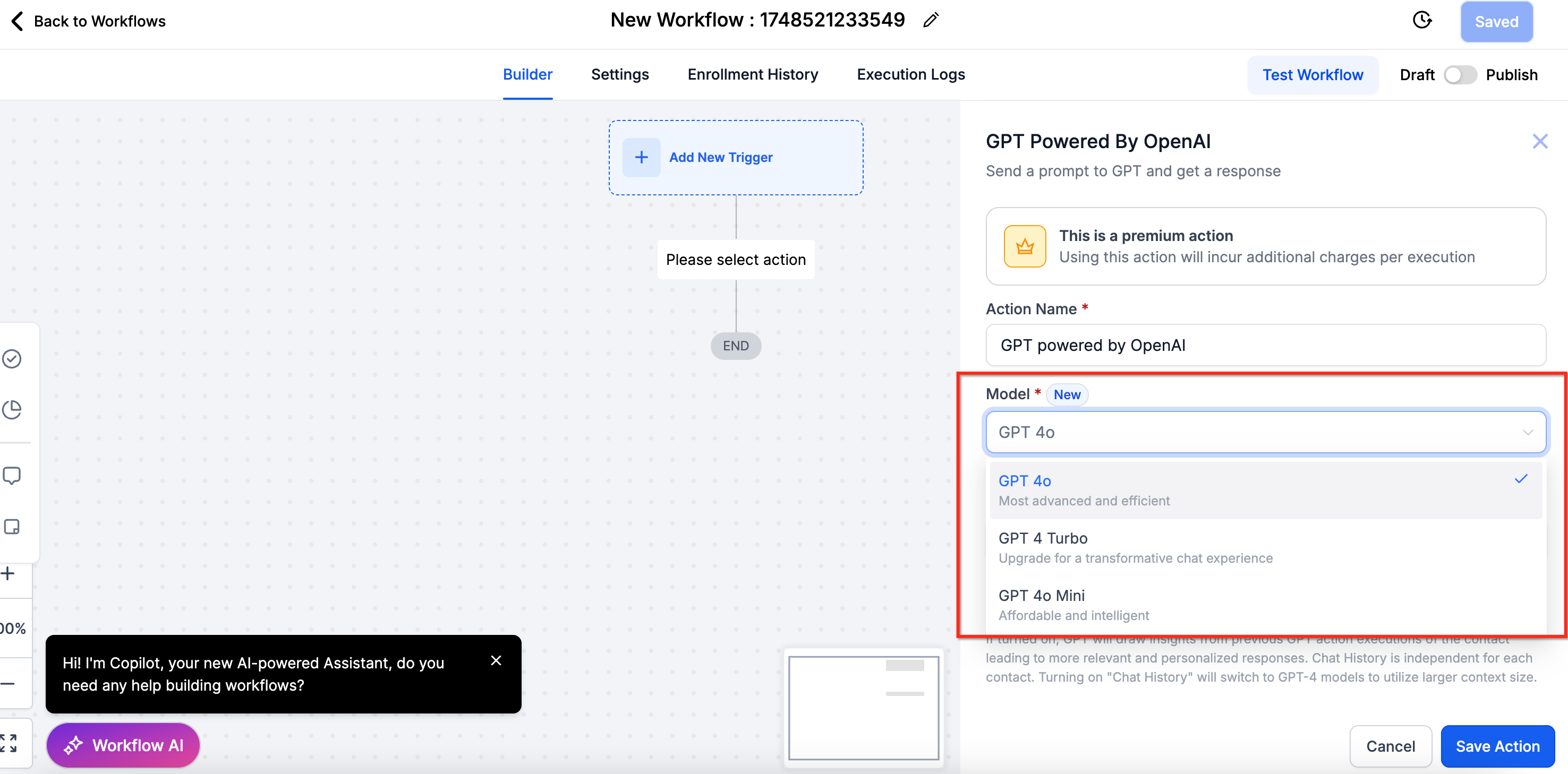
- Choose the model you want from the Model Switcher UI.
- If you use a custom prompt, type the prompt text in the provided box.
- Optionally insert dynamic variables such as {{contact.first_name}} into the prompt.
- Save the step, then test the workflow with a contact to see the AI output.
07What it looks like in HighLevel
08Settings that matter
- Model Switcher UI. Allows you to pick GPT-3.5, GPT-4, or GPT-4 Turbo for each AI step.
- System Prompt. Provides optional instructions that shape the AI’s tone and behavior.
- AI Billing Settings. Shows token usage and cost details for each AI action in your account.
09Things to know before you rely on it
- Pricing is token based with zero markup; you pay the exact OpenAI rates for input and output tokens.
- GPT-4 Turbo is a premium action and may not be available on all HighLevel plans.
- Tokens are counted per execution, so cost scales with how many words you send and receive.
10How it connects to the rest of HighLevel
- Learn how to configure the GPT action in a workflow. Configure GPT action
- Read the guide on creating workflows with triggers and actions. Workflow creation guide
- Check plan details to see if you have access to premium Content AI features. HighLevel pricing
Michael's take

In my experience, the token based pricing of GPT 4 Turbo can be advantageous for high volume tasks, but for low volume or low complexity needs, a simpler model may be more economical.