
01Who this is for
- Social media managers who need quick, relevant replies to keep engagement high.
- Digital marketing agencies handling multiple client pages and wanting consistent automated responses.
- Ecommerce brands looking to answer product questions in comments without manual effort.
02Facebook comments + Workflow AI, explained
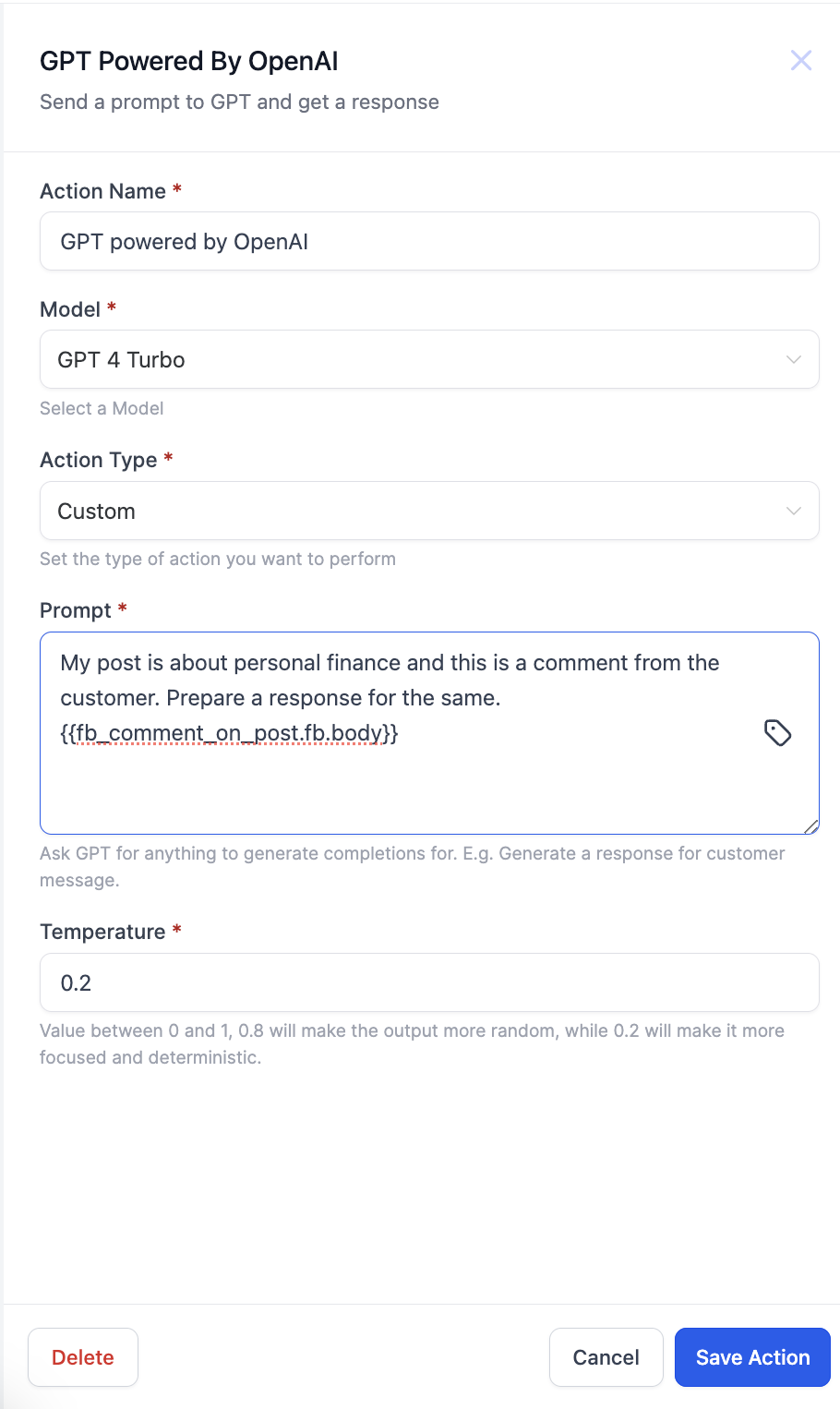
This feature adds an AI driven step to a workflow. By placing a GPT powered by OpenAI action before the Respond on comment action, the system can craft a reply that matches the tone and content of the original comment.
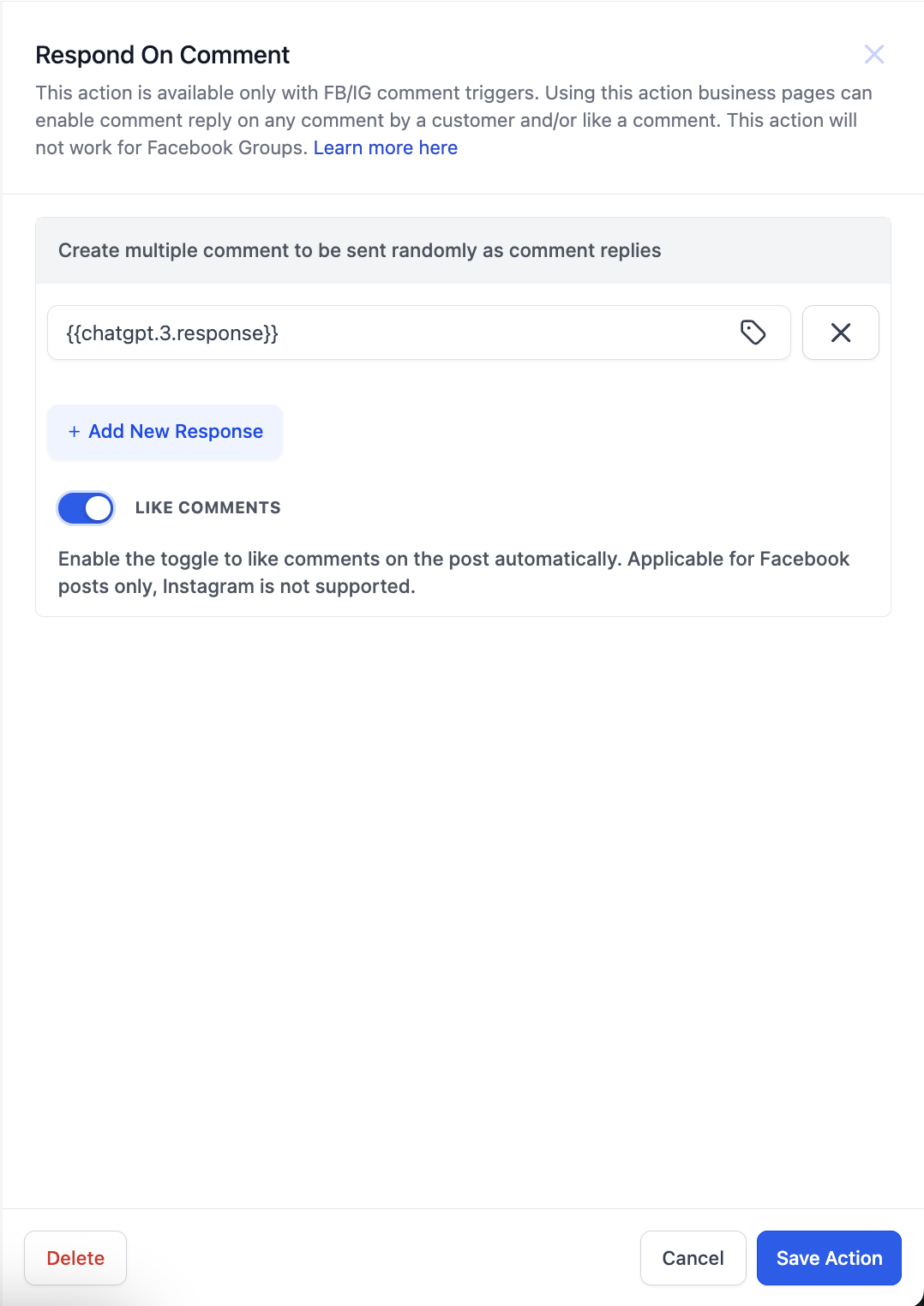
The workflow runs only when a Facebook, User comments on a post or Instagram, User comments on a post trigger fires. The comment text is fed to the GPT prompt, the generated answer is captured, and the Respond on comment action uses that answer to post back to the original comment.
03How businesses use Facebook comments + Workflow AI
- Create tailored AI replies. Add a GPT powered by OpenAI action before the Respond on comment step, write a prompt that defines the desired reply style, and map the incoming comment body into the prompt.
- Maintain consistent tone. Use a single custom prompt that instructs GPT on tone and content, allowing each comment to receive a personalized response without rewriting the prompt each time.
- Automate multi platform replies. Select the comment body from either Facebook or Instagram in the custom value picker, so the same workflow can reply to comments on both platforms.
04Before you start
- A Facebook, User comments on a post or Instagram, User comments on a post trigger must be available in the workflow.
- Access to the GPT powered by OpenAI action is required.
05How to set up and use Facebook comments + Workflow AI in HighLevel
Set up automated comment reply using GPT
- Add a GPT powered by OpenAI action before the Respond on comment action in the workflow.
- Choose Custom for the Action Type and type the Prompt that tells GPT how to craft the reply.
- Use the custom value picker to select the Facebook or Instagram comment body and then save the GPT action.
- Insert the Respond on comment action after the GPT step.
- In the response field of the Respond on comment action, pick the GPT output via the custom value picker.
06What it looks like in HighLevel
07Settings that matter
- Action Type. Selects the mode for the GPT action; choosing Custom allows you to define a specific prompt.
- Prompt. The text that instructs GPT on how to generate the comment reply.
- Custom value picker. Maps the incoming comment text to the GPT prompt and later maps the GPT response to the reply field.
08Things to know before you rely on it
- The workflow only works when a Facebook or Instagram comment trigger is present.
- Only the comment body is offered as a source in the custom value picker.
09How it connects to the rest of HighLevel
- Learn how to automate Facebook and Instagram comment replies Comment automation guide
- Configure the GPT action within a HighLevel workflow GPT action guide
- Step by step workflow creation instructions Workflow setup guide
Michael's take

Jumping into AI generated replies can feel risky if your audience expects a human touch. A poorly written prompt could produce off brand or confusing comments, and you still need that initial trigger set up correctly.
The workflow can generate replies based on the prompt you provide.