
01Who this is for
- Sales managers can assign sales reps to opportunities while keeping marketing staff as contact owners, matching their workflow.
- Customer support teams can keep contact owners for service follow up while allowing dedicated account executives to own the sales deals.
- Agency owners can delegate lead nurturing to one team and deal closing to another, keeping accountability clear.
02Owners for contacts and opportunities, explained
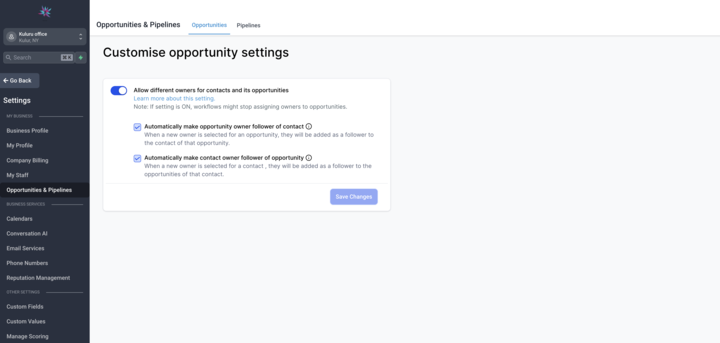
The feature adds a toggle in the Settings area of each subaccount. When switched on, contacts and the opportunities linked to them can have different owners. This separates responsibility for lead nurturing from sales conversion.
After activation, a newly created opportunity inherits the contact’s owner as the default. Users can change the opportunity owner at any time. Two optional sub settings let you keep followers in sync: changing an opportunity owner can update the contact’s follower, and changing a contact owner can update the opportunity’s follower.
The setting lives under Settings > subaccount. The optional follower sync options appear directly below the main toggle once it is enabled.
03How businesses use owners for contacts and opportunities
- Real estate agency. The agency enables the setting, assigns the listing agent as the contact owner, and gives the sales broker a different opportunity owner. When the broker changes, the contact’s follower updates automatically if the sync option is turned on.
- SaaS startup. The startup turns on separate ownership, lets marketing own the lead contact, and assigns a sales rep as the opportunity owner. If the sales rep changes, the contact follower updates through the sync setting.
- Fitness studio. The studio activates the toggle, keeps the front desk staff as contact owners, and assigns a membership manager as the opportunity owner. Enabling follower sync ensures the manager sees all activity on the member’s contact record.
04How to set up and use owners for contacts and opportunities in HighLevel
Enable owners for contacts and opportunities
- Open Settings in the desired subaccount.
- Scroll down until you see the option labeled “Allow different owners for contacts and its opportunities.”
- Switch the toggle to the On position.
05What it looks like in HighLevel
06Settings that matter
- Allow different owners for contacts and its opportunities. Turns on the ability for contacts and their linked opportunities to have separate owners.
- Sync Contact Follower with Opportunity Owner. When on, changing an opportunity’s owner also updates the follower on the related contact.
- Sync Opportunity Follower with Contact Owner. When on, changing a contact’s owner automatically updates the follower on the related opportunity.
07Things to know before you rely on it
- The default owner for a new opportunity is the contact’s owner, but it can be changed after creation.
- A workflow action for further automation is listed as Coming Soon and is not yet available.
08How it connects to the rest of HighLevel
- Understanding opportunities in HighLevel Opportunities overview
- Enable multiple opportunities per contact in HighLevel Multiple opportunities
- Automating opportunities in HighLevel Opportunity automation
Michael's take

I would turn the toggle on, then give the lead gen person ownership of the contact and the closer ownership of the opportunity. I’d also enable the follower sync that matches my hand off process so each owner stays in the loop without extra clicks.