
01Who this is for
- Founders of subscription businesses who need to track renewals without overwriting previous deals.
- Franchise owners who manage several locations that share the same contact record.
- Sales managers handling parallel product offerings for a single client.
02Multiple opportunities per contact, explained
Allow Multiple Opportunities per Contact is a subaccount toggle that changes the way the platform treats opportunity cards linked to a contact. When the switch is on, the system permits two or more cards for the same person inside the same pipeline. Existing opportunity cards stay unchanged; the setting only influences the creation of new cards.
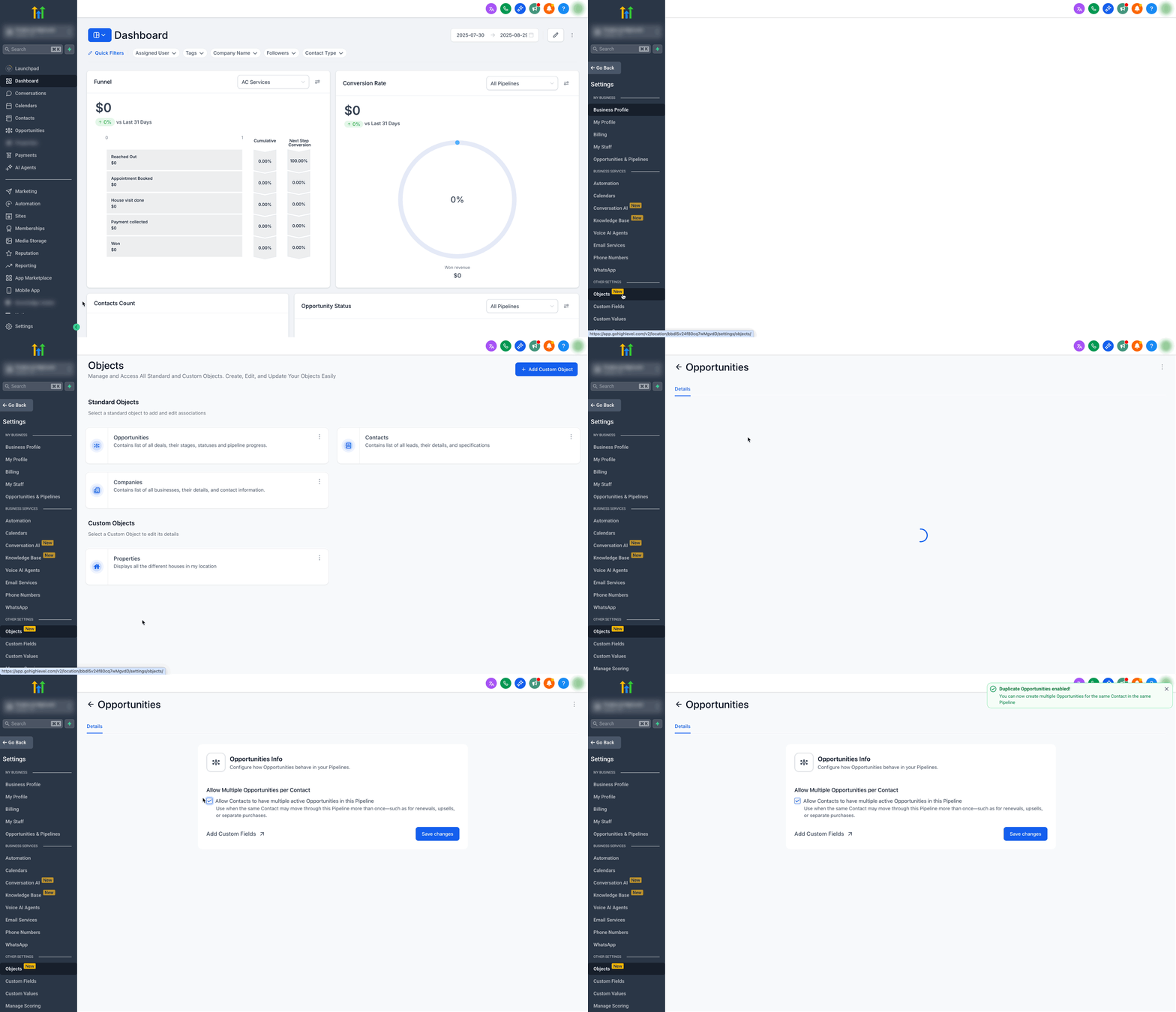
The feature resides under Subaccount Settings > Objects > Opportunities. Turning it on does not affect opportunities that exist in other pipelines. Automation steps that create or update opportunities will still run, but you must ensure workflow logic selects the intended card.
Enabling the option gives teams the ability to record renewals, upsells, separate product lines, or multi location services without losing visibility of any deal. Forecasts and pipeline totals will include every open opportunity, so reports should be structured to reflect that aggregate view.
03How businesses use multiple opportunities per contact
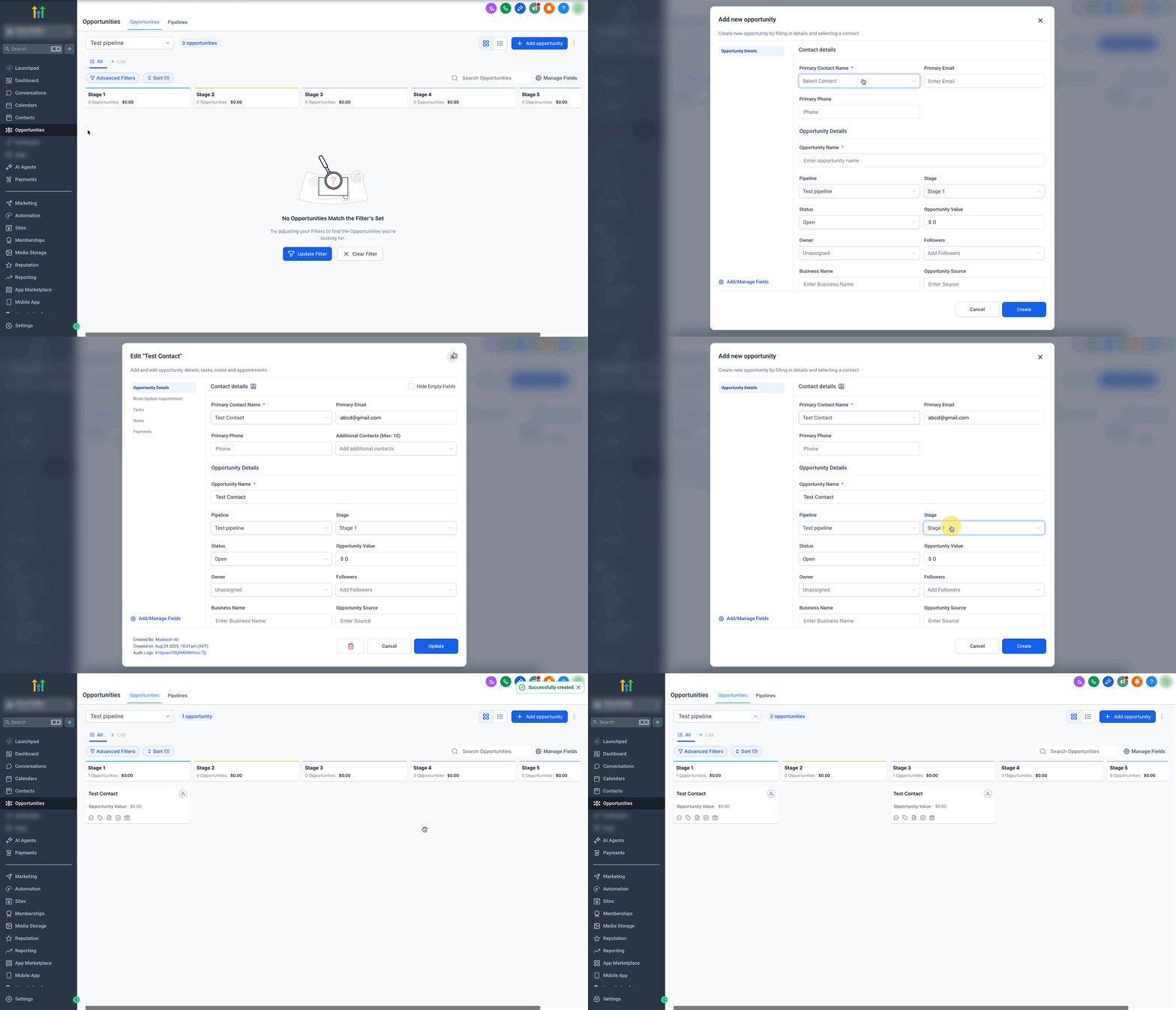
- SaaS subscription company. The company turns the setting on, then creates a new renewal opportunity for an existing subscriber while the original contract remains as a separate card. Workflows use the Find Opportunity action to target the renewal card, avoiding accidental updates to the original.
- Restaurant franchise chain. Each restaurant location can generate its own opportunity for the same owner contact. After enabling the setting, staff add a new opportunity for a new site, and automation routes communications to the correct location specific card.
- Consulting firm. When a client signs on for multiple projects, the firm creates a distinct opportunity for each project under the same contact record. The firm then configures workflows to pick the appropriate opportunity based on project name or stage.
04How to set up and use multiple opportunities per contact in HighLevel
Enable multiple opportunities per contact
- Open Subaccount Settings > Objects > Opportunities.
- Toggle the Allow Multiple Opportunities per Contact option to ON.
- Click Save changes.
- Create two opportunity cards for the same contact in the same pipeline to verify both appear.
- Check that automations target the correct card to avoid duplicate communications.
05What it looks like in HighLevel
06Settings that matter
- Allow Multiple Opportunities per Contact. Controls whether the platform permits more than one active opportunity card for the same contact inside a single pipeline.
07Things to know before you rely on it
- The toggle only affects duplicate opportunities within the same pipeline; it does not allow multiple cards across different pipelines when the setting is off.
- Existing opportunity cards are not altered when the setting is switched on or off.
- Turning the option off later will stop new duplicate cards from being created, but will not delete any that already exist.
- Forecast totals will include all open opportunities, which may increase reported pipeline value.
08How it connects to the rest of HighLevel
- Learn how to filter opportunities for faster pipeline reviews Filter opportunities
- Explore the FAQ for opportunities and pipelines Opportunities FAQ
- See how to customize opportunity cards in board view Customize cards
Michael's take

In my experience, the setting helps keep each deal visible without overwriting prior opportunities. A common pitfall is not updating automations, which can lead to duplicate messages to the same contact.