
01Who this is for
- Sales managers who need to split responsibility between account owners and deal owners for clearer accountability.
- Customer support leads who want contact owners to handle service while sales reps own the associated opportunities.
- Marketing directors who assign campaign owners to contacts but let business development staff own the resulting deals.
02Owners for contacts and opportunities, explained
The platform includes a toggle that, when turned on, lets a contact and its related opportunities have distinct owners. This provides flexibility in assigning responsibility across teams.
When the toggle is active, a newly created opportunity inherits the contact’s owner as its default. You can later change the opportunity owner to reflect the appropriate person. Two optional subsettings let the system automatically update the contact follower when the opportunity owner changes, and vice versa.
The setting is located in the Settings area of HighLevel. After enabling it, the new ownership behavior applies throughout the Opportunities and Pipelines module.
03How businesses use owners for contacts and opportunities
- Real estate agency. The agency turns on the toggle in Settings, then assigns the listing agent as the contact owner while assigning a separate broker as the opportunity owner. If the broker changes, they enable the subsetting to automatically update the contact follower, keeping communication aligned.
- Marketing agency. The agency enables the feature, sets the account manager as the contact owner, and gives the media buyer ownership of the opportunity. They activate the option to update the opportunity follower when the contact owner changes, ensuring the media buyer stays informed.
- SaaS startup. The startup activates the setting, lets the customer success manager own the contact, and assigns a sales engineer as the opportunity owner. They turn on the subsetting that updates the contact follower if the opportunity owner changes, so the success team receives notifications automatically.
04How to set up and use owners for contacts and opportunities in HighLevel
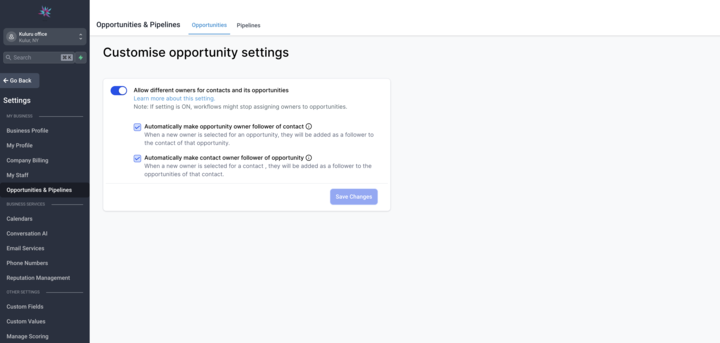
Enable separate owners for contacts and opportunities
- Navigate to Settings.
- Find the "Allow different owners for contacts and its opportunities" option.
- Toggle the setting to "On".
05What it looks like in HighLevel
06Settings that matter
- Allow different owners for contacts and its opportunities. Turns on the ability for contacts and their opportunities to have distinct owners.
- Allow updating the contact follower based on the opportunity owner change. When enabled, the contact follower is automatically changed to match the new opportunity owner.
- Allow updating the opportunity follower based on the contact owner change. When enabled, the opportunity follower updates automatically when the contact owner is changed.
07Things to know before you rely on it
- A workflow action linked to this feature is labeled as Coming Soon and is not yet available.
- New opportunities default to the contact owner until the owner is manually changed.
- The two follower update subsettings are optional and must be turned on separately.
08How it connects to the rest of HighLevel
- Enable multiple opportunities per contact Multiple opportunities per contact
- Understanding opportunities in HighLevel Opportunities overview
- HighLevel pricing and plans Pricing
Michael's take

Decoupling owners for contacts and opportunities feels like a small convenience that can become a real shift for teams where outreach and deal closing are handled by different people. It lets you keep responsibility clear without juggling manual reassignments.
A boutique real estate agency, for example, could have one agent own the buyer’s contact while another agent owns the property deal. That way each specialist stays focused, and the built in follower updates keep everyone in the loop.