
01Who this is for
- Founders who send automated email or SMS campaigns need merge fields to address each recipient personally.
- Business owners who generate invoices and receipts use merge fields to insert client and payment details automatically.
- Service based teams that schedule appointments rely on merge fields to include date, time and location in reminders.
02Merge fields, explained
Merge fields let you insert saved information into any text based output on the platform. The platform swaps each placeholder with the actual value from the relevant record at the moment the message or document is generated. This works for contacts, users, appointments, calendars, campaigns, invoices, courses, service bookings and more.
Each category of merge field pulls data from a specific object. Contact fields include name, email and raw phone numbers. User fields provide the sender’s details such as email signature and booking link. Appointment fields give start times, links to reschedule or cancel, and assigned user information. Similar sets exist for accounts, invoices, courses and other record types. Raw phone fields remove spaces, parentheses and dashes, which is useful for URLs or international formats.
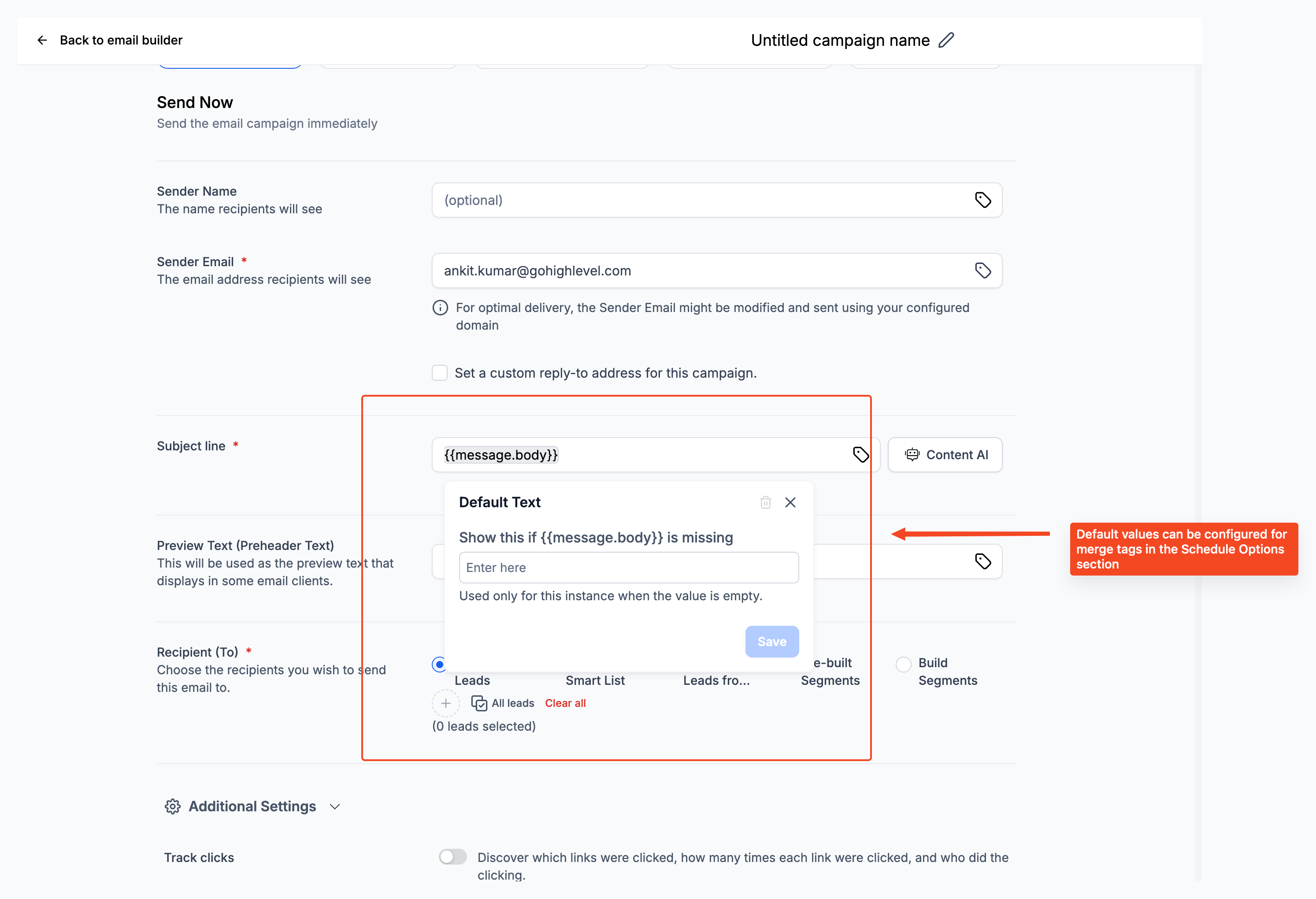
The platform also supports fallback values for any field that may be empty. By adding a fallback inside the editor, you can specify alternative text that appears when the source data is missing, preventing blank spaces in communications.
03How businesses use merge fields
- Dental practice. Use appointment merge fields like {{appointment.start_time}} and {{appointment.reschedule_link}} in reminder texts. Include the dentist’s name with {{user.name}} in confirmations. Add the patient’s raw phone number {{contact.phone_raw}} to links for easy click to call.
- Real estate agency. Insert contact fields such as {{contact.first_name}} and {{contact.email}} in listing newsletters. Use {{appointment.title}} and {{appointment.meeting_location}} for showing property tour details. Add {{user.calendar_link}} to let agents share their scheduling page.
- Online course provider. Populate enrollment emails with {{courses.productTitle}} and {{courses.categoryTitle}} to show the course name. Add {{contact.name}} for a personalized greeting. Provide {{appointment.only_start_date}} for live session dates.
04The numbers and rules that matter
- Available merge fields can vary based on enabled tools, configuration, and the type of record you’re editing.
05What it looks like in HighLevel
06Things to know before you rely on it
- Raw phone format fields strip spaces, parentheses and dashes, making them suitable for links and international numbers.
- Some accounts may show different field names for external calling numbers depending on configuration.
- Available merge fields can vary based on enabled tools and the type of record being edited.
- Provider specific attribution fields may differ between accounts; use the merge field picker to insert the exact field name.
- Voice AI merge fields may appear blank if the required data is not present in the contact or call context.
07How it connects to the rest of HighLevel
- Overview of merge fields and custom variables Merge fields overview
- How HighLevel handles merge fields and email fallback values Fallback values guide
- Creating and managing custom fields for better data organization Custom fields guide
Michael's take

When you’re sending a high volume of emails, texts, invoices or booking confirmations, merge fields can save the effort of manually copying and pasting names, dates and amounts.
If you only send a few messages, the time spent learning the field names may not be worthwhile, and static text could be simpler.