
01Who this is for
- Founders who run multiple email campaigns and need a single consistent sender identity across all sends.
- Compliance officers in finance or healthcare who must lock outbound email to an approved address.
- Agency owners managing subaccounts for different client brands and wanting isolated sender control.
02Default headers, explained
The Default Header is a setting attached to each validated dedicated sending domain inside a subaccount. It stores a From Name and a From Email that the platform applies to every email sent through that domain.
When an email is dispatched, HighLevel first checks whether a Default Header exists. If it does, the stored values are used, ignoring any From information entered on the specific campaign or workflow. This override happens for both broadcast emails and workflow triggers.
If the Default Header fields are empty, HighLevel moves down a four tier fallback chain: campaign or workflow From values, then the Business Email from the Business Profile, and finally an auto generated reply@ address based on the subdomain. The chain guarantees that a send always has a From address.
03How businesses use default headers
- Dental practice. The practice adds a dedicated sending domain for patient reminders. By setting a Default Header with the clinic name and a support address, every reminder email uses the same branding, regardless of which staff member creates the campaign.
- Financial advisory firm. The firm configures a Default Header that matches regulatory requirements. All client communications, whether sent as a broadcast or via a workflow, automatically carry the approved From address, meeting compliance without needing each adviser to set it manually.
- Online coaching business. The coach creates a dedicated domain for course announcements. Setting a Default Header with the coach's name and a dedicated inbox ensures every announcement shows the same sender, even when different team members schedule emails.
04The numbers and rules that matter
- Fallback chain tiers: 1 Default Header, 2 Campaign/Workflow From fields, 3 Business Profile email, 4 autogenerated reply@<subdomain>.
05Before you start
- You must work within a subaccount; agency level accounts cannot set a Default Header.
- Your dedicated sending domain must be added and validated with DNS records (CNAME, DKIM, SPF).
06How to set up and use default headers in HighLevel
Set default header (From Name & From Email)
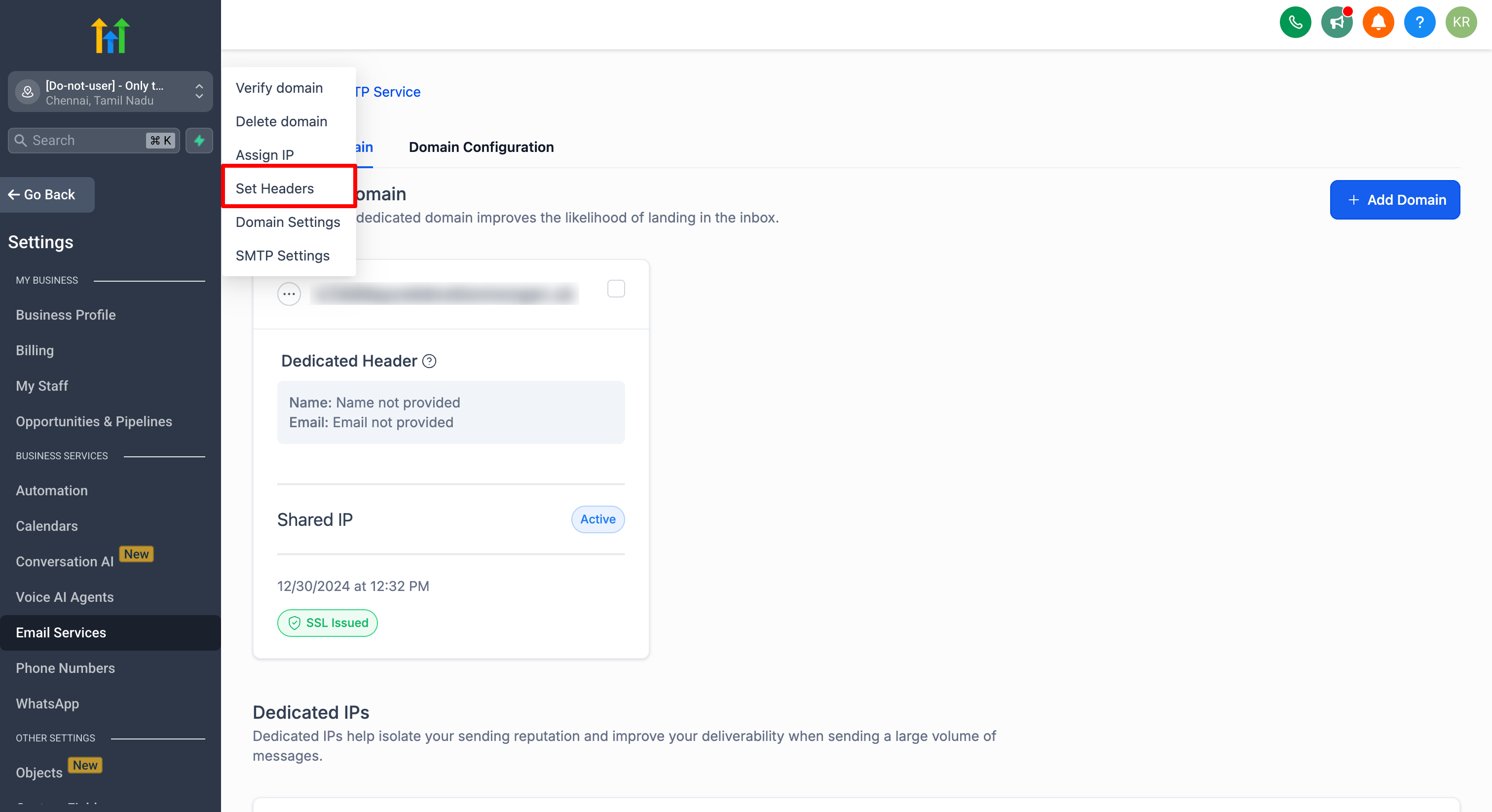
- Open the subaccount, go to Settings > Email Service > SMTP Service > Dedicated Domain and IP > Set Headers.
- Locate the validated domain in the list and click Set Headers to open the configuration panel.
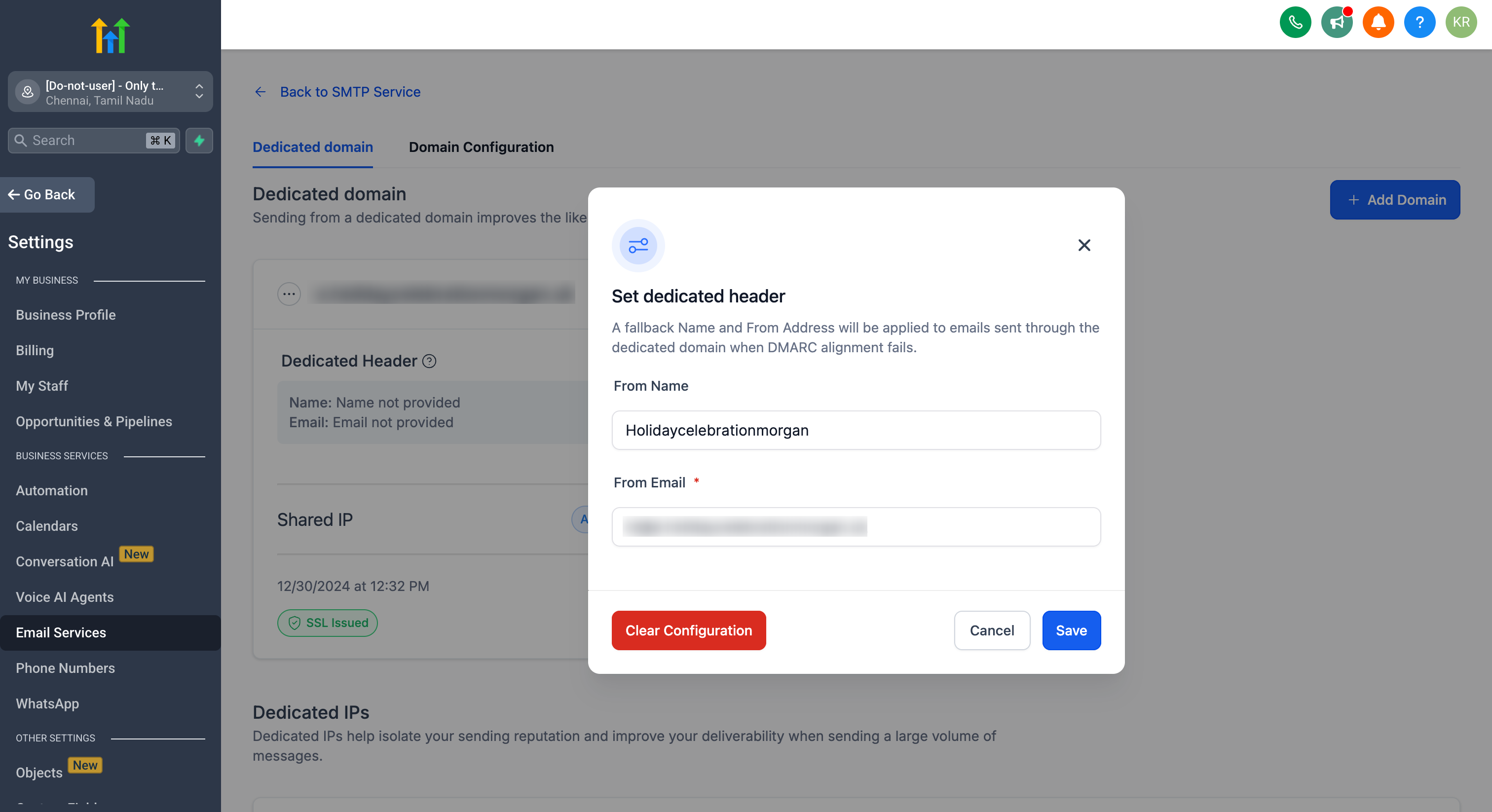
- Enter the desired From Name and From Email, then save the changes.
07What it looks like in HighLevel
08Settings that matter
- Default Header. Specifies the From Name and From Email that will replace any campaign or workflow values for the selected dedicated sending domain.
09Things to know before you rely on it
- The Default Header can only be set on dedicated sending domains that belong to a subaccount; agency level domains do not support it.
- When a Default Header is present, it overrides every From field in campaigns and workflows without condition.
- If all higher priority fields are empty, the platform falls back to a generic reply@ address, which may appear less trustworthy.
- Each dedicated domain can have its own independent Default Header.
10How it connects to the rest of HighLevel
- Overview of dedicated sending domain setup and management Dedicated domain overview
- Assign dedicated sending domains to different email types Assign domains by type
- Manually add DNS records for a dedicated sending domain Manual DNS setup
Michael's take

Default headers give a tiny business a reliable way to lock down its email identity without hunting through every campaign.
It helps keep branding consistent and, because the address comes from an authenticated domain, the email is less likely to be rejected or flagged as spam.