
01Who this is for
- Sales managers who need a single source of truth for each account can avoid fragmented data.
- Operations teams that maintain contact and opportunity links benefit from keeping all information under one company record.
- Agency administrators can enforce consistent data entry across multiple subaccounts.
02Duplicate detection for companies, explained
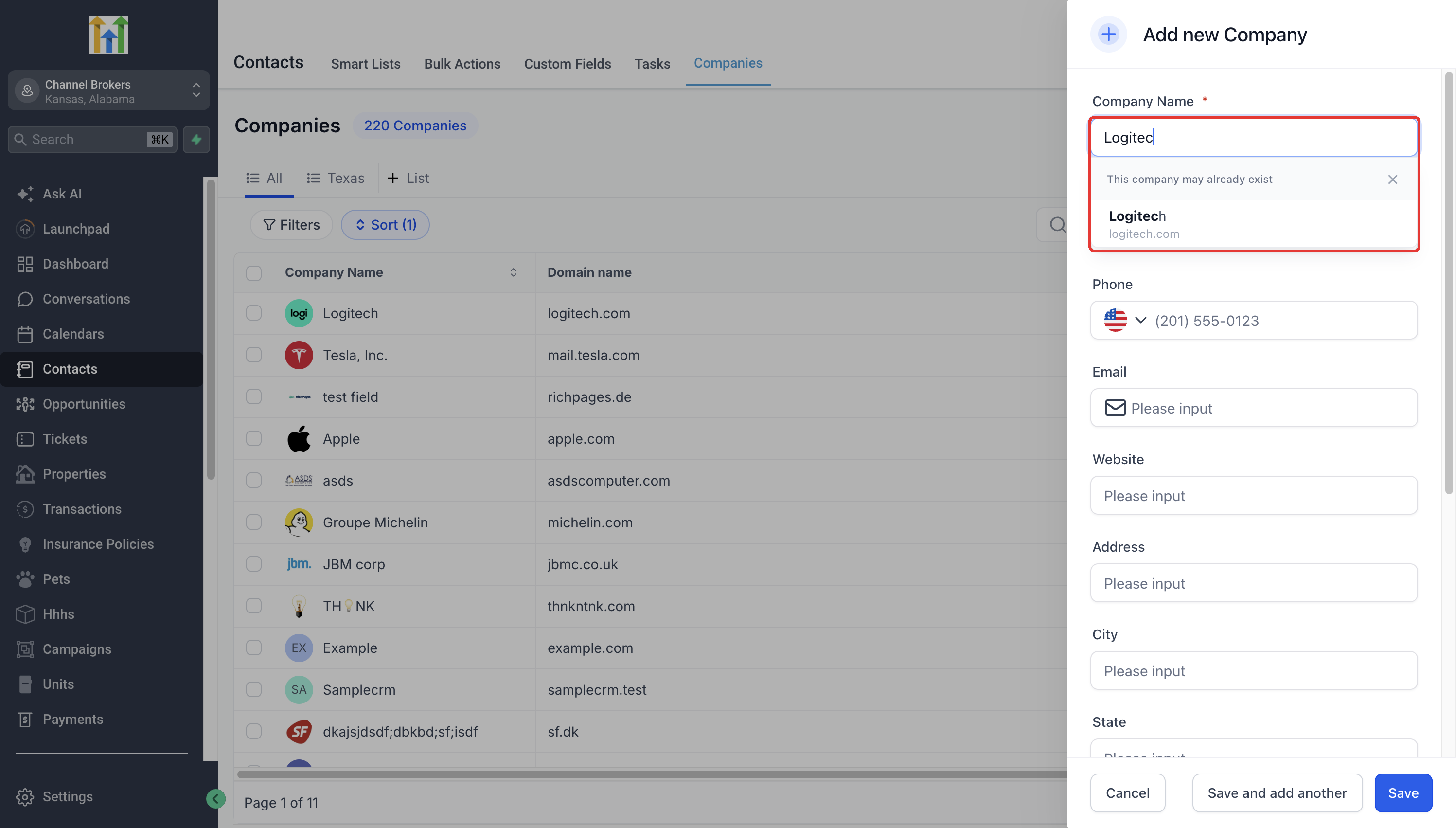
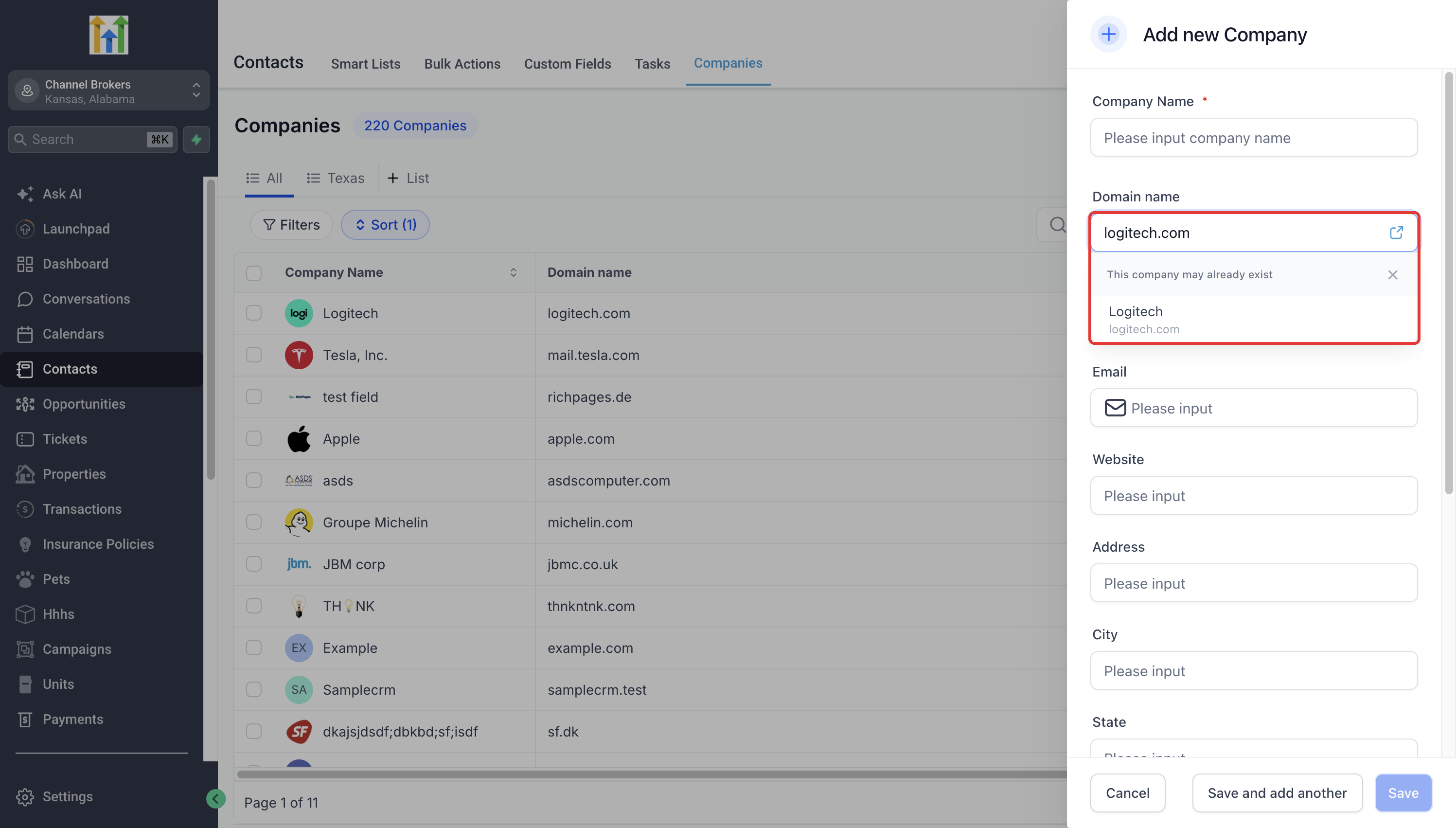
The feature lives in the Labs section of Settings. When turned on, the platform watches each keystroke in the Add Company form. If the entered name or domain resembles an existing company, a banner appears that says “This company may already exist” with a list of suggestions.
The suggestion list lets users open a matching company to verify details or dismiss the notice and proceed with a new record. The process does not merge records automatically; it only prompts the user to review potential duplicates.
Duplicate detection runs only during manual creation via the Add Company panel. It does not run for CSV imports, contacts, opportunities, or custom objects.
03How businesses use duplicate detection for companies
- Real estate brokerage. When an agent types a property management firm's name, the system flags any existing company with a similar naming pattern. The broker can open the suggested record to confirm it is the same business or dismiss the alert to add a new client.
- SaaS provider. During onboarding of a new corporate client, the sales rep enters the company domain. HighLevel right away checks for another account using the same domain and shows possible matches. The rep reviews the suggestion and either selects the existing account or creates a fresh entry.
- Insurance agency. An underwriter begins a new policy entry and types the insurer's name. Duplicate detection surfaces any earlier insurer record with a similar name or typo. The underwriter opens the record to verify details or dismisses the prompt to keep the new insurer separate.
04Before you start
- Access to the appropriate HighLevel subaccount
- Permission to view and modify Labs settings
05How to set up and use duplicate detection for companies in HighLevel
Enable the preemptive duplicate detection feature
- Open the target HighLevel subaccount
- Navigate to Settings > Labs
- Locate Preemptive Duplicate Detection for Companies
- Toggle the feature to enable it
Add a new company while duplicate detection is active
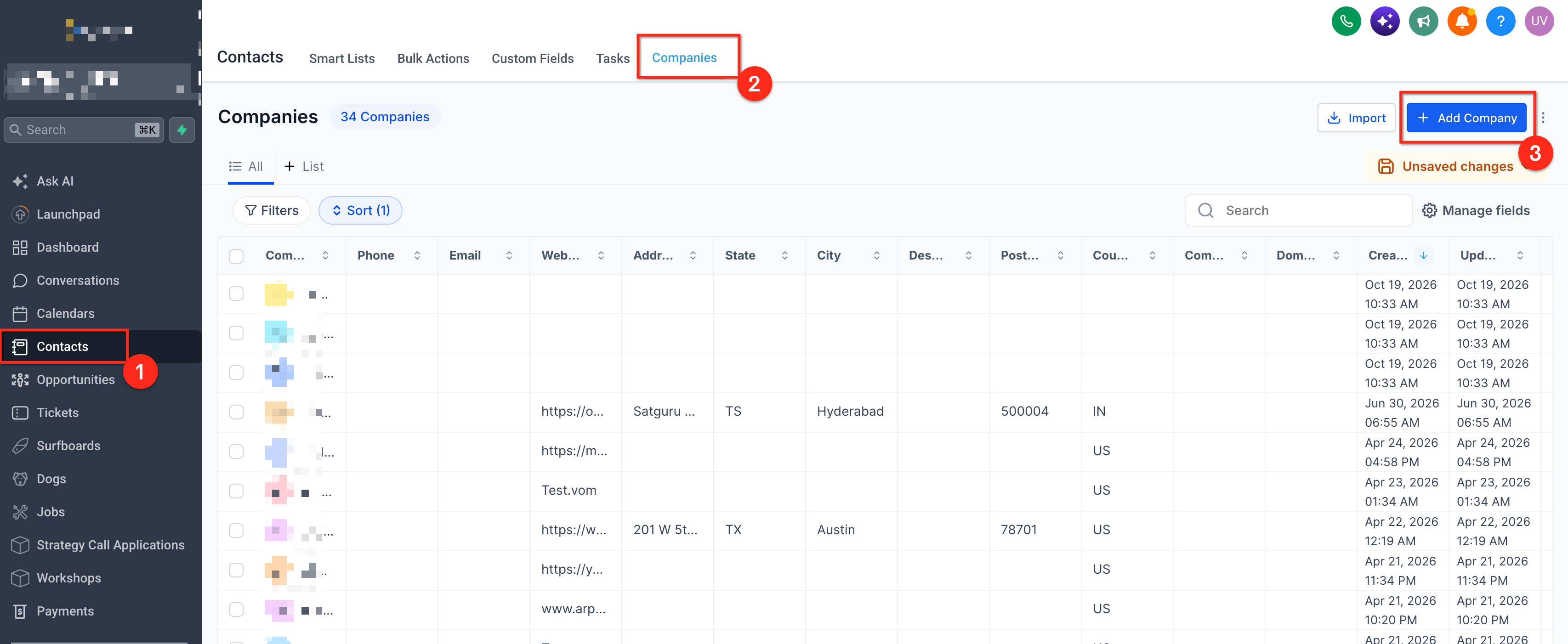
- Go to Contacts > Companies
- Click Add Company
- Enter at least two characters in the Company Name or Domain field
- Observe any duplicate suggestions that appear
Review and act on duplicate suggestions
- Select a suggested company to open its record
- Check the company details to confirm it matches the intended business
- If it is different, dismiss the suggestions
- Complete required fields and click Save to create the new company
06What it looks like in HighLevel
07Settings that matter
- Preemptive Duplicate Detection for Companies. Controls whether the platform checks for similar company names or domains while a user creates a new company record.
08Things to know before you rely on it
- The feature is a Labs option and may be unavailable in some accounts.
- Suggestions do not merge records and may not catch every duplicate.
- Dismissing suggestions does not override other duplicate prevention rules; domain uniqueness may still block saving.
- Detection works only during manual entry via the Add Company panel, not during CSV imports or for contacts, opportunities, or custom objects.
09If something goes wrong
- Cannot find the feature in Labs. Verify you are in the correct subaccount and have the required permissions. An agency administrator may need to enable access.
10How it connects to the rest of HighLevel
- Managing companies in HighLevel: key features and tips Managing companies
- How to set up Company based workflows in HighLevel Company workflows
- All Companies features overview Companies overview
Michael's take

When you have a growing list of accounts and teams are constantly adding new companies, the time saved from not having to search the list for each entry quickly adds up. The feature keeps contact and opportunity data attached to a single record, which reduces confusion and follow up errors.
If your business only adds a handful of companies per month or already uses a dedicated data cleaning process, the extra step of reviewing suggestions may feel like low value. In those cases the feature’s benefit is limited and you might choose to rely on other duplicate prevention rules instead.