
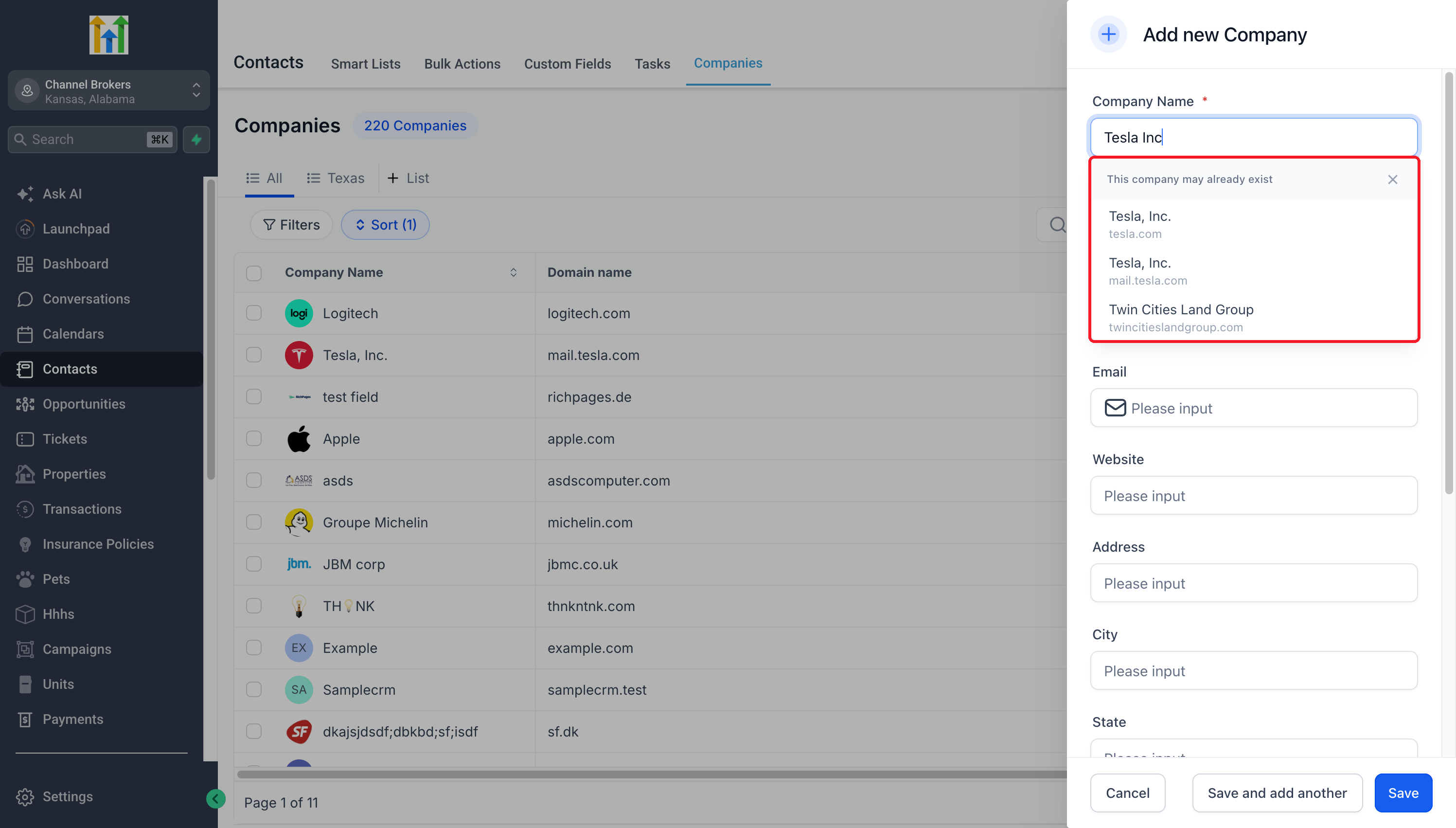
Teams often create the same Company twice under names that look alike, such as Tesla, Inc. and Tesla Inc, or with a small typo, which splits Contacts, deals and history across two records. Preemptive Duplicate Detection for Companies checks the name and domain as you type in Add Company and shows Co
Michael's take
I like this tweak. It isn’t a massive overhaul but it trims a common annoyance.
If you already use Add Company, you’ll now see a list of similar companies as you type, so you can stop before you create a duplicate.
I’d give it a spin by typing a few variations of a known client name and checking that the suggestion list shows the existing record and lets me dismiss it when I really need a new entry.
In practice I’d use it when a rep is on a call and needs to log a new prospect; the system will pop up the existing record if the name is close, letting the rep pull up past activity instantly.
I think tools should keep the data we rely on tidy, not let the little errors grow into bigger problems.
It’s worth checking out if you want to keep your company list clean without adding extra steps.
Teams often create the same Company twice under names that look alike, such as Tesla, Inc. and Tesla Inc, or with a small typo, which splits Contacts, deals and history across two records. Preemptive Duplicate Detection for Companies checks the name and domain as you type in Add Company and shows Companies that may already exist, so you can open the existing record instead.
What changed
- Suggestions as you type:See possible existing Companies while entering a company name or domain in Add Company.
- Names that look alike:Partial names, punctuation differences and common typos still find the existing Company. Typing “Tesla Inc” suggests Tesla, Inc.
- Open the existing Company:Select a suggestion to review the record already in your CRM.
- Control over what you save:Dismiss suggestions and create a separate Company when needed. Suggestions do not merge records or prevent saving.
Why it matters for Founders
Avoid splitting account information and associated work across accidental duplicates. Check for an existing Company during entry, so your team can keep working from the same record.
How to turn it on
- Enable Preemptive Duplicate Detection for Companies in Labs for your subaccount.
- Go to Contacts > Companies and click Add Company.
- Enter a company name or domain and review the suggestions.
- Open a matching Company, or continue entering and saving your distinct Company.
Pro Tips
- Check the details:Similar names or shared domains can belong to different businesses.
- Try a fuller query:Use more of the Company name or its domain if the expected record is not suggested.
- Use it during Company entry:Suggestions help avoid new duplicates; they do not scan or merge records already in your CRM.
Questions Founders ask
What did HighLevel release in "See Look Alike Companies Before You Add a New One"?
Teams often create the same Company twice under names that look alike, such as Tesla, Inc. and Tesla Inc, or with a small typo, which splits Contacts, deals and history across two records. Preemptive Duplicate Detection for Companies checks the name and domain as you type in Add Company and shows Co
What should a Founder do with See Look Alike Companies Before You Add a New One?
Turn on Preemptive Duplicate Detection for Companies in Labs for your subaccount this week. any Founder or agency owner who regularly adds new companies in HighLevel.
How do I turn on See Look Alike Companies Before You Add a New One in HighLevel?
In HighLevel: Enable Preemptive Duplicate Detection for Companies in Labs for your subaccount. Then Go to Contacts > Companies and click Add Company. Then Enter a company name or domain and review the suggestions. Then Open a matching Company, or continue entering and saving your distinct Company.
Why does See Look Alike Companies Before You Add a New One matter?
Avoid splitting account information and associated work across accidental duplicates. Check for an existing Company during entry, so your team can keep working from the same record.
How do I get this feature with setup help?
Start a free HighLevel trial through Michael Reimer's link and the CRM Pros team helps with setup in your first 7 days, with an onboarding call, three live calls every week and the affiliate community included.
Get More InformationOpens in a new tab Published November 11, 2026. Screenshots belong to HighLevel.