
01Who this is for
- Founders who need to adjust AI agent behavior quickly without rebuilding configurations.
- Marketing teams that want to add form triggers or change the agent’s tone using simple language.
- Customer support managers who must keep Knowledge Base references synchronized with agent instructions.
02Guided Managed Agent Builder, explained
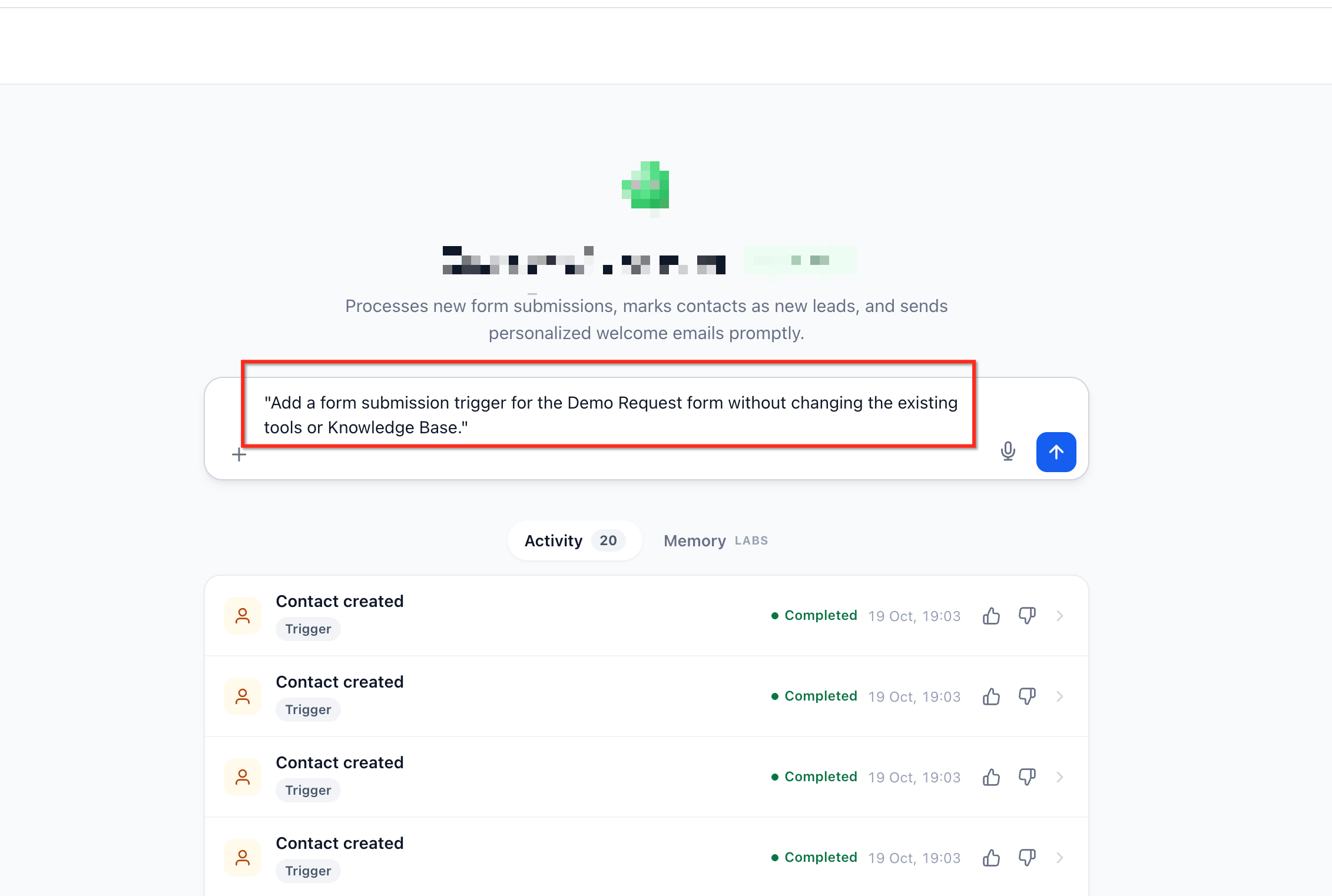
The Guided Managed Agent Builder lives inside Agent Studio and works through a conversational composer. You type natural language requests to create or tweak a Managed Agent, and the system interprets intent, asks clarification when needed, and updates the agent’s settings.
As the builder processes your input, a live configuration panel displays the agent’s Instructions, Triggers, Tools, Skills, and Knowledge Bases. You can watch each element change in real time and edit any supported field directly in the panel before publishing.
The builder also applies smart cascades, automatically aligning related instructions when you modify triggers, plugins, or Knowledge Bases, while preserving unrelated configurations.
03How businesses use the Guided Managed Agent Builder
- Ecommerce store. The owner can add a trigger for a checkout form by typing a request, then confirm the builder selects the correct form. After the live panel updates, they test the agent and publish, enabling automated order assistance without rebuilding the whole flow.
- Dental practice. Staff can change the agent’s tone to sound friendlier by describing the desired adjustment. The builder updates the instruction text, lets the team preview the change right away, and they can fine tune the wording directly in the panel before going live.
- SaaS startup. The product team can replace an outdated Knowledge Base with a new support repository via a single prompt. The builder swaps the Knowledge Base, synchronizes related instructions, and the team reviews the updated configuration before publishing.
04Before you start
- A HighLevel subaccount with access to Agent Studio.
05How to set up and use the Guided Managed Agent Builder in HighLevel
Use the Guided Managed Agent Builder
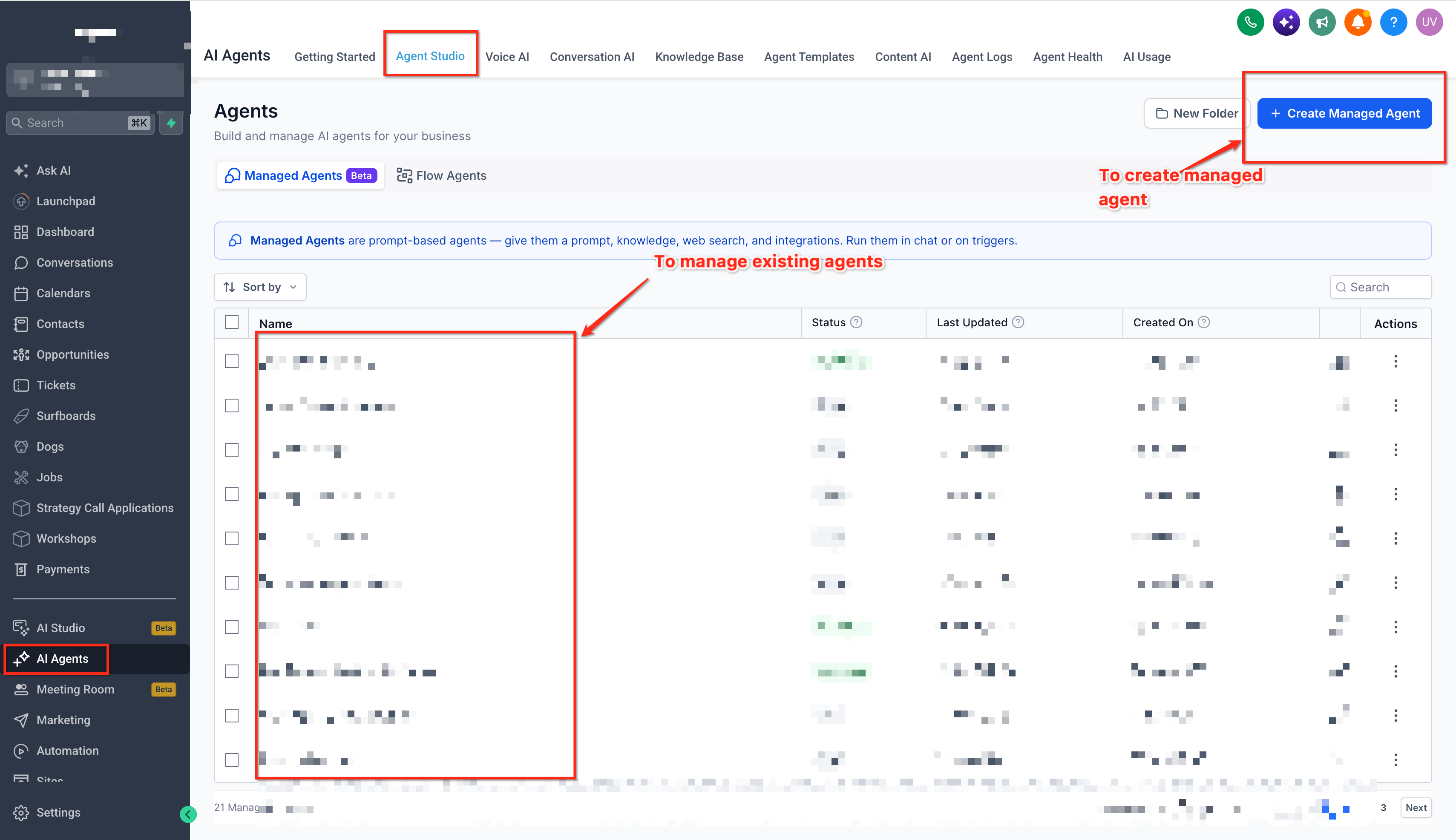
- Log in, go to AI Agents > Agent Studio, and open the Managed Agents tab.
- Create a new Managed Agent or open an existing one for editing.
- Enter a natural language instruction describing the desired creation or change, then submit it.
- Answer any clarifying question by selecting the correct resource or providing missing details.
- Watch the live configuration panel reflect updates to instructions, triggers, tools, skills, and Knowledge Bases.
- Use the Test option to verify the agent’s behavior.
- Confirm that the changes work as expected.
- Check that unrelated settings and capabilities remain unchanged.
- Make any additional adjustments directly in the configuration panel if needed.
- Select Publish to finalize the agent configuration.
06What it looks like in HighLevel
07Settings that matter
- Instructions. Defines the agent’s behavior, tone, and communication guidelines.
- Triggers. Specifies the events that start the agent’s execution.
- Tools. Enables the agent to perform supported actions and integrations.
- Skills. Allows the agent to carry out particular tasks within its workflow.
- Knowledge Bases. Provides reference information the agent can use when responding.
08Things to know before you rely on it
- Edits apply only to supported configuration fields; unsupported fields cannot be changed inline.
- If a requested form or resource is not found in the subaccount, the builder asks for clarification instead of using an invalid reference.
09If something goes wrong
- Builder asks for clarification. Select the appropriate resource or supply the missing information so the builder can continue.
- Requested form or resource cannot be found. Verify the form or resource exists in your subaccount and then provide its name.
10How it connects to the rest of HighLevel
- Set up Managed Agents and access the Guided Builder Managed Agents setup
- Explore all AI Employee features AI Employee overview
- Review HighLevel pricing and plans Pricing
Michael's take

Wondering if you can tweak an AI agent without rebuilding it from scratch? The Guided Managed Agent Builder lets you speak to the system, make focused edits, and watch changes appear in the live panel, so you keep the parts that work while adjusting the rest.
If I were setting up a support bot, I’d start by adding the Support Knowledge Base and a form trigger, then let the builder sync the instructions. I’d run a quick test before publishing to be sure the bot reacts the way I expect.