
01Who this is for
- Founders who want to automate welcome journeys for new contacts, reducing manual onboarding steps.
- Sales managers aiming to qualify new opportunities as they enter specific pipeline stages, ensuring timely follow ups.
- Customer success teams that need automatic actions when an opportunity is marked Won, Lost or Abandoned.
02Contact and opportunity triggers, explained
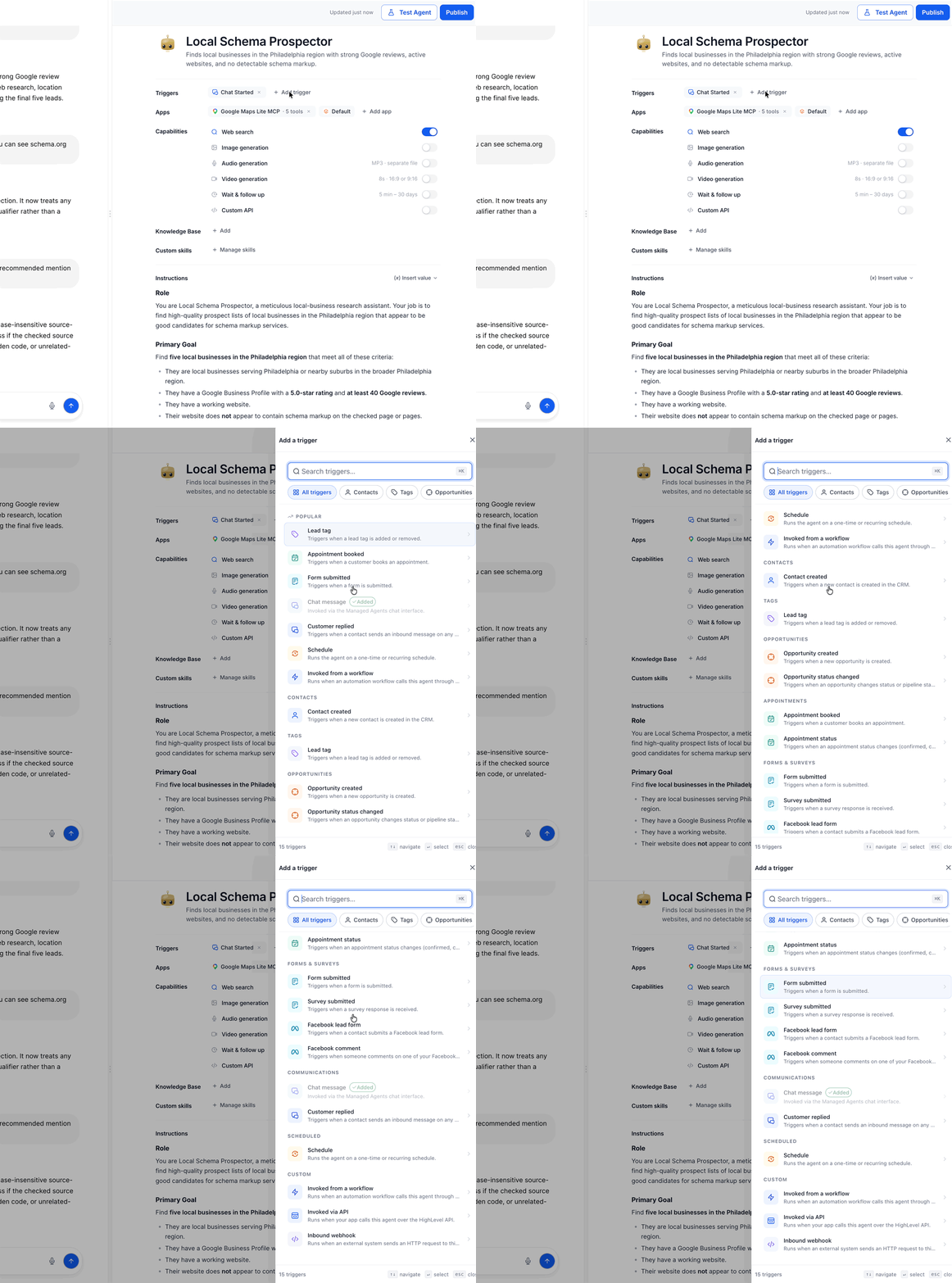
The feature introduces three CRM based triggers, Contact Created, Opportunity Created, and Opportunity Status Changed, that can launch a Managed Agent whenever the corresponding event happens in HighLevel. The triggers sit alongside existing options such as Chat, Form Submitted, Tag Changed, Appointment and Schedule.
Each trigger can be filtered. Opportunity Created lets you pick a pipeline and a stage, while Opportunity Status Changed adds a status filter (Open, Won, Lost or Abandoned). Contact Created runs for any new contact without extra settings.
Triggers are configured inside the Agent Studio of a HighLevel subaccount. After setting the trigger, you define the agent’s instructions, save, test with sample data, publish, and monitor executions on the Activity tab.
03How businesses use contact and opportunity triggers
- SaaS startup. The startup creates a Managed Agent that starts a welcome email sequence whenever a new contact is added. It selects the Contact Created trigger, saves the instructions, tests with a dummy contact, publishes the agent and watches the execution in the Activity tab.
- Real estate brokerage. The brokerage configures an Opportunity Created trigger for the "Lead" pipeline at the "New Lead" stage. When a new opportunity appears, the agent sends an SMS to the prospect and assigns the lead to an agent, all set up through the trigger picker and filters.
- Online course provider. The provider uses the Opportunity Status Changed trigger with a status filter set to "Won". When a student’s enrollment opportunity is marked Won, the agent automatically enrolls the student in the course platform and adds them to the onboarding email flow.
04The numbers and rules that matter
- Three triggers are available: Contact Created, Opportunity Created, Opportunity Status Changed.
- Supported opportunity statuses: Open, Won, Lost, Abandoned.
05Before you start
- Access to a HighLevel subaccount that includes AI Agents > Agent Studio.
06How to set up and use contact and opportunity triggers in HighLevel
Set up contact and opportunity triggers for a Managed Agent
- Navigate to AI Agents > Agent Studio in your HighLevel subaccount.
- Open an existing Managed Agent or create a new one.
- In the Triggers section, click + Add Trigger to open the Trigger Picker.
- Use the search bar or select the Contacts or Opportunities category to find the trigger you need.
- Select Contact Created, Opportunity Created, or Opportunity Status Changed; a side panel opens.
- Configure the chosen trigger: Contact Created needs no extra settings; Opportunity Created requires Pipeline and Opportunity Stage filters; Opportunity Status Changed requires Pipeline, Opportunity Stage, and Opportunity Status filters.
- If any required field indicators appear, address them before saving.
- Add the agent’s instructions and any required tools.
- Click Save in the trigger configuration panel.
- Test the trigger using a sample contact or opportunity.
- Publish the agent and review its executions in the Activity tab.
07What it looks like in HighLevel
08Settings that matter
- Contact Created. Runs a Managed Agent whenever a new HighLevel contacts is added; no extra configuration is needed.
- Opportunity Created. Runs a Managed Agent when a new opportunity appears; you can limit execution by selecting a pipeline and an opportunity stage.
- Opportunity Status Changed. Runs a Managed Agent when an opportunity changes status; you can filter by pipeline, stage, and the status options Open, Won, Lost or Abandoned.
09Things to know before you rely on it
- Only the supported filter fields (pipeline, stage, status) can be set; unsupported fields are ignored.
- The status filter accepts only Open, Won, Lost or Abandoned values.
- These triggers add to existing Managed Agent triggers; they do not replace Chat, Form Submitted, Tag Changed, Appointment or Schedule triggers.
10If something goes wrong
- Managed Agent did not execute after the expected CRM event.. Confirm the agent is published and that the trigger filters match the event details.
11How it connects to the rest of HighLevel
- Explore other trigger types available for Managed Agents Other Managed Agent triggers
Michael's take

Most people assume the Contact Created trigger needs extra setup and waste time searching for hidden options. In reality it fires as soon as a new HighLevel contacts appears, with no additional fields to fill.
I would add the trigger, leave the configuration blank, and immediately test with a sample contact. That way you confirm the agent runs before layering on more complex opportunity filters.