
01Who this is for
- Developers building web or mobile apps need a simple way to call HighLevel agents without recreating logic.
- Product managers who want a single agent to power both on platform chat and external integrations.
- Support teams that require consistent agent behavior across help desk widgets and backend systems.
02Deploy to API for Managed Agents, explained
Deploy to API for Managed Agents adds an Invoked via API trigger to a published agent. The trigger lets external applications call the agent through HighLevel’s Managed Agents API while the agent continues to respond to chat and other built in triggers. All API calls always run the agent’s published version, so draft changes stay isolated until you republish.
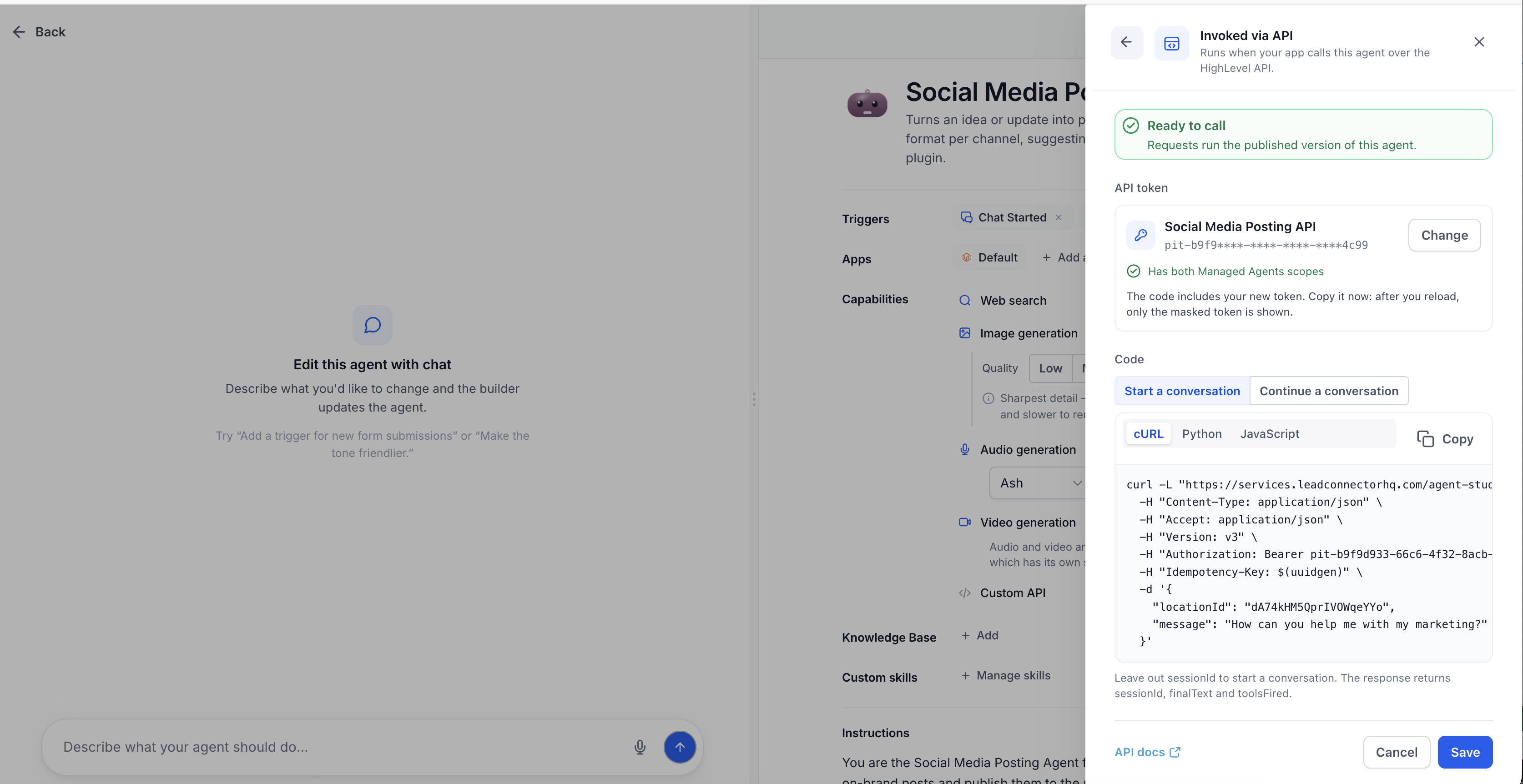
The feature lives inside Agent Studio. From the Managed Agent builder you add the Invoked via API trigger, configure a Private Integration token, and generate ready made request code. The drawer supplies cURL, Python and JavaScript examples for starting a new conversation or continuing an existing one, complete with an Idempotency Key to guard against duplicate execution.
When the API request runs, it appears in the agent’s Activity feed alongside chat runs, giving you a single place to monitor and troubleshoot all interactions.
03How businesses use deploy to API for Managed Agents
- Ecommerce site. Add the Invoked via API trigger to a checkout assistance agent, copy the generated cURL request, and call it from the site’s order page. The agent can start a new conversation for each visitor or continue a prior chat using the returned sessionId.
- SaaS product. Create a support bot as a Managed Agent, generate a Python request, and embed it in the product’s help overlay. The bot runs the published version, and the Idempotency Key prevents duplicate runs when the overlay reloads.
- Customer support portal. Configure a Private Integration token, select the JavaScript code sample, and call the agent from a support ticket widget. Use the Continue a conversation option to keep context across multiple ticket updates.
04The numbers and rules that matter
- Unpublished agents return a 404 for API calls.
05Before you start
- The Managed Agent must be fully configured, tested, and published.
- The user setting up the deployment must have subaccount admin rights to create Private Integration tokens.
06How to set up and use deploy to API for Managed Agents in HighLevel
Set up Deploy to API for a Managed Agent
- Go to AI Agents > Agent Studio.
- Open the Managed Agent you want to make available through the API.
- Verify that the agent's instructions, tools, knowledge, and other settings are ready for production.
- Test the Managed Agent inside the builder.
- Publish the Managed Agent.
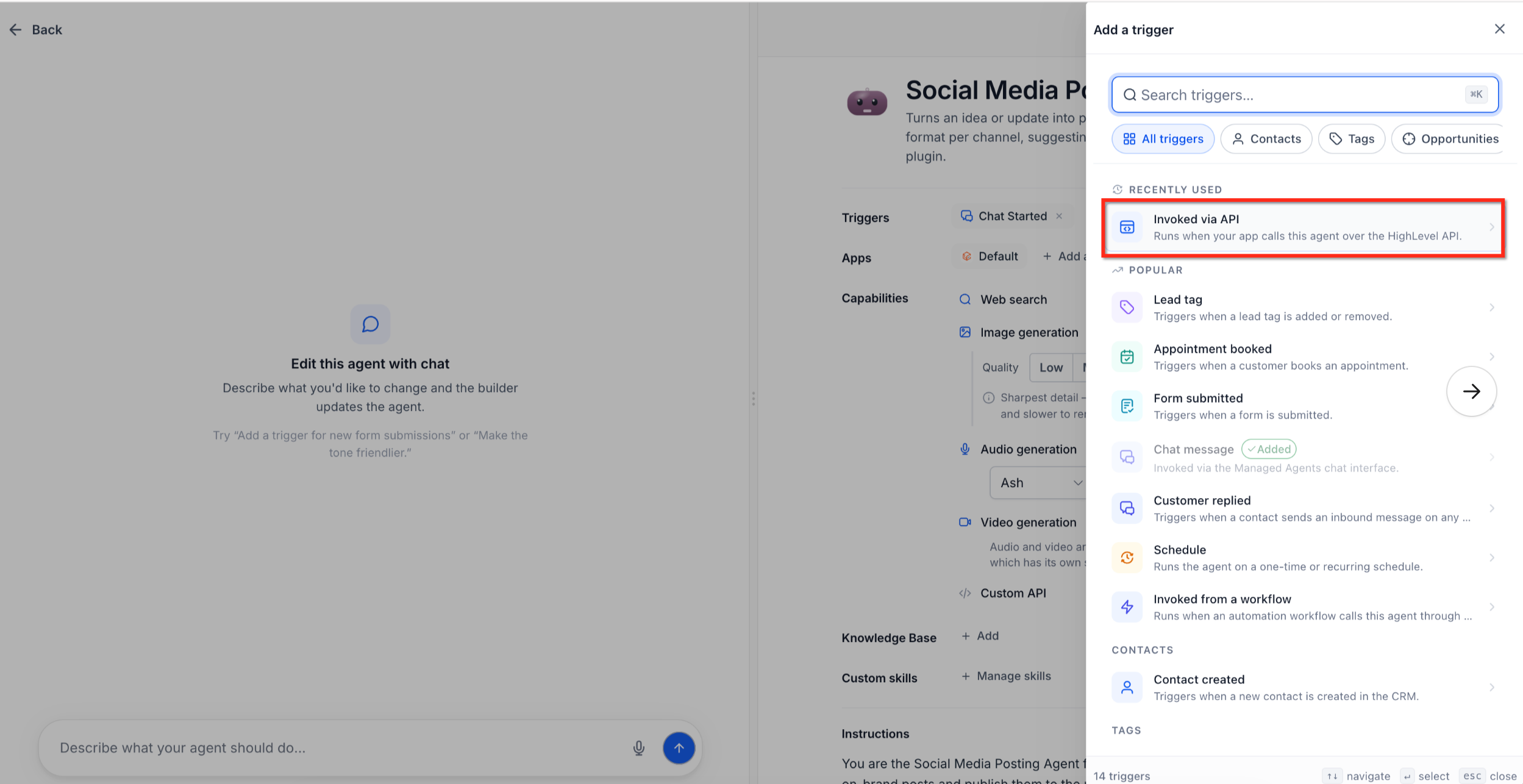
- In the Triggers row, click + Add trigger.
- Choose Invoked via API as the trigger.
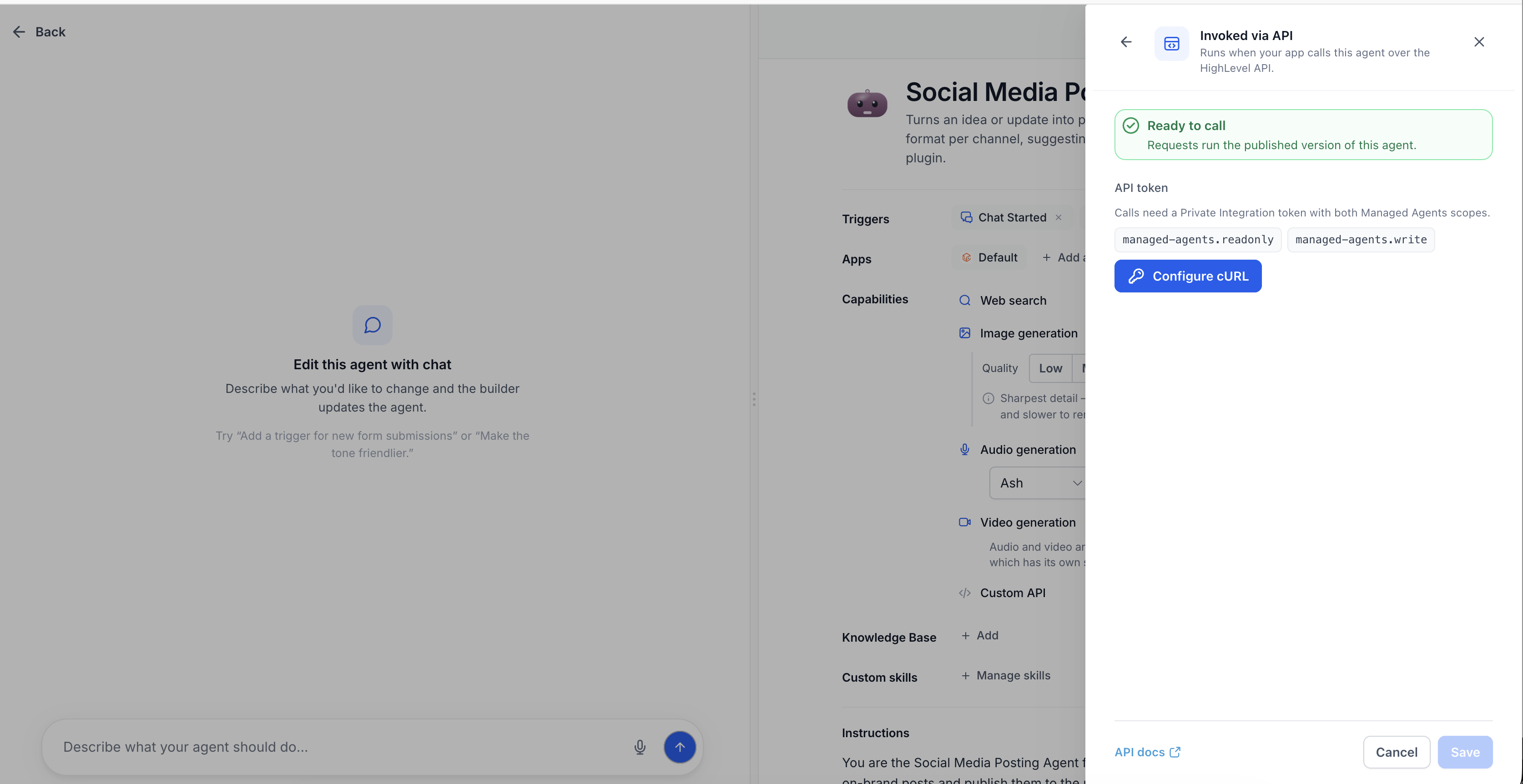
- Open the API deployment drawer.
- Click Configure cURL.
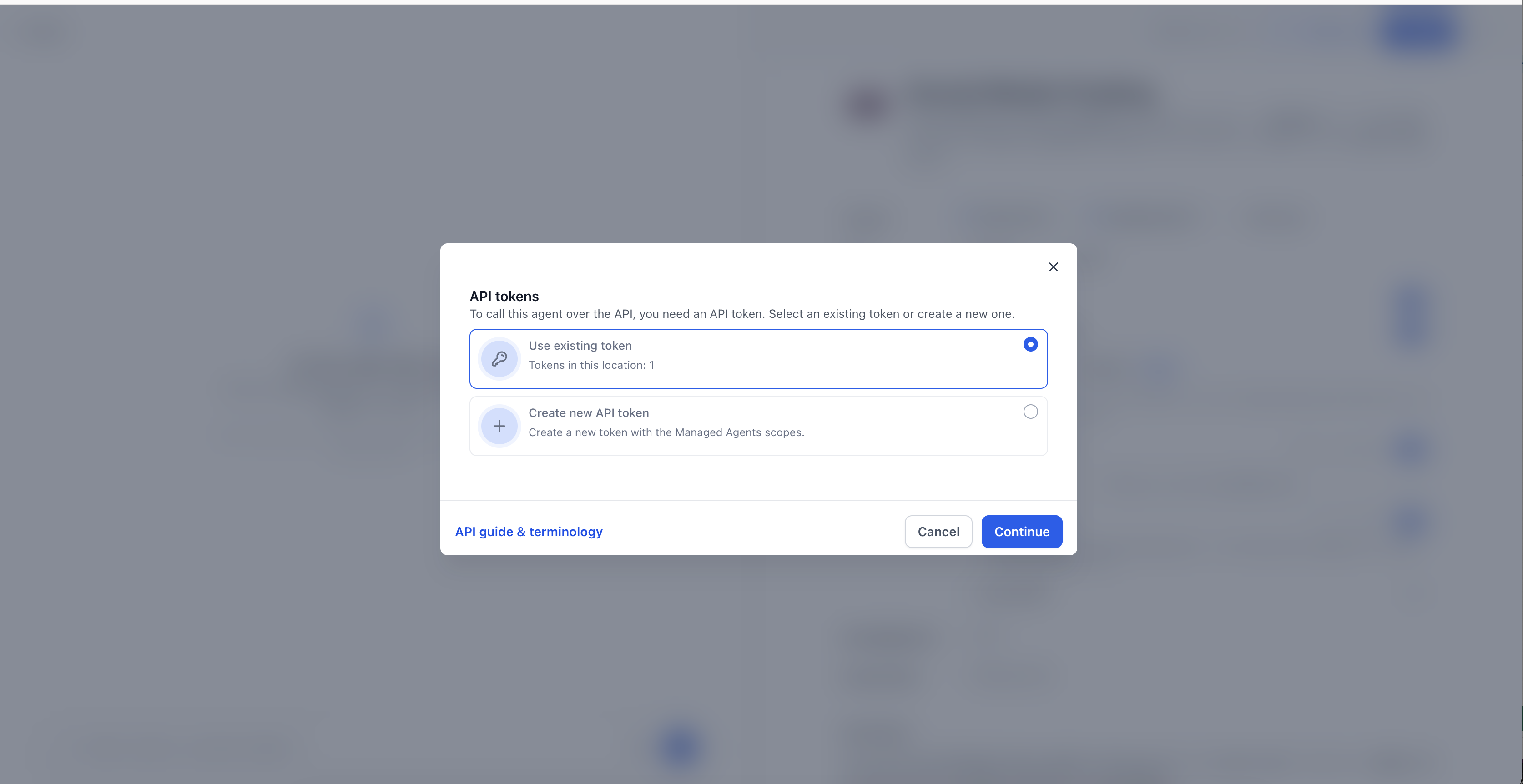
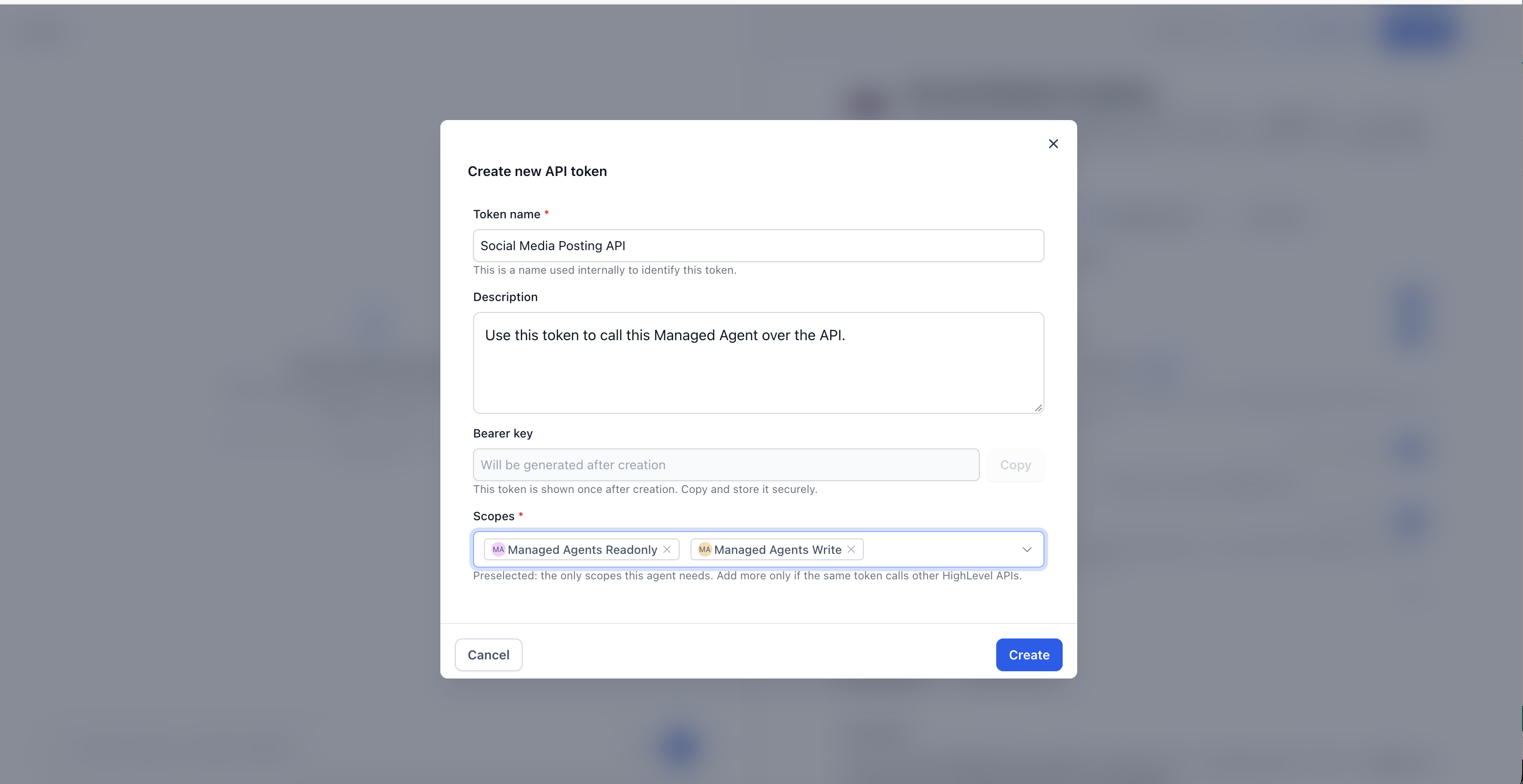
- Select an existing Private Integration token or create a new one.
- New tokens automatically include the required Managed Agents scopes.
- If the chosen token lacks those scopes, add them using the provided option.
- Save the API configuration.
- Paste your securely stored full token into the token field to generate runnable code; the token is not saved.
- Choose the code format you prefer: cURL, Python, or JavaScript.
- Select Start a conversation for the first request.
- Copy the generated request into your application.
- Send the request and record the sessionId returned in the response.
- Return to the deployment drawer and select Continue a conversation to view the continuation request.
- Include the previously saved sessionId in the next request.
- Keep the Idempotency Key unchanged so retries do not run the agent twice.
- Review the Managed Agent’s Activity to confirm the API triggered execution succeeded.
07What it looks like in HighLevel
08Settings that matter
- Invoked via API. Enables external applications to start the Managed Agent through the Managed Agents API.
- Private Integration token. Authenticates API requests and must contain the Managed Agents scopes.
- Idempotency Key. Prevents duplicate agent execution when the same request is retried.
- Start a conversation. Creates a new conversation context for the first API request.
- Continue a conversation. Uses a previously returned sessionId to keep context across multiple API calls.
- Code format selection (cURL, Python, JavaScript). Determines which language example is generated for the API request.
09Things to know before you rely on it
- API calls always run the published version of the Managed Agent; draft changes are ignored until publishing.
- If the Managed Agent is unpublished, API requests return a 404 error.
- The configured Private Integration token is shown masked after setup and the full token is never saved.
- Only subaccount admins can create new API tokens.
- Generated requests include an Idempotency Key to avoid accidental duplicate execution.
10How it connects to the rest of HighLevel
- Learn how to set up and use Managed Agents in Agent Studio. Managed Agents setup
- View how to manage existing flow agents in HighLevel Agent Studio. Manage flow agents
- Check HighLevel pricing and plan options for API access. Pricing
Michael's take

Don’t expose your Private Integration token in client side code or public repositories.