
01Who this is for
- Marketing managers can see traffic and conversion metrics to evaluate campaign effectiveness.
- Sales teams can review form submissions and attribution details to follow up on qualified leads.
- Small business owners can compare performance across multiple AI Studio projects from a single dashboard.
02Analytics and form tracking, explained
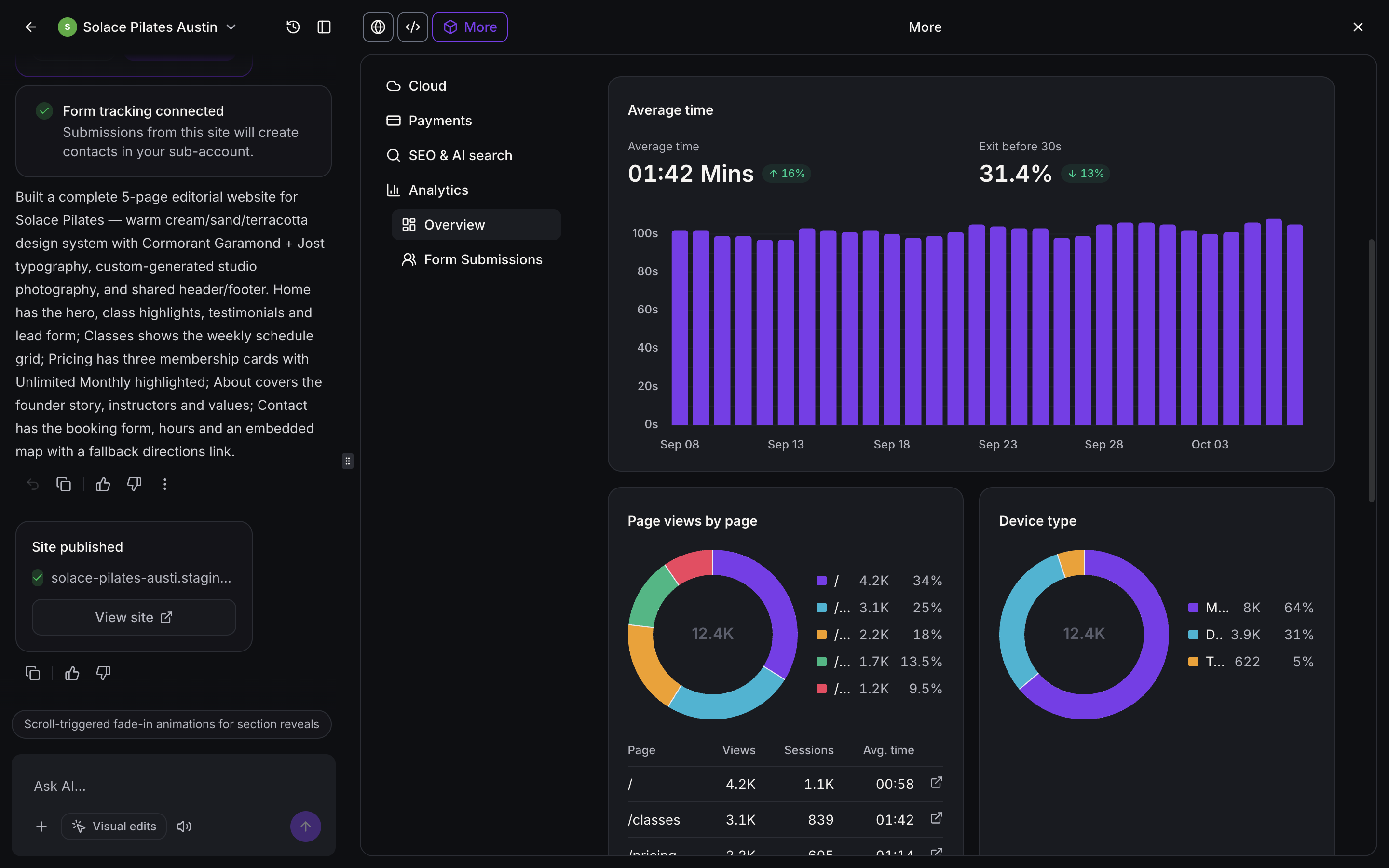
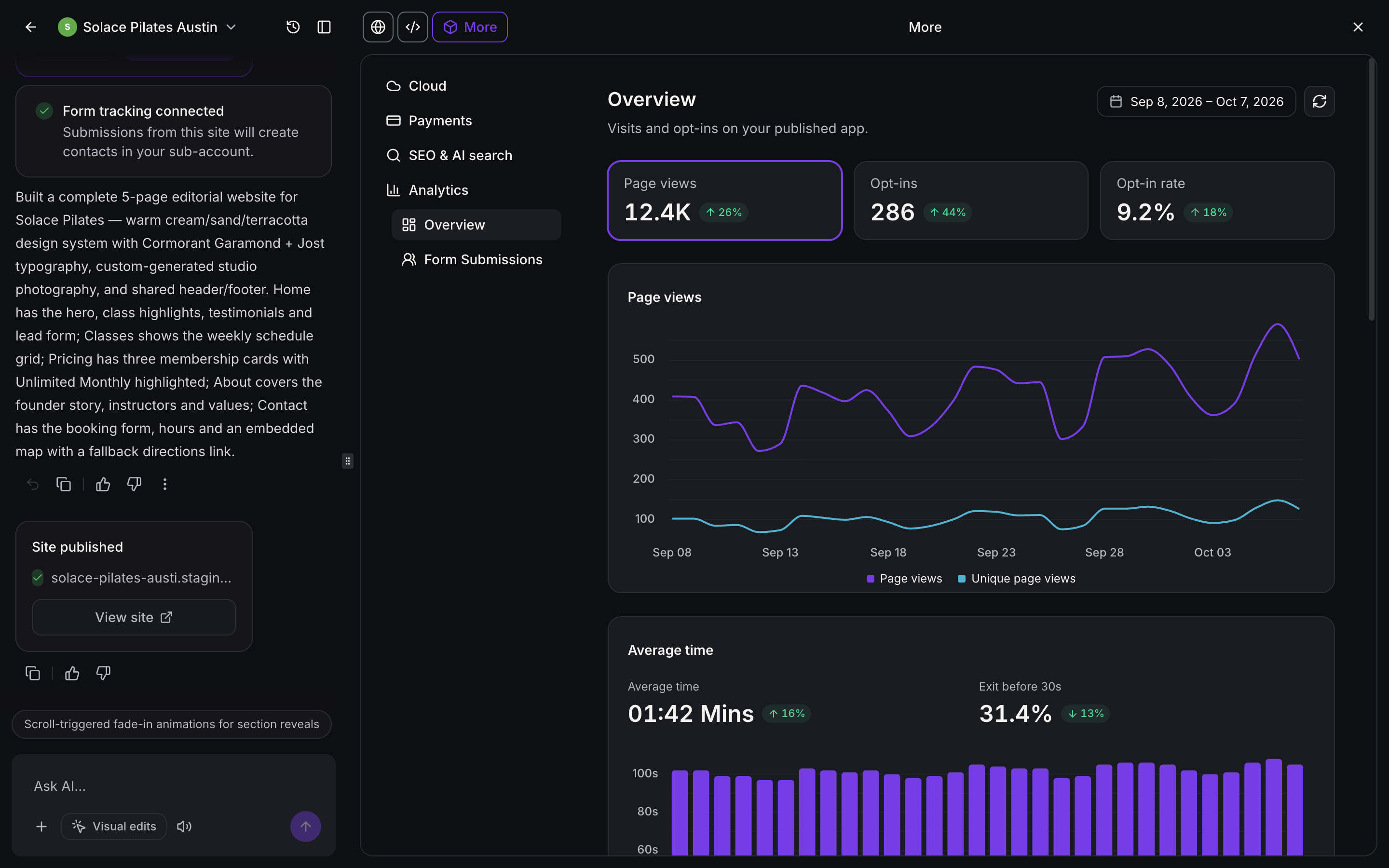
The AI Studio analytics feature generates reports for each published project. Metrics include page views, unique page views, opt ins, opt in rate, average time on site and visitor trends. Additional breakdowns show top pages, traffic sources, devices, browsers and geographic locations.
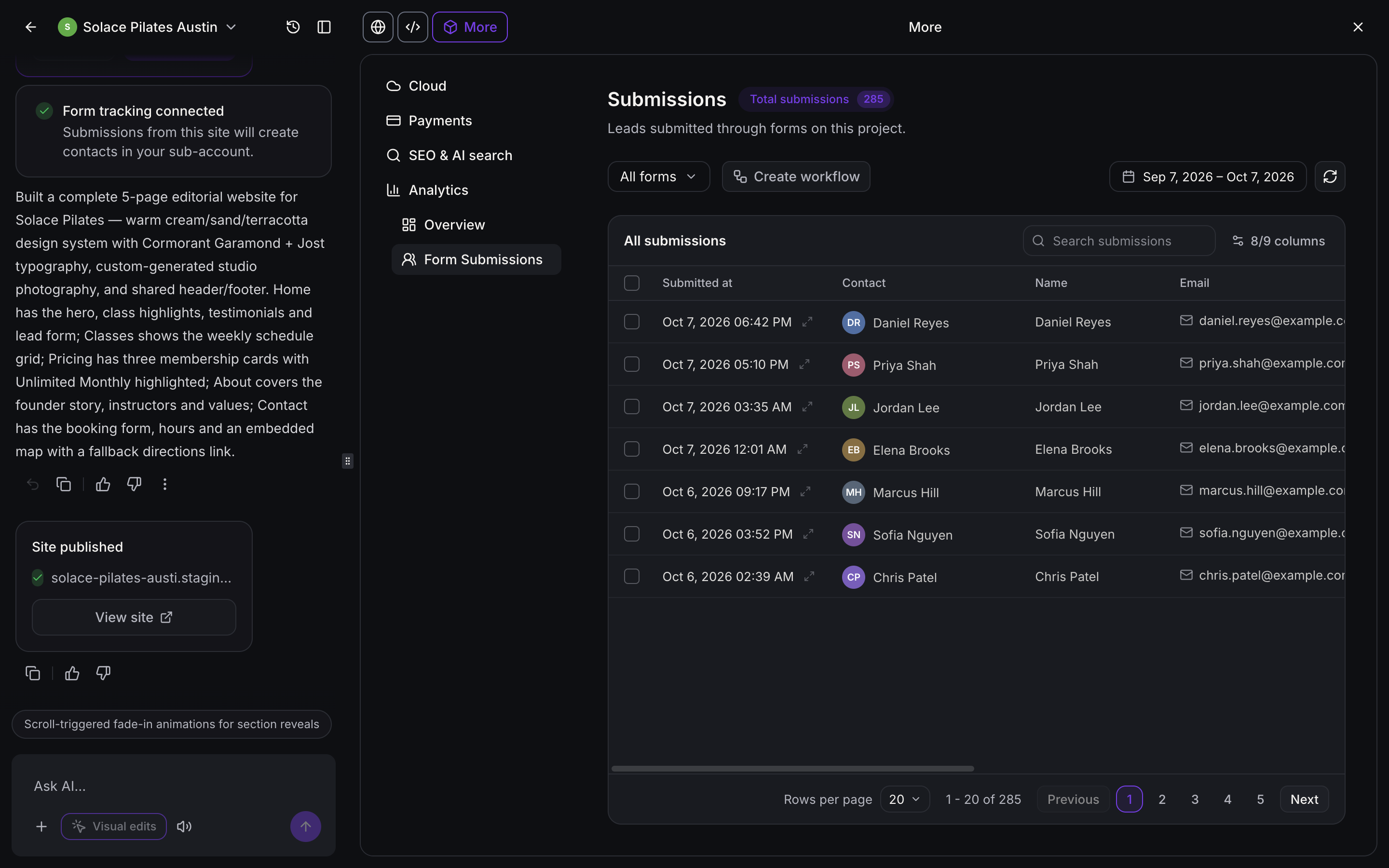
Form submissions are collected from any connected form on the AI Studio site. A centralized table lists each lead, its submission date, contact name and contact information, and allows you to launch a workflow directly from the view.
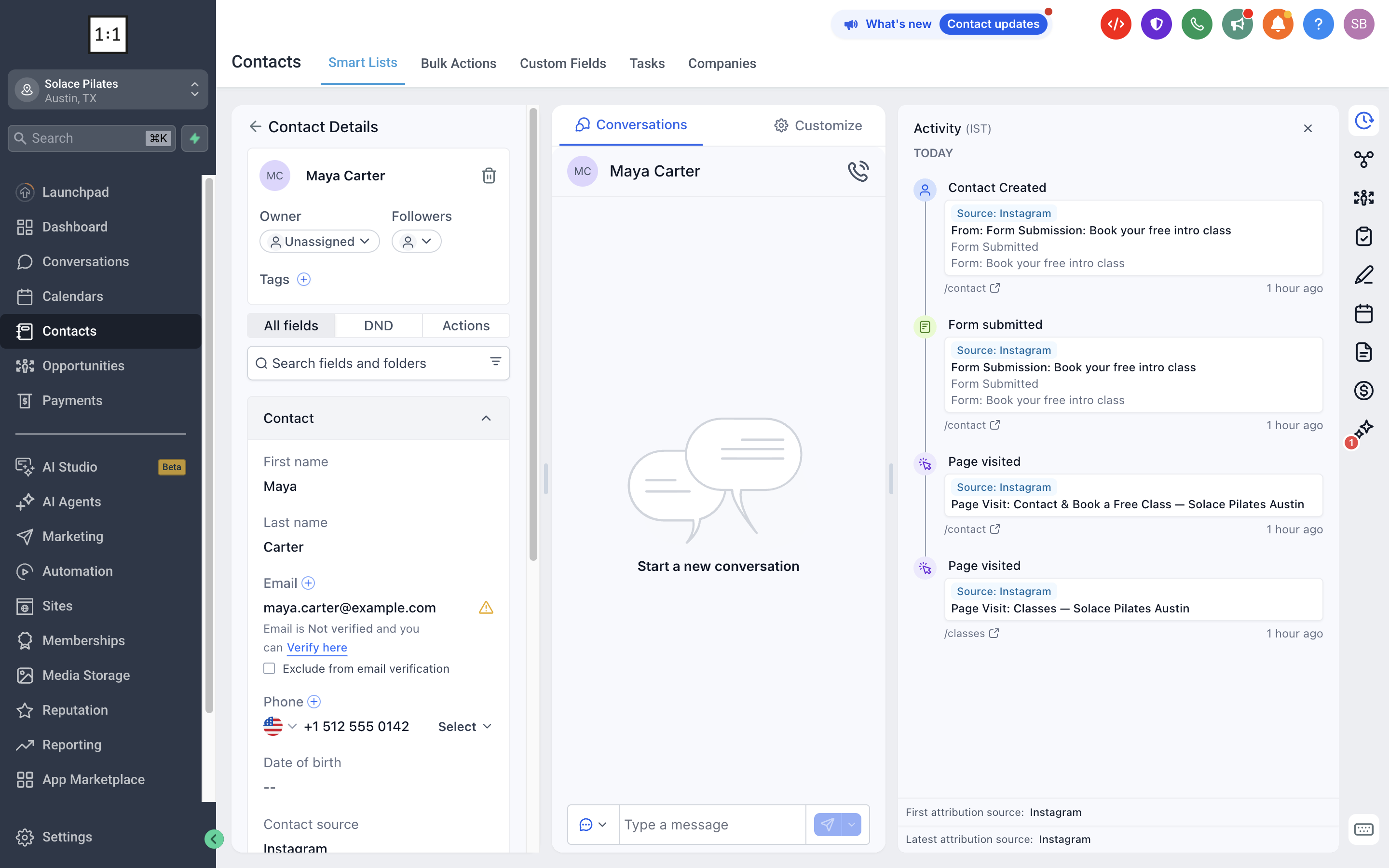
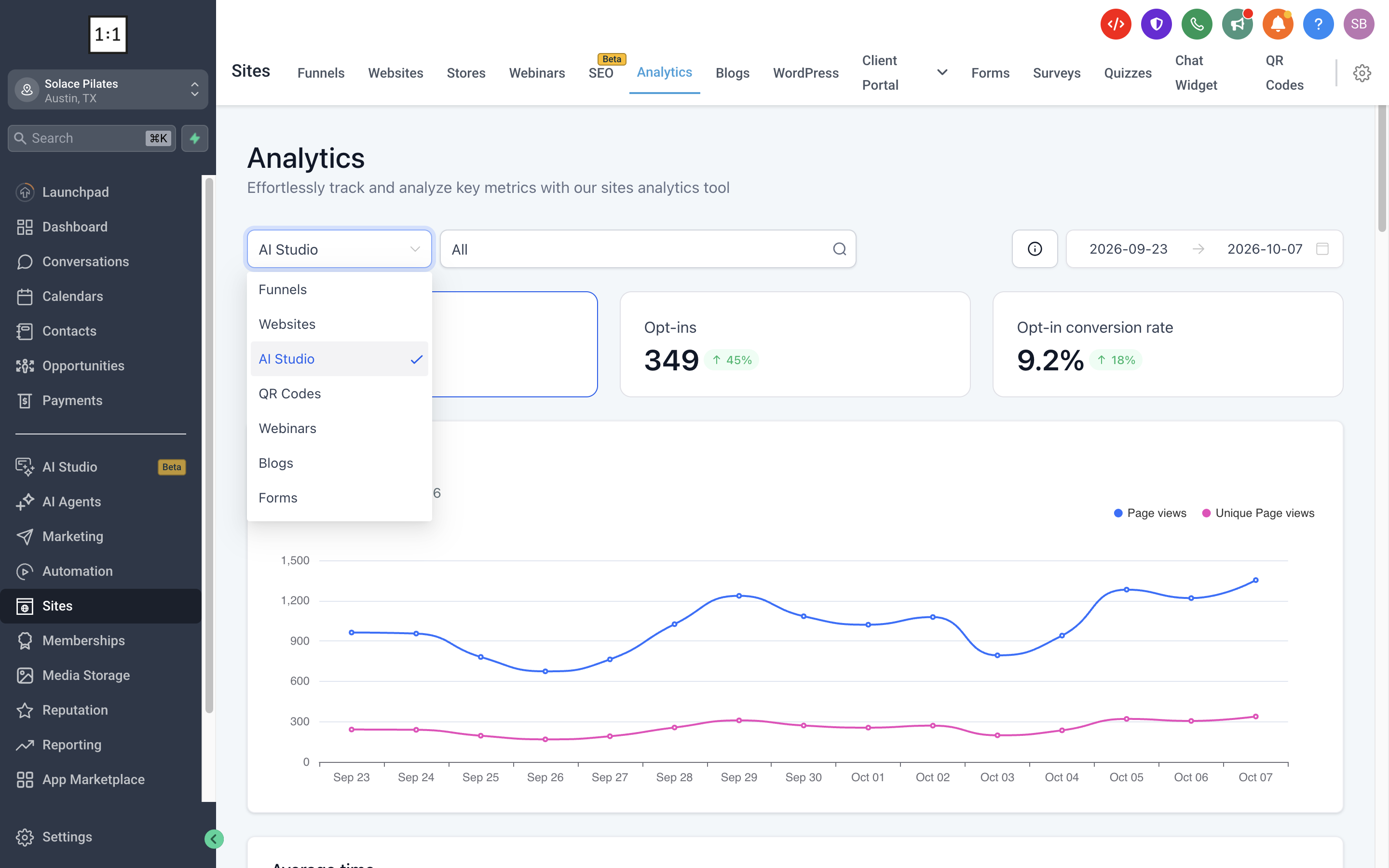
When a visitor submits a form, the platform links that event to the visitor’s contact record. The contact’s Activity panel then displays the pages they visited, the traffic source and the form submission, giving full lead attribution. This data is also available in the main Sites > Analytics dashboard, where you can filter by AI Studio projects and compare performance across assets.
03How businesses use analytics and form tracking
- Digital marketing agency. The agency opens a client’s AI Studio project, selects Analytics > Overview, and reviews page view trends and opt in rates to advise on landing page improvements. It also checks Form Submissions to extract new leads for campaign reporting.
- Real estate office. Agents navigate to Contacts, choose a prospect, and examine the Activity panel to see which property pages the prospect visited before submitting a contact form, helping them tailor follow up conversations.
- Online course provider. The provider accesses Sites > Analytics, filters the view to AI Studio, and selects a date range to compare enrollment form submissions across several course landing pages in one report.
04The numbers and rules that matter
- Traffic source, device, browser, location are available in additional reporting.
05Before you start
- Forms must be connected to the AI Studio website before using the Form Submissions view.
- If you need new page visit attribution for existing forms, reconnect form tracking in AI Studio and republish the site.
06How to set up and use analytics and form tracking in HighLevel
Access analytics
- Open the left navigation menu and click AI Studio.
- Select the published project you want to analyze.
- Press the More button in the top navigation bar.
- Choose Analytics from the dropdown list.
- Click Overview to display the analytics dashboard.
View and manage form submissions
- From the HighLevel Subaccount view, click AI Studio in the left menu.
- Open the AI Studio project that contains the connected forms.
- Select More in the top navigation bar.
- Pick Analytics from the menu.
- Click Form Submissions to open the submissions view.
- Examine the All submissions table for captured leads.
View lead attribution in contact activity
- Navigate to Contacts in the main menu.
- Select the contact record you want to inspect.
- Open the Activity panel within the contact details.
- Read the Page visited and Form submitted events for attribution information.
View AI Studio analytics across multiple sites
- Go to Sites and then select Analytics.
- Open the asset type dropdown at the top of the dashboard and choose AI Studio.
- Use the adjacent project filter to pick All projects or a specific AI Studio project.
- Set the desired date range to review performance for that period.
07What it looks like in HighLevel
08Things to know before you rely on it
- Forms that were connected before this feature launched still count opt ins, but they will not automatically link to page view data unless you reconnect tracking and republish.
- Analytics are provided without the need for external tracking code, but only for published AI Studio projects.
09How it connects to the rest of HighLevel
- Learn more about AI Studio fundamentals and publishing AI Studio basics
- Set up forms and calendars to work with AI Studio Connect forms
- Use the Form Submitted trigger in workflows Form submitted trigger
Michael's take

Most people assume they need custom tracking scripts to get any insight from AI Studio. The feature already logs page views, opt ins and form submissions right inside the project, so adding extra code just adds complexity. I would first open the Analytics Overview, glance at the opt in rate and compare it to the previous period to see if my recent changes are moving the needle.
Next, I’d hop into the Form Submissions view, filter for the newest entries and click a contact to verify the activity timeline shows the pages they visited before converting. That quick check tells you whether the built in attribution is working before you start building any automation.