
01Who this is for
- Founders of SaaS platforms need a backend without managing servers, so they can focus on product features while controlling instance and storage costs.
- Agency owners who host client portals benefit from predictable monthly fees and the ability to pause or remove Cloud to stop charges when a project ends.
02AI Studio Cloud pricing, explained
AI Studio Cloud provides hosted compute, database, and file storage inside the HighLevel platform. It removes the need for separate backend services and lets an app store user data, upload files, and run server side logic.
You choose an instance size that defines CPU cores and RAM. The Tiny instance is free; larger sizes are billed by the hour. Database storage is reserved in GB and billed hourly regardless of actual use, while file storage is billed for the real space your files occupy.
All Cloud settings live within the AI Studio area of HighLevel. Instance size, database storage, and file storage are adjusted from the Cloud configuration screen, and billing is recorded in your HighLevel wallet.
03How businesses use AI Studio Cloud pricing
- Fitness membership site. Select a Small instance to handle member login and workout video uploads. Reserve 4 GB of database storage for member profiles and let file storage grow as users add progress photos. Monitor usage to stay within the free allowances.
- Real estate lead portal. Choose a Medium instance for faster page loads when agents view property listings. Increase database storage to 8 GB to keep transaction records, and delete unused PDFs to keep file storage charges low.
- Online education platform. Start with a Mini instance for course content delivery. Reserve 6 GB of database space for student records, and store video files in the file buckets, watching the usage so that charges only appear when storage exceeds 1 GB.
04The numbers and rules that matter
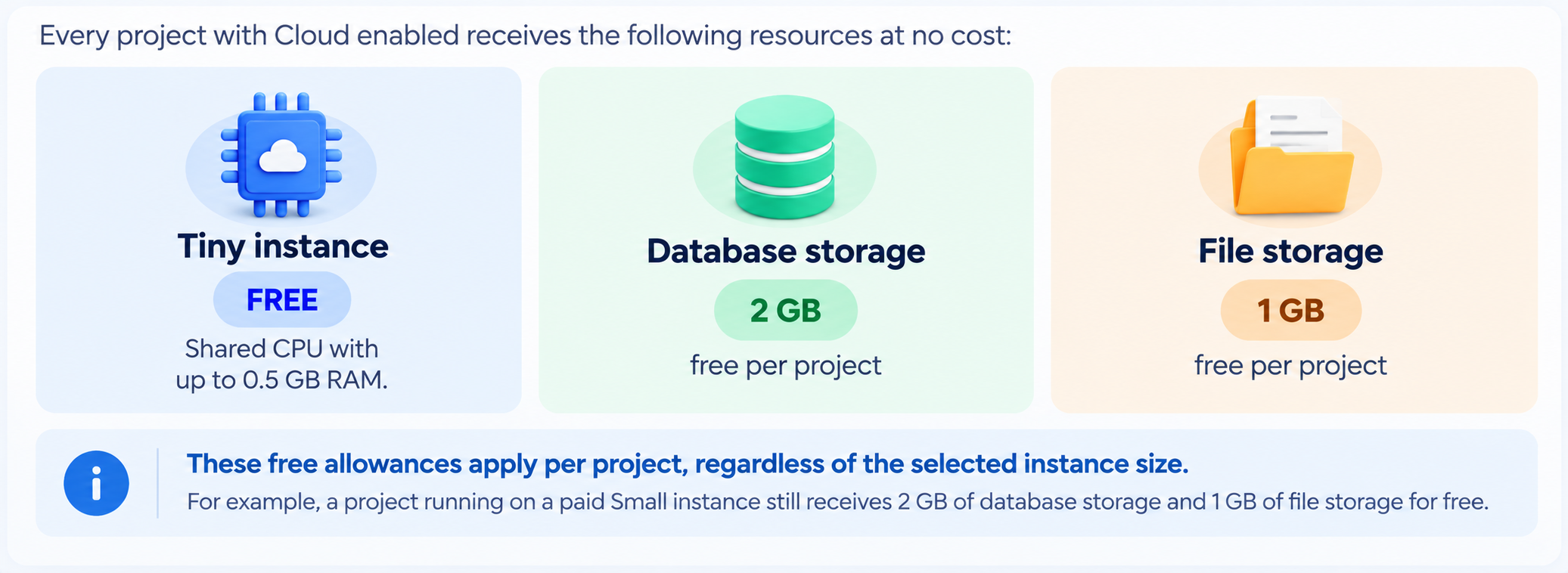
- Free Tiny instance, 2 GB database storage, 1 GB file storage per project.
- Mini instance $0.015456 per hour (~$11.28 per month) (per HighLevel's help center, checked November 2026).
- Small instance $0.02369 per hour (~$17.29 per month) (per HighLevel's help center, checked November 2026).
- Medium instance $0.09453 per hour (~$69.01 per month) (per HighLevel's help center, checked November 2026).
- Large instance $0.174455 per hour (~$127.35 per month) (per HighLevel's help center, checked November 2026).
- X Large instance $0.330855 per hour (~$241.52 per month) (per HighLevel's help center, checked November 2026).
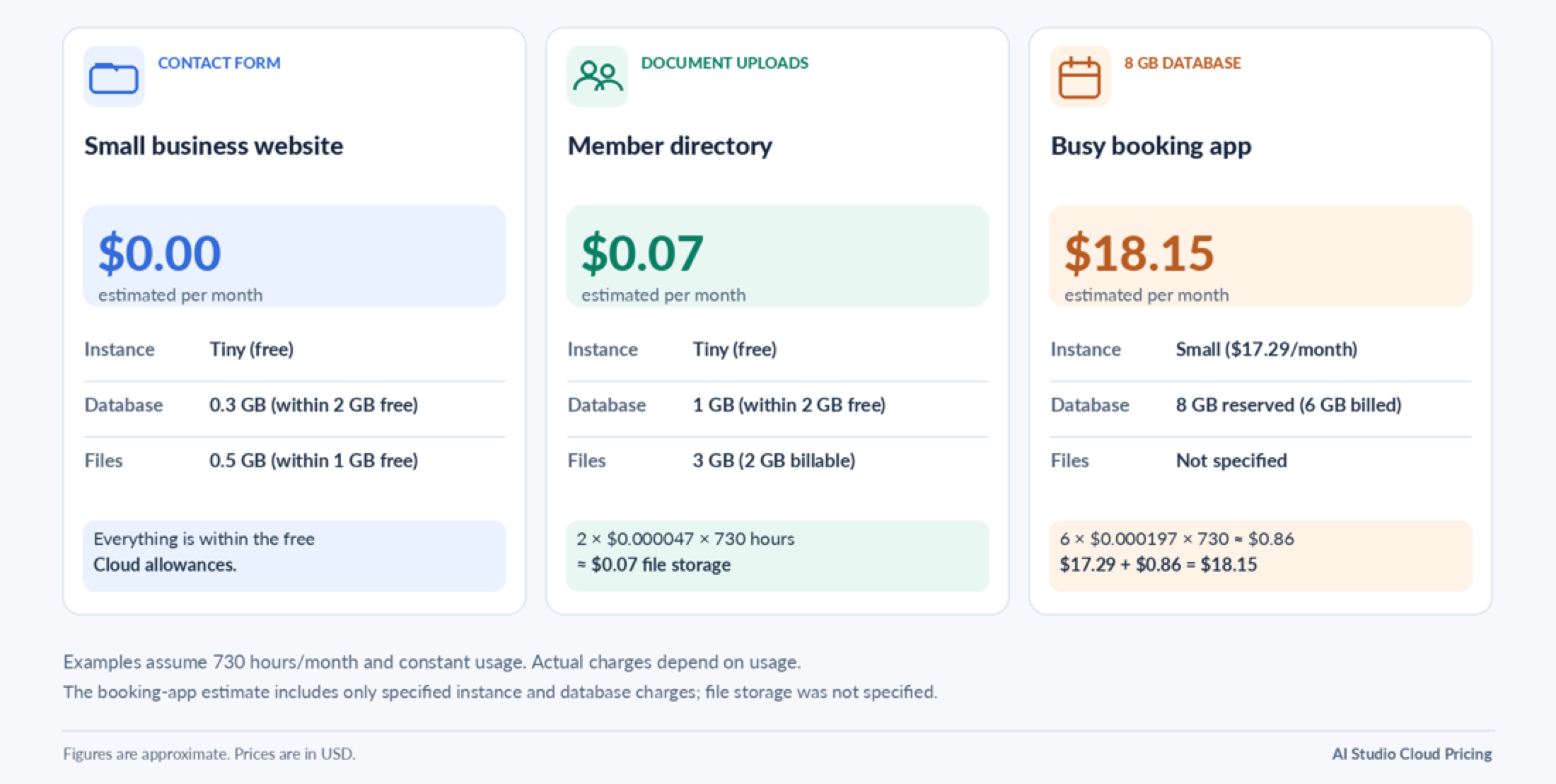
- Database storage $0.000197 per GB per hour (~$0.14 per GB per month) (per HighLevel's help center, checked November 2026).
- File storage $0.000047 per GB per hour (~$0.034 per GB per month) (per HighLevel's help center, checked November 2026).
- The smallest database storage increase is to 8 GB (adds 6 GB above the free 2 GB).
- Monthly estimates are based on 730 hours.
05Before you start
- Review current database usage under Advanced settings > Database storage before increasing reserved storage.
06How to set up and use AI Studio Cloud pricing in HighLevel
Change the instance size for a Cloud project
- Select the new instance size you want to run.
- Confirm the change to apply the new size.
- The hour of the change is billed for a full hour at the old size and a full hour at the new size.
- You can change the size only once per clock hour.
- From the following hour onward, billing uses the new instance rate.
Pause Cloud to stop instance charges temporarily
- Initiate the pause action for the Cloud environment.
- Make sure Cloud stays paused for the entire billing hour.
- Instance charges stop for any hour that is fully paused.
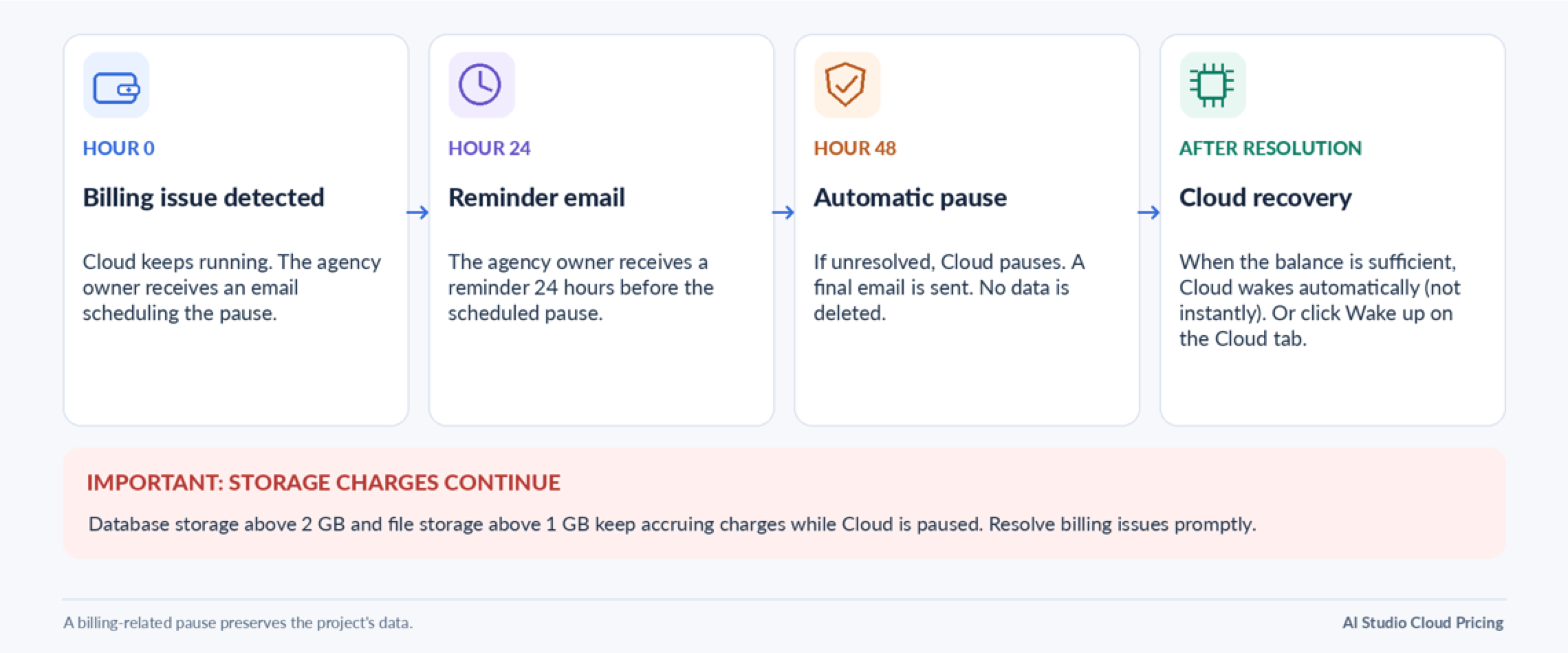
- Database and file storage charges may continue while paused.
Remove Cloud and eliminate all ongoing charges
- Select the option to remove Cloud from the project.
- Confirm the removal, acknowledging that data will be permanently deleted.
- All instance, database storage, and file storage charges cease immediately.
- The database, user accounts, and stored files are permanently removed.
07What it looks like in HighLevel
08Settings that matter
- Instance size. Controls the CPU cores and memory allocated to the app, determining hourly compute cost.
- Reserved database storage. Sets the amount of database space reserved for the project; billing is based on this reserved size each hour.
- File storage. Tracks the actual space used by uploaded files; charges apply only for usage above the free 1 GB allowance.
09Things to know before you rely on it
- Every project receives a free Tiny instance, 2 GB of database storage, and 1 GB of file storage.
- Database storage can only be increased; it cannot be reduced without removing Cloud.
- You can change the instance size only once per clock hour; each change bills a full hour at both old and new rates.
- Pausing Cloud stops instance charges only for fully paused hours; storage charges continue while paused.
10How it connects to the rest of HighLevel
- See detailed AI Studio Cloud pricing tiers and usage examples. AI Studio pricing
- Learn how to set up AI Studio Cloud for your app, including database and file storage configuration. AI Studio features
- Start a 30 day trial to explore AI Studio Cloud capabilities. 30 day trial
Michael's take

When the backend needs only a tiny amount of compute and stays within the free 2 GB database and 1 GB file limits, you can run it without incurring Cloud charges.
If the app grows beyond the free allowances, you will begin paying the instance and storage rates described in the pricing tables.