
01Who this is for
- Agency owners who need a single system to build client automations, because workflows merge triggers and campaign steps.
- Agency team members who manage client automation and require detailed execution logs for troubleshooting.
02Workflows vs campaigns/triggers, explained
Workflows let you design automation by selecting a trigger, adding optional filters, then chaining actions. You can insert if/else branches, wait steps, math operations and other logic to personalize each contact’s path. All steps run inside the platform and are recorded in a status or execution log, which helps you see where a contact is in the automation and troubleshoot any issues.
The workflow builder lives under the Workflows section of HighLevel. From there you create a new workflow, pick a trigger (for example a contact tag or a form submission), add any filters, and then drag actions such as send email, add a tag, or update a field. You can also import existing campaigns and then add triggers to convert them into a workflow.
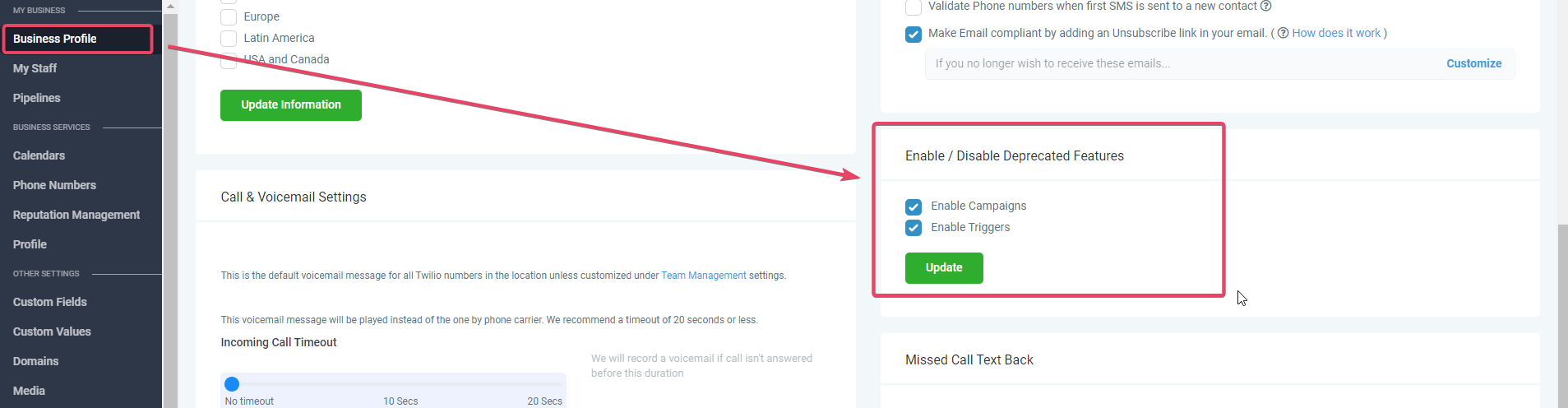
Because workflows replace the older Campaigns and Triggers, the platform automatically disables those deprecated features in new subaccounts. If a subaccount was created from an older snapshot that still had campaigns and triggers, an option to enable deprecated features appears in Business Profile settings; otherwise it is hidden.
03How businesses use workflows vs campaigns/triggers
- Digital marketing agency. The agency imports a client’s existing campaign into a workflow, adds a tag trigger, and uses if/else branches to send different follow up emails based on the lead’s source. The execution log lets the agency verify each step before going live.
- Real estate brokerage. A broker creates a workflow that triggers when a new contact is added, applies a wait of three days, then checks a custom field with a math operation to decide whether to send a property listing email or a reminder call. All actions are managed within the workflow editor.
- Online fitness studio. The studio builds a workflow that fires on a membership signup tag, adds the member to a custom audience, and uses a conditional step to send a welcome email only if the member’s start date is within the next week. The log shows each member’s progress through the automation.
04The numbers and rules that matter
- Agencies created after November 2021 do not see the option to enable Deprecated Features Campaigns & Triggers.
05What it looks like in HighLevel
06Things to know before you rely on it
- Campaigns and Triggers are hidden in subaccounts created after November 2021 unless the subaccount was cloned from a snapshot that already contained those features.
- Only the trigger steps and actions marked “Yes” for Workflows can be used; many older Trigger steps (e.g., Contact Created, Note Changed) and some Campaign actions (e.g., Instagram DM, Review Request) are not available in Workflows.
07How it connects to the rest of HighLevel
- HighLevel workflow creation: triggers, filters, actions Workflow creation guide
- HighLevel workflow settings overview Workflow settings
- How to add a workflow action step by step Workflow actions list
Michael's take

Beware that campaigns and triggers are being phased out. If you keep relying on them, you’ll eventually hit limits where the UI simply won’t let you enable or edit those old automations in newer subaccounts.
The upside is clear: Workflows give you conditional logic, wait times and a full execution log. Switching to workflows means you can build richer, more reliable automations and keep everything in one place.