
01Who this is for
- Marketing managers who need to capture leads from TikTok ads and feed them into automated follow up sequences.
- Customer support teams that want to gather feedback via TikTok forms and automatically tag contacts for later review.
- Small business owners looking to route TikTok form data into email notifications and contact updates without manual entry.
02TikTok form submit triggers, explained
The TikTok Form Submit trigger is a workflow starter that fires when a form on TikTok is submitted. It allows you to begin any workflow you have built in HighLevel.
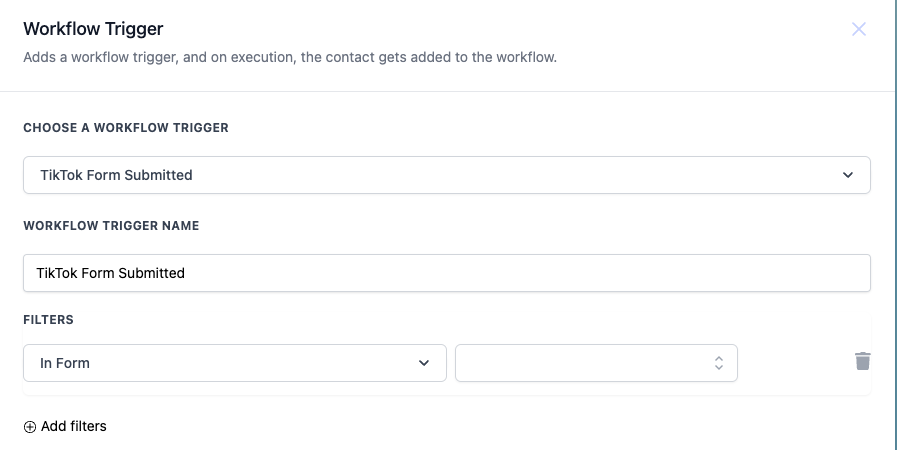
When configuring the trigger you select “TikTok Form Submitted” from the trigger list, give the trigger a descriptive name, and choose the specific TikTok form that should activate it. The “In Form” field is mandatory and defines the exact form that will launch the workflow.
After the trigger fires, the workflow proceeds through the actions you have added, such as sending an email or updating a contact record. Filters can be applied to limit activations to particular form names, ensuring only relevant submissions start the workflow.
03How businesses use TikTok form submit
- Digital marketing agency. The agency creates a workflow that begins with the TikTok Form Submit trigger for a lead capture form. It then sends a welcome email and adds the contact to a nurture sequence, all set up inside HighLevel.
- Ecommerce store. The store configures the trigger for a feedback form on TikTok. When a customer submits the form, HighLevel tags the contact as “Feedback Provided” and sends a thank you email automatically.
- Fitness studio. The studio uses the trigger for a class sign up form on TikTok. Submissions launch a workflow that sends a confirmation email and updates the member’s profile with a “Class Interested” tag.
04How to set up and use TikTok form submit in HighLevel
Set up TikTok form submit trigger
- Choose a Workflow Trigger and select TikTok Form Submitted from the list.
- Enter a descriptive Workflow Trigger Name.
- In the Filters section, set the In Form value to the TikTok form you want to monitor.
05What it looks like in HighLevel
06Settings that matter
- In Form. Selects the specific TikTok form that will trigger the workflow when submitted.
07How it connects to the rest of HighLevel
- Explore the basics of workflow automation to understand how triggers, filters, and actions work together. Workflow basics
- If you need to receive data from external sources, see how inbound webhooks can start workflows. Inbound webhook trigger
- Review the Workflow Pro Plan pricing to confirm you have access to the TikTok Form Submit trigger. Workflow Pro pricing
Michael's take

The TikTok form submit trigger is a small convenience that can turn a simple form fill into an automated follow up. It doesn’t overhaul your process, but it removes the manual step of copying a TikTok lead into your HighLevel account.
A boutique fitness studio that runs TikTok ads to collect class sign ups can point the trigger at its "Class Interest" form, then automatically email a welcome packet and add a "TikTok Lead" tag. That way the studio can nurture the prospect without a single spreadsheet entry.