
01Who this is for
- Founders who run customer feedback programs and need automatic follow up after surveys.
- Small business owners who want to tag contacts based on survey participation without manual effort.
02Survey submitted triggers, explained
The Survey Submitted trigger starts a workflow whenever a contact submits a survey. You can attach filters to run the trigger only for selected surveys or when the response is not marked as disqualified. This lets you build branches that react to the type of survey or its qualification status.
The trigger is part of the workflow builder in HighLevel. It appears in the list of available triggers when you create or edit a workflow. After you add the trigger, you add actions such as sending emails, updating fields, or applying tags.
The trigger works for surveys that are part of funnels, website pages, or shared via external links. It does not evaluate individual survey answers directly, but you can use tags or custom fields applied by the survey for further logic.
03How businesses use survey submitted trigger
- Online course provider. Create a workflow that runs when a student finishes the course feedback survey and is not disqualified. The workflow sends a thank you email and updates a field marking the survey as completed.
- Dental practice. Set up a trigger for the post appointment satisfaction survey. When the response is not disqualified, the workflow adds a tag for satisfied patient and sends a follow up email offering a future discount.
- Real estate agency. Configure the trigger for a property interest survey. When a lead completes the survey without a disqualifying answer, the workflow updates the lead status and assigns the contact to a follow up sequence.
04How to set up and use survey submitted trigger in HighLevel
Configure the Survey Submitted trigger
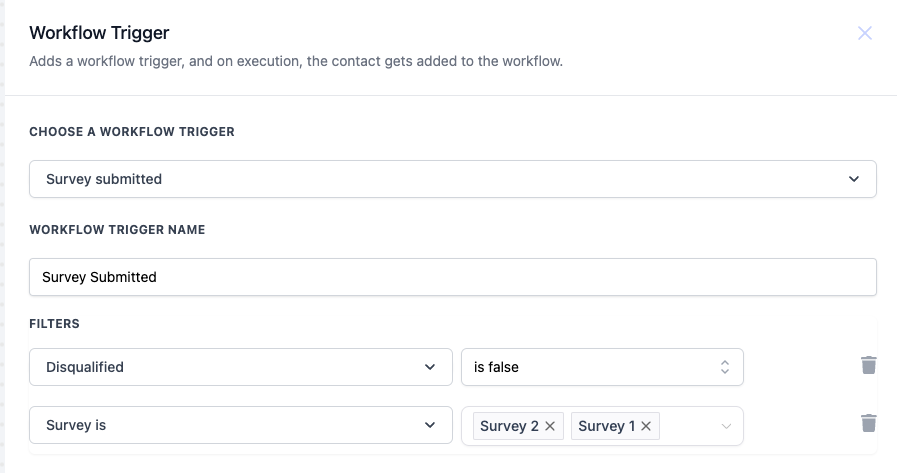
- Open the workflow editor and select Survey Submitted from the trigger list.
- Enter a descriptive name for the trigger, such as Survey Submitted.
- Add filters to define when the trigger should fire.
- Set the Disqualified filter to is false if you only want non disqualified contacts.
- Choose the Survey is filter and select one or more surveys to target, or leave it blank to apply to any survey.
05What it looks like in HighLevel
06Settings that matter
- Disqualified. Controls whether the trigger runs when the contact’s survey response is marked as disqualified; options are is true or is false.
- Survey is. Lets you pick specific surveys that will start the workflow; you may select multiple surveys or leave the field empty to trigger from any survey.
07Things to know before you rely on it
- The trigger works for surveys embedded in funnels, website pages, or shared via external links.
- It does not evaluate individual survey answers directly; use tags or custom fields added by the survey for additional logic.
08How it connects to the rest of HighLevel
- HighLevel workflow automation basics Workflow basics
- How to build a workflow with triggers, filters, and actions Workflow creation guide
- HighLevel pricing and plans Pricing page
Michael's take

Beware that the Survey submitted trigger only fires on the act of submission, not on individual answer values. If your workflow depends on specific answers, you’ll need to pair the trigger with Custom Fields or tags that capture those responses.
The feature lets you acknowledge participants and keep contact records up to date. A simple thank you email or a status flag can keep your engagement loop tight without lifting a finger.