
01Facebook comment automation, explained
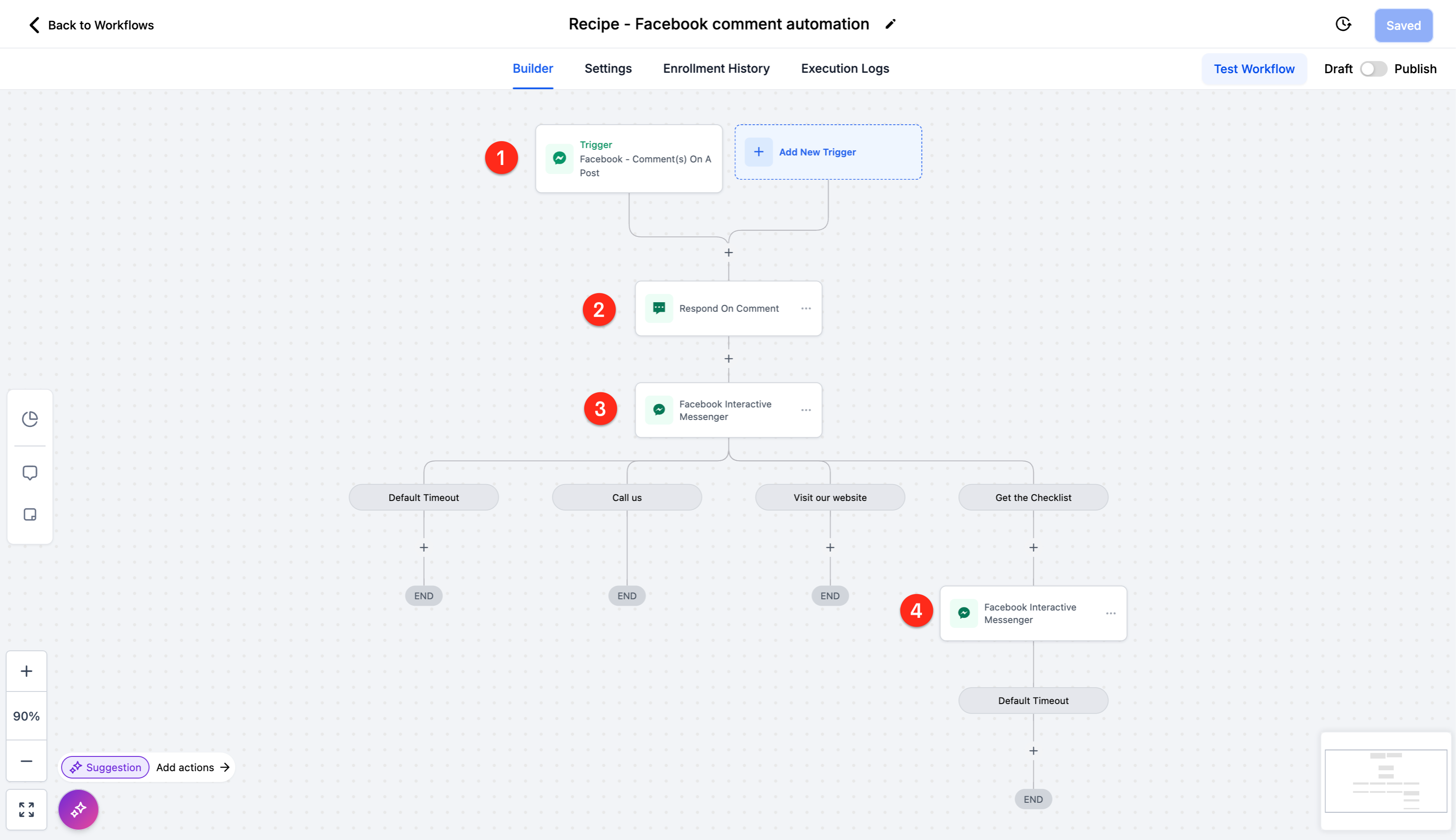
Facebook comment automation is a workflow that starts when someone writes a first level comment on a Facebook post. The workflow posts a reply to the comment and then continues the conversation in Messenger.
After the reply, the workflow sends a messenger message with interactive buttons and can deliver a file such as a checklist.
02How businesses use Facebook comment automation
- Autorespond to interest. When a prospect comments on a post, the workflow posts a thank you reply like “hey check your DM” or “thanks for showing interest. please check your DM”. It then sends a DM that says “I am excited that you want to start your Personal Finance journey.” with buttons for a website or a checklist.
- Deliver a lead magnet. The DM includes a button labeled “get the checklist”. A subsequent messenger action sends the checklist file.
03How to set up and use Facebook comment automation in HighLevel
Create Facebook comment automation workflow
- Select the Facebook Comment Automation recipe.
- Add the trigger: Fires on any first level comment on the post.
- Add the first action: Respond to the comment with "hey check your DM" or "thanks for showing interest. please check your DM".
- Add the second action: Interactive messenger reply to the comment via DM with the text "I am excited that you want to start your Personal Finance journey." and buttons "visit our website" or "get the checklist".
- Add the third action: Interactive messenger reply to the DM with the text "here is your checklist".
04What it looks like in HighLevel
05Instagram comment automation in HighLevel
Instagram comment automation in HighLevel triggers on first level comments, replies with a preset message, and can send follow up direct messages with buttons and a file.
Instagram comment automation is a workflow recipe that reacts when someone posts a first level comment on an Instagram post.
The recipe includes a trigger for the comment, a public reply, and two interactive direct message steps that can include buttons and a final message.
Set up Instagram comment automation workflow
- Create a new workflow and select the recipe "Instagram Comment Automation".
- Add the trigger: Fires on any first level comment on the post.
- Add the first action: Respond to the comment with "hey check your DM" or "thanks for showing interest. please check your DM".
- Add the second action: Interactive messenger reply to the comment via DM with the text "I am excited that you want to start your Personal Finance journey." and buttons "visit our website" or "get the checklist".
- Add the third action: Interactive messenger reply to the DM with the text "here is your checklist".
Michael's take

Don’t forget to test that the DM delivers correctly before you go live.