
01Facebook comments + Workflow AI, explained
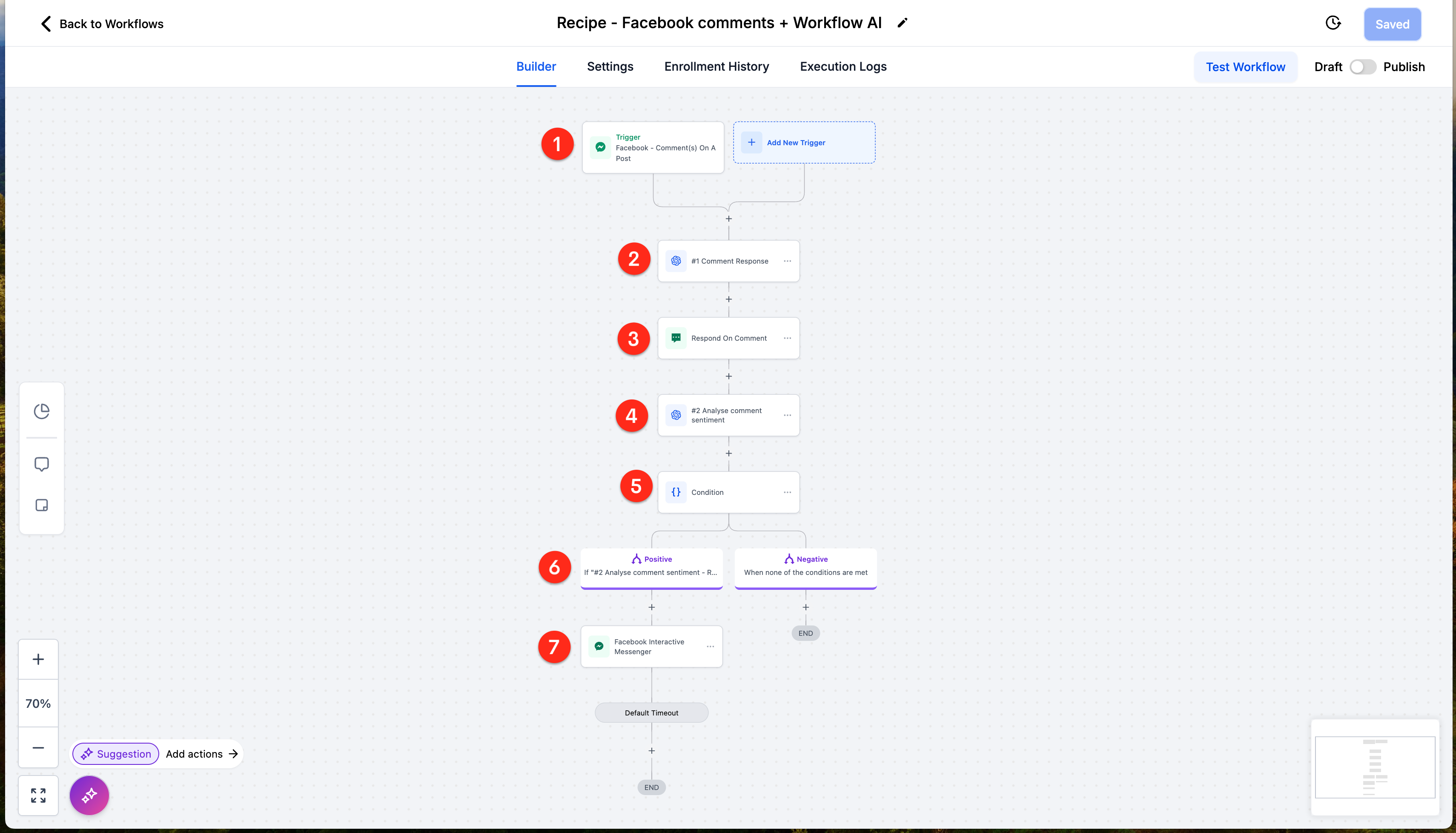
The recipe triggers whenever a first level comment appears on a Facebook post. It sends that comment to OpenAI with a short prompt for a good response. The AI generated reply is posted back to the comment thread.
The same comment is then sent to OpenAI for sentiment analysis. The workflow branches based on whether the sentiment is positive or negative. When the sentiment is positive, an interactive direct message is sent to the commenter.
02How businesses use Facebook comments + Workflow AI
- Automated comment replies. Reply in comments with the AI generated response.
- Positive sentiment follow up. When the sentiment is positive, send an interactive direct message.
03How to set up and use Facebook comments + Workflow AI in HighLevel
Create workflow from recipe
- Create a workflow from this recipe.
- Add a trigger that fires on any first level comment in the post.
- Add an action to send the comment to OpenAI with a short prompt asking for a good response.
- Add an action to reply in comments with the AI response.
- Add an action to send the original comment to OpenAI for a sentiment analysis and split the workflow by positive or negative.
- Add an action that, when positive, sends an interactive DM.
04What it looks like in HighLevel
Michael's take

Michael ReimerFounder of CRM Pros, HighLevel Commander and Certified Admin
Automation can feel risky when you let a bot talk to real people. A poorly phrased AI reply could sound off brand or miss the tone you want.
When it works, the workflow provides a reply and a chance to nurture happy commenters with a direct message, freeing you to focus on bigger tasks.
Get More InformationOpens on HighLevelPublished November 2, 2026 · Updated November 3, 2026