
01Who this is for
- Agency owners who manage client contracts, because they can right away generate contract records tied to each client contact.
- Real estate teams tracking properties, since each property can be created as a custom object and linked to the owner's contact.
- Service providers with recurring jobs, because job records can be auto created and associated with the customer contact.
02Create an Associated Record for Contact, explained
The Create Associated Record for Contact action is a workflow step that generates a new custom object record and links it to a contact. It works only after you have added custom objects to the subaccount and defined at least one association label between those objects and contacts.
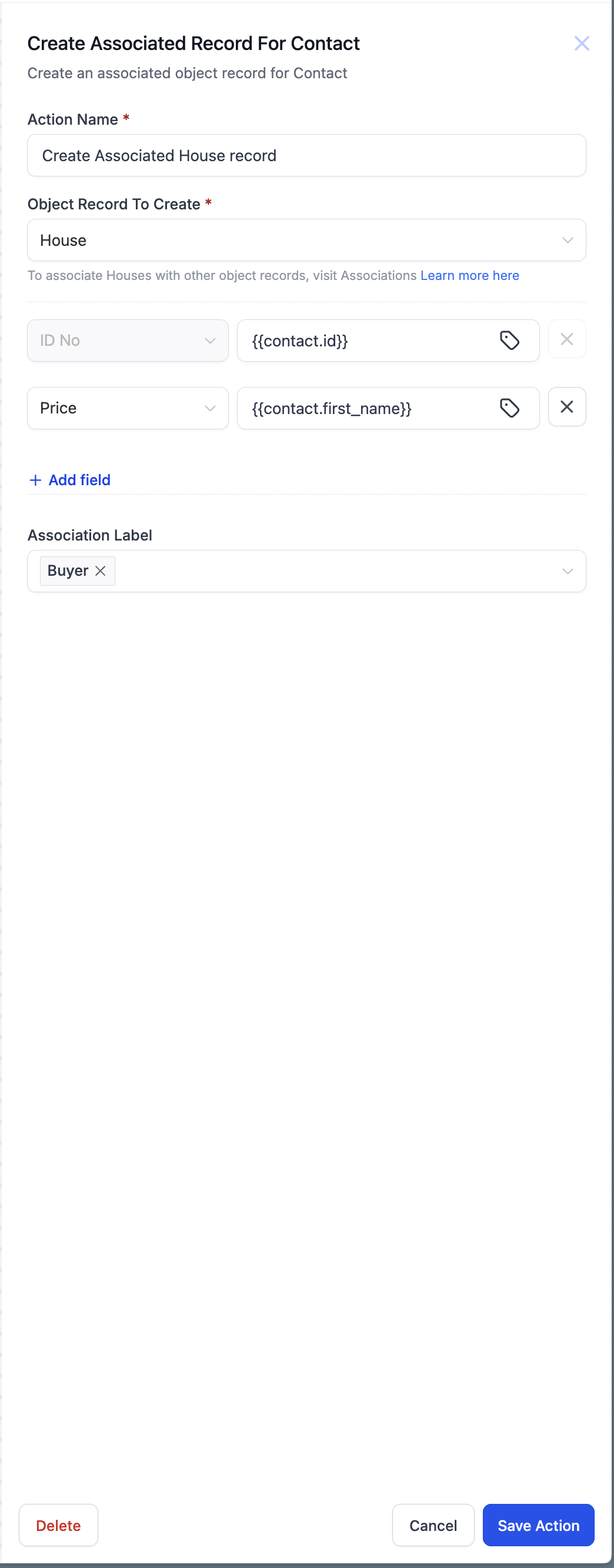
When you add this action, you select which custom object to create, fill in any number of fields, and optionally use merge fields to pull data from the workflow. You also choose an association label that categorizes how the new record relates to the contact. The platform then creates the record and automatically attaches it to the contact using the chosen label.
This action lives within Contact based workflows, under the list of available actions. It complements other workflow actions that update or clear associated records.
03How businesses use create an associated record for contact
- Real estate brokerage. The brokerage creates a custom object called Property. In a workflow that runs when a lead becomes a client, the Create Associated Record for Contact action adds a Property record, fills in address fields using merge data, and tags it with an association label such as "Owned Property".
- Solar installation company. When an opportunity is marked as Won, the workflow creates an Install custom object, populates Site Survey Date with today’s date and Install Date from scheduling data, and applies the "Installation Scheduled" label to link the record to the customer contact.
- Legal services firm. Upon signing an agreement, the firm runs a workflow that creates a Contract custom object, sets contract start and end dates using merge fields, and associates it with the client contact using the "Active Contract" label.
04Before you start
- Custom objects must be created in the subaccount.
- An association label must exist linking at least one custom object to contacts.
05How to set up and use create an associated record for contact in HighLevel
Create an associated record for a contact via workflow
- Confirm that custom objects are set up in the subaccount and that an association label connects the desired object to contacts.
- In the workflow editor, add the Create Associated Record for Contact action.
- Select the custom object you want to create from the available list.
- Define the fields for the new record and assign values, using merge fields where needed.
- Choose the association label that will attach the new record to the contact, then save the workflow.
06What it looks like in HighLevel
07Settings that matter
- Object Record to Create. Specifies which custom object type the workflow will generate.
- Fields. Allows you to map values, including merge fields, to the fields of the new custom object record.
- Association Label. Determines the label that categorizes the relationship between the created record and the contact.
- Custom value and custom fields - merge fields. Enables insertion of dynamic data from the workflow into the new record's fields.
08Things to know before you rely on it
- Only custom objects that exist in the subaccount appear as options.
- An association label must be defined before the action can be used.
- The action is available solely in Contact based workflows.
09How it connects to the rest of HighLevel
- Update an associated record for contact Update associated record
- Clear fields of an associated record for contact Clear associated fields
- Workflow action library All workflow actions
Michael's take

I see this as a small convenience that can become a real shift for businesses that juggle multiple related records. Instead of manually entering a property, contract or installation entry after a sale, the workflow does it for you and keeps everything tied to the same contact.
A solar installer, for example, can let the system generate an Install record the moment a job is won. The dates flow in, the record appears, and the installer has a clean line of sight from lead to postsale follow up without extra clicks.