
01Who this is for
- Coaching business owners who need to grant clients instant access to training modules after sign up.
- Membership site Founders looking to automate onboarding of new members to exclusive courses.
- Corporate training managers who want to provide employees with course access based on workflow triggers.
02Course grant offers, explained
The Course Grant Offer action is a workflow step that enrolls a contact in a course linked to an existing offer. When the workflow runs, HighLevel adds the contact to the selected course without manual steps.
The action lives in the workflow builder alongside other triggers, filters, and actions. It references offers created under Memberships > Offers and courses configured under Memberships > Products. Optional parameters let you send a notification email after enrollment.
03How businesses use the course grant offer
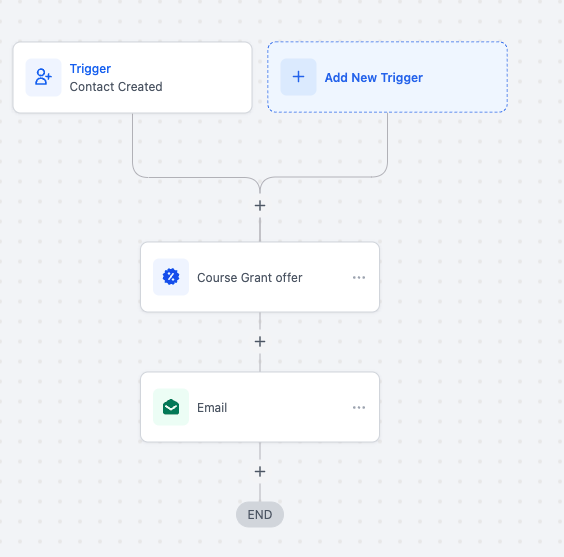
- Online coaching business. Create an offer for a beginner coaching course, then add a Course Grant Offer step to the workflow that runs when a new client signs up. The client is automatically enrolled, and you can add an email step to send login details.
- Corporate training department. Set up a free offer for an internal compliance course. In a workflow that triggers on employee onboarding, use the Course Grant Offer action to grant access, ensuring every new hire receives the course automatically.
- Membership site Founder. Build a paid offer for a premium membership course. Attach a Course Grant Offer action to a workflow that fires after a member purchases the package, enrolling them in the course and optionally emailing the course link.
04Before you start
- Create the offer you plan to grant under Memberships > Offers before adding the Course Grant Offer action to a workflow.
05How to set up and use the course grant offer in HighLevel
Set up Course Grant Offer action
- Open the workflow editor and select the “Course Grant Offer” action from the actions menu.
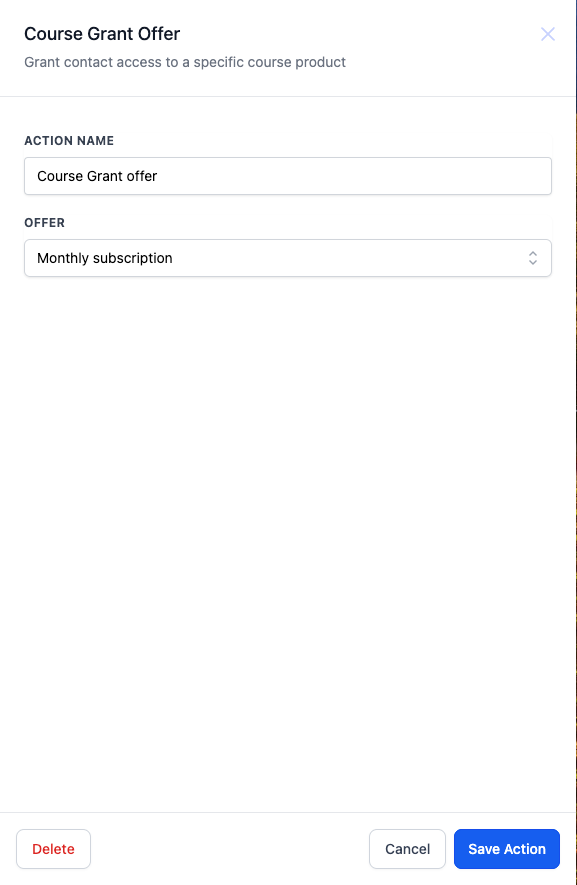
- Enter a descriptive name for the action, such as “Grant Access to Beginner’s Course.”
- Choose the pre created offer that should be granted to the contact.
- Adjust the access settings by editing the course under Memberships > Products.
- If needed, create an offer behind a paywall or a free offer under Memberships > Offers.
- Define the trigger or condition that will cause the action to run, for example a new contact creation.
- Optionally, add parameters like a notification email that includes course details and a CTA button.
06What it looks like in HighLevel
07Settings that matter
- Offer. Specifies which existing offer provides the course access that will be granted to the contact.
08Things to know before you rely on it
- Granting access a second time does not duplicate the enrollment or reset the contact’s progress.
- The action can only reference offers that have already been created; it cannot generate a new offer on the fly.
09How it connects to the rest of HighLevel
- Learn the basics of HighLevel workflow automation. Workflow basics
- View HighLevel pricing and plan options. Pricing
- Start a 30 day trial of HighLevel. Free trial
Michael's take

The Course grant offer feels like a small convenience that can quickly become a real shift in how you deliver training.
A coaching business that runs weekly webinars fits perfectly. Set up a free offer for the webinar replay, trigger the grant when someone signs up, and follow with an email containing the replay link.