
01Issue certificates, explained
The Issue Certificates trigger and action are available in Workflows. The Certificate Issued trigger watches for a certificate that has been issued, and the Issue Certificate action can issue a new certificate from within a workflow.
All certificates created through workflows appear in Membership > Certificates > Issued Certificates, making them easy to locate.
02How businesses use issue certificates
- Automated certificate delivery. When a certificate is issued, a workflow can include an action to send the certificate automatically.
- Certificate based workflow actions. A workflow can trigger additional actions after a certificate is issued.
03Before you start
- Prerequisite for using WhatsApp under Workflows.
04How to set up and use issue certificates in HighLevel
Add Certificate Issued trigger
- Automations > Workflows > click the Create a Workflow button at the top right of the screen.
- Click Add New Trigger.
- Search for the Certificate Issued trigger.
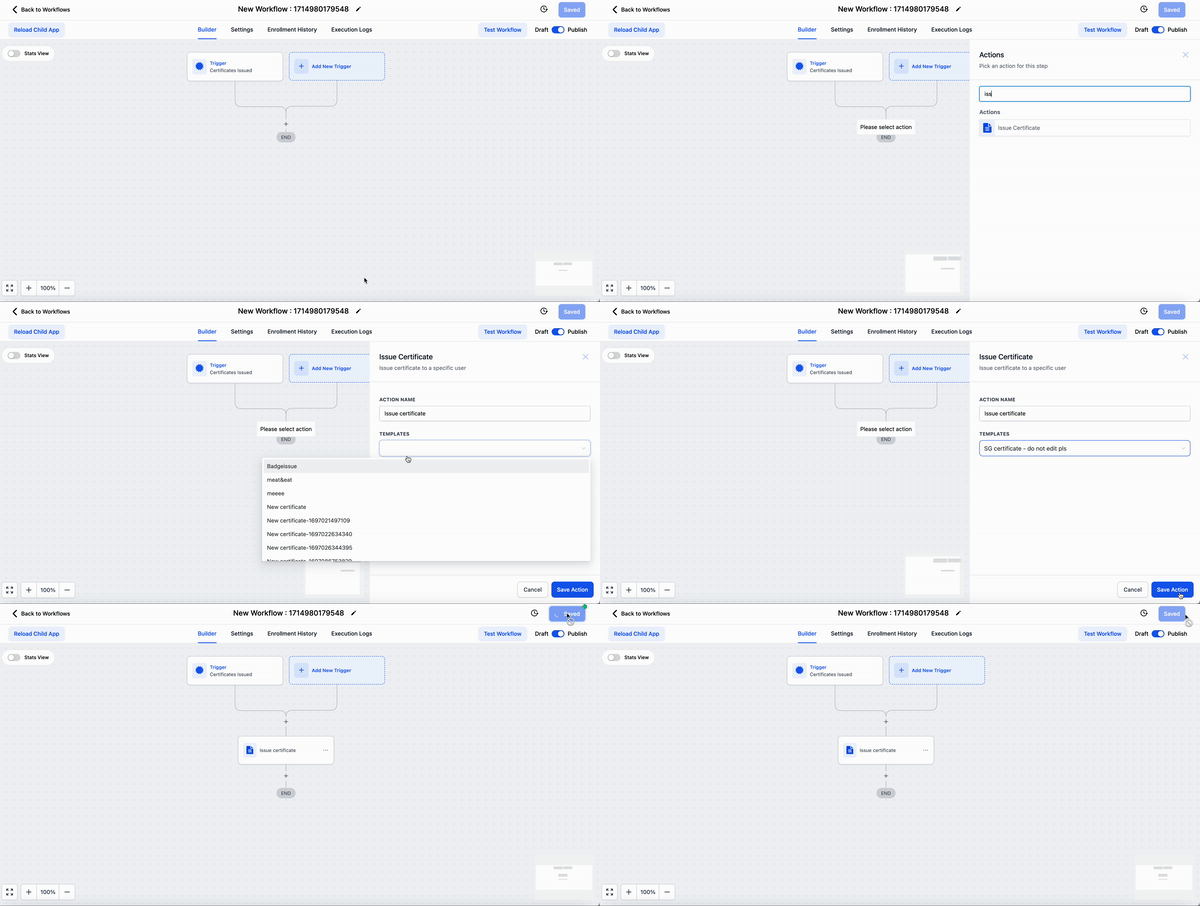
Add Issue Certificate action
- Automations > Workflows > click the Create a Workflow button at the top right of the screen.
- Click Add New Action.
- Search for the Issue Certificate action.
05What it looks like in HighLevel

Michael's take

Michael ReimerFounder of CRM Pros, HighLevel Commander and Certified Admin
Issue certificates can automate delivery and follow up when a credential is created, providing a clear audit trail in the Issued Certificates list.
Don’t forget to confirm the prerequisite for WhatsApp under Workflows before you start.
Get More InformationOpens on HighLevelPublished November 2, 2026 · Updated November 3, 2026