
01Who this is for
- Marketing managers at small agencies can automate image rich outreach without re uploading files each time.
- Real estate teams benefit by quickly sending property photos to leads through reusable URLs.
- Dental practice owners improve patient reminders by attaching care instruction diagrams via MMS.
02Custom Values for MMS, explained
Custom values are entries that hold a URL you want to reuse across your automations. When an MMS action references a custom value, the platform pulls the stored URL and includes it as the message attachment. The attachment is sent only if it matches the carrier's size limits and uses a supported file type (jpeg, png, gif). You create and manage custom values under Location Settings > Custom Values, and you add them to messages while editing a workflow in the Workflows section.
03How businesses use Custom Values for MMS
- Real estate agency. The agency stores a link to a property photo as a custom value. In a lead nurturing workflow, the MMS action pastes that custom value so each new lead receives the photo automatically.
- Dental practice. A dental office saves a URL to a post procedure care diagram. After an appointment, a workflow sends an MMS reminder that includes the diagram via the custom value.
- Event planning company. The planner creates a custom value with a flyer image URL. When an event invitation workflow runs, the MMS action attaches the flyer by referencing the custom value.
04The numbers and rules that matter
- AT&T long code MMS attachment size 0.6 MB.
- AT&T toll free MMS attachment size 0.6 MB.
- AT&T shortcode MMS attachment size 0.6 MB.
- Sprint long code MMS attachment size 1.4 MB.
- Sprint toll free MMS attachment size 0.6 MB.
- Sprint shortcode MMS attachment size 1.4 MB.
- T mobile long code MMS attachment size 1.5 MB.
- T mobile toll free MMS attachment size 0.6 MB.
- T mobile shortcode MMS attachment size 1.0 MB.
- Verizon long code MMS attachment size 0.675 MB.
- Verizon toll free MMS attachment size 0.6 MB.
- Verizon shortcode MMS attachment size 1.2 MB.
05How to set up and use Custom Values for MMS in HighLevel
Attach custom value URL to MMS
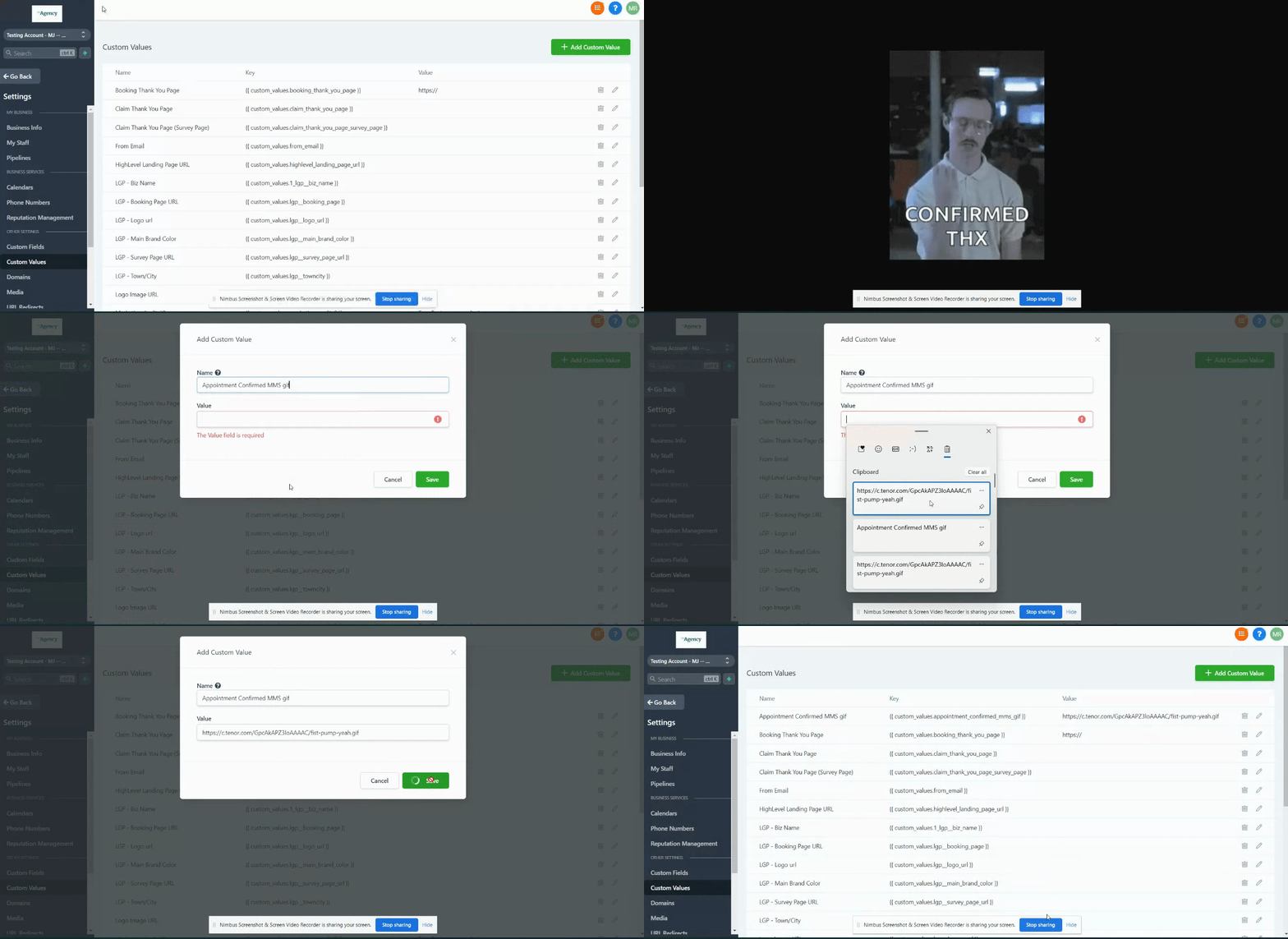
- Navigate to Location Settings > Custom Values.
- Click the + Add Custom Value button.
- Paste the image URL into the field and save the custom value.
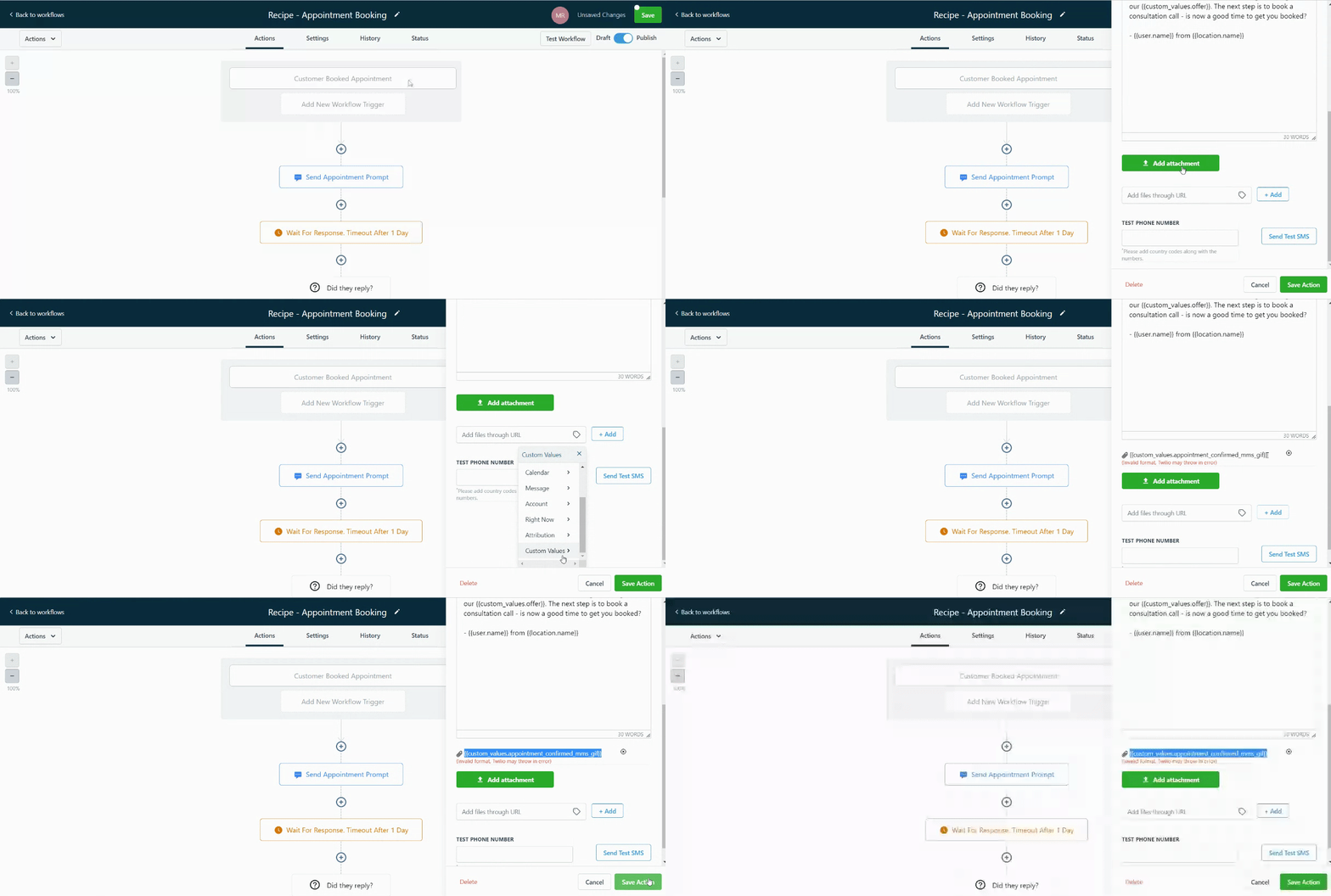
- Open the target workflow, add an MMS action, and paste the custom value into the attachment field.
- Ensure the URL contains no spaces and that the image size complies with the carrier’s limits.
06What it looks like in HighLevel
07Settings that matter
- Custom Values. Stores reusable URLs that can be inserted into MMS attachments within workflows.
- MMS URL. The web address of the image file that will be sent as an MMS attachment.
08Things to know before you rely on it
- Carrier specific size limits apply: AT&T long code 0.6 MB, Sprint long code 1.4 MB, T mobile long code 1.5 MB, Verizon long code 0.675 MB; other number types have their own limits.
- Supported image formats are jpeg, png, and gif.
- The MMS URL must not contain any spaces; otherwise the attachment will fail.
09If something goes wrong
- Custom value does not work when the message is sent. Verify the URL contains no spaces by testing it in a dummy funnel page. Also confirm the image size fits the carrier’s limit.
10How it connects to the rest of HighLevel
- Learn how to create a workflow with triggers, filters, and actions Workflow creation guide
- Review workflow settings for contact control and timing Workflow settings overview
- See the complete list of workflow actions you can add Workflow actions list
Michael's take

Ever wonder how to send a picture in an automated text without manually uploading each time? Custom Values let you store the image URL once and pull it into any MMS step, so you can keep your workflows tidy and reuse media across campaigns.
If I were setting up a new follow up sequence, I’d create a custom value for the screenshot I want to share, then drop it into the MMS step. A quick test in a dummy funnel confirms the URL works and meets carrier size rules before I go live.