
01Who this is for
- Agency owners who resell WhatsApp messaging can clear registration errors before offering the service to clients.
- Small business Founders using the platform for customer support need the button removed to send and receive messages.
- Marketing teams that rely on WhatsApp campaigns must ensure numbers are properly registered to avoid delays.
02Retry registration buttons, explained
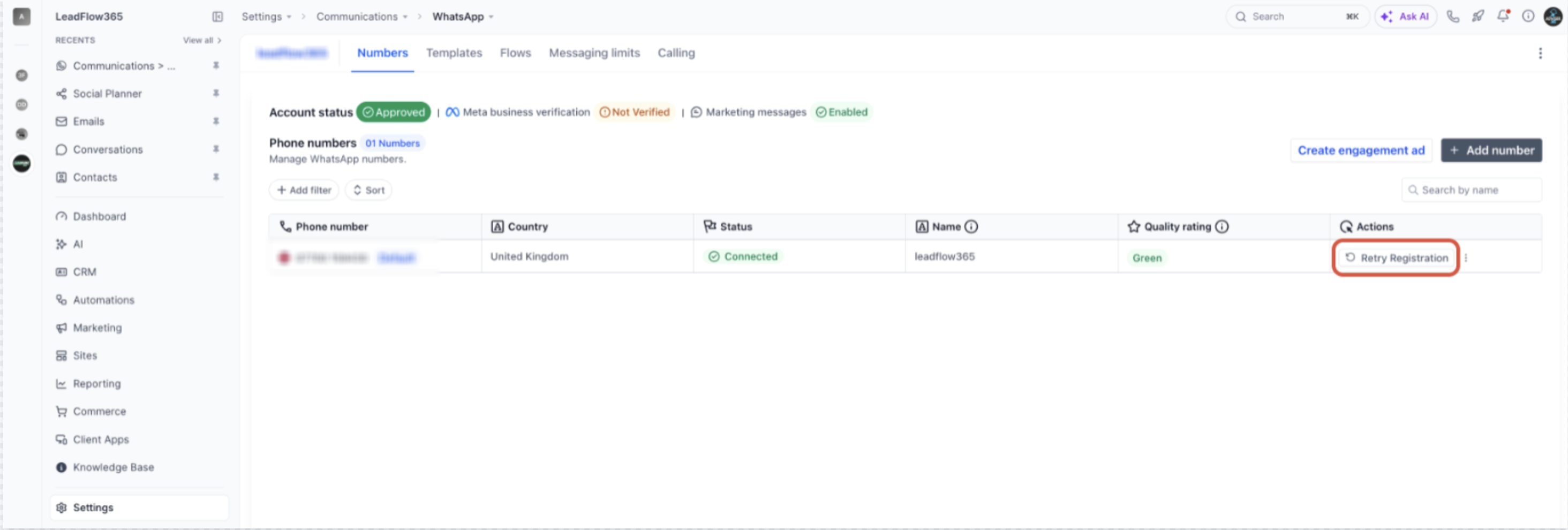
The feature displays a Retry Registration button in the Numbers tab when a WhatsApp number cannot finish the standard sign up. The platform requires the number to have no active WhatsApp or WhatsApp Business app account. While an app account exists, registration stays incomplete and the button appears.
The button lives under Settings > Communications > WhatsApp > Numbers. Clicking it triggers Meta to send a one time passcode to the number for verification. Once the passcode is entered, the registration completes and the button disappears.
If the number is still active in an app, the button will reappear after each attempt. Users can instead use the Coexistence method to share the number with the WhatsApp Business app while keeping chat history.
03How businesses use retry registration
- Digital marketing agency. The agency deletes the WhatsApp account from the phone that holds the number, then clicks Retry Registration in HighLevel to verify the number. This clears the error, allowing the agency to connect the number to client campaigns.
- Ecommerce store owner. The store owner backs up any important chats, removes the app account, and uses the Retry Registration button to re verify the number. After verification, the store can send order updates via WhatsApp.
- Service based consultancy. When a consultant’s number shows the Retry Registration button, they follow the steps to delete the app account, wait, and verify the number. Once complete, they test messaging with an internal contact to confirm two way flow.
04The numbers and rules that matter
- Meta can take up to about 3 minutes after deletion for the number to become available again.
05Before you start
- Back up chats in the WhatsApp Business app if you want to keep the history.
- Make sure you have the phone that uses the number and that it can receive SMS or voice calls.
- Confirm the customer no longer needs the number in the app; otherwise use the Coexistence method.
06How to set up and use retry registration in HighLevel
Fix the Retry Registration button
- Open the phone that holds the number and launch WhatsApp or WhatsApp Business.
- Navigate to Settings > Account and choose Delete my account (or Delete account), then enter the phone number and follow the prompts.
- If the number appears in both WhatsApp and WhatsApp Business, or on multiple phones, ensure no active account remains on any device.
- Wait a few minutes, up to about three minutes, for Meta to release the number.
- In HighLevel, go to Settings > Communications > WhatsApp > Numbers and click Retry Registration in the Actions column.
- Enter the OTP that Meta sends by SMS or voice call to finish registration; the button will disappear once the process succeeds.
07What it looks like in HighLevel
08Settings that matter
- Retry Registration. Triggers Meta to send a one time passcode to the selected number, allowing the platform to complete the WhatsApp registration after the number is freed from an app account.
09Things to know before you rely on it
- Deleting the WhatsApp account removes its chat history permanently.
- The number becomes available for registration only after a short wait of up to about three minutes.
- Retry Registration will reappear if any WhatsApp or WhatsApp Business account remains active for the number.
10If something goes wrong
- Retry Registration fails again right away. Wait a few more minutes and retry. Verify that no WhatsApp or WhatsApp Business account is still active for the number on any phone.
- The verification code does not arrive. Confirm the line can receive SMS and calls, then request the code by voice call instead of SMS.
- The number is connected through another provider. Move the number away from the other provider first; see the guide on migrating a number from another partner.
11How it connects to the rest of HighLevel
- Set up WhatsApp coexistence to keep the Business app and chat history WhatsApp coexistence guide
- Migrate a WhatsApp number from another partner before retrying registration Number migration guide
- Full setup guide for agencies using WhatsApp messaging Agency WhatsApp setup
Michael's take

Be careful about removing a WhatsApp account. Once you delete it, all chat history disappears. That step is permanent, so back up anything you might need later before you go ahead.
When the number is finally cleared, the Retry Registration button is a quick way to finish the setup and get back to messaging. It's worth the effort for businesses that rely on WhatsApp for client communication.