
01Who this is for
- Agency owners who manage multiple client phone numbers benefit because the shared limit prevents a single client from exhausting the portfolio capacity.
- Ecommerce retailers using promotional templates need higher limits to reach more customers without hitting the default cap.
- Service providers that send authentication or utility messages can maintain compliance while scaling outreach as their user base grows.
02WhatsApp messaging limits, explained
The feature shows the total number of unique WhatsApp users a business can message outside a service window in any 24 hour rolling window. The count is calculated for the entire business portfolio, so all phone numbers under the same portfolio draw from the same pool.
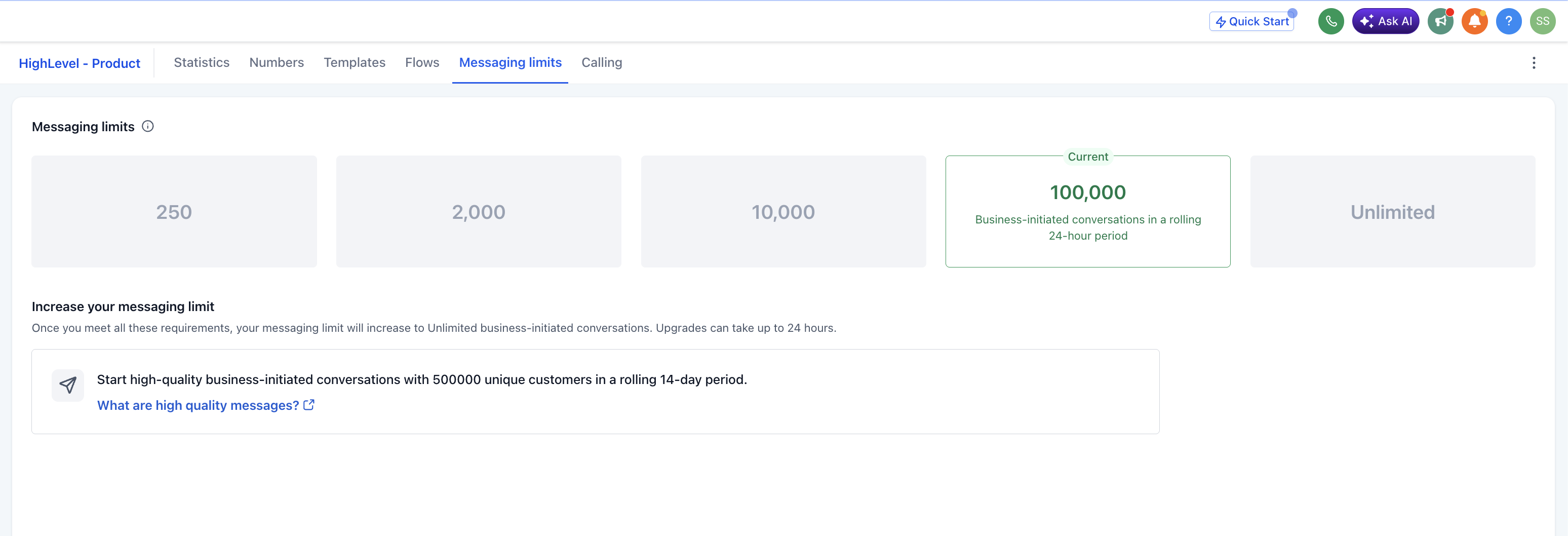
Limits start at 250 messages per day. By meeting a scaling path, business verification, partner verification, or delivering 2,000 high quality template messages in 30 days, the portfolio can be upgraded to 2,000 messages. Once at 2,000, Meta automatically evaluates usage and quality to move the limit up to 10,000, 100,000, and Unlimited, each within six hours of meeting criteria.
The limit view is located in WhatsApp Manager under Account tools > Messaging limits panel. Webhooks business_capability_update and account_alerts report changes and denial reasons.
03How businesses use WhatsApp messaging limits
- Ecommerce store. The store checks its current portfolio limit in WhatsApp Manager, then completes the verification path to raise the limit. After approval, it can send marketing templates to up to 2,000 unique shoppers per day.
- Digital agency. The agency reviews the shared limit for its client portfolio, follows the partner verification scaling path, and gains a higher limit that all client numbers can use for campaign messaging.
- Appointment based service. The service tracks delivered appointment reminder messages. Once it reaches 2,000 unique reminders in 30 days using high quality templates, Meta upgrades the limit, allowing more daily reminders.
04The numbers and rules that matter
- Initial limit: 250 messages per 24 hour moving period.
- Tier limits: 2,000, 10,000, 100,000, Unlimited.
- Limits are shared across all business phone numbers in a portfolio.
- Automatic scaling moves the limit up one tier at a time within 6 hours when criteria are met.
- Criteria for automatic scaling: High quality messages and at least 50% of current limit used in the last 7 days.
05How to set up and use WhatsApp messaging limits in HighLevel
Increase messaging limit to 2,000
- Open WhatsApp Manager and go to Account tools > Messaging limits panel.
- Select one scaling path, business verification, partner verification, or send 2,000 high quality template messages in a 30 day period, and complete the required actions.
- Wait for Meta to analyze the activity and send an approval email, developer alert, and webhook with the new limit.
06What it looks like in HighLevel
07Settings that matter
- Messaging limits. Displays the total number of unique users a portfolio can message in a 24 hour rolling period.
08Things to know before you rely on it
- New portfolios start with a 250 message daily limit.
- All phone numbers in the same portfolio share the same limit pool.
- The 2,000 tier is reachable only after completing one scaling path.
- Automatic scaling to higher tiers requires using at least half of the current limit in the past 7 days and maintaining high quality messaging.
- Limits increase one tier at a time: 2,000 > 10,000 > 100,000 > Unlimited.
09If something goes wrong
- Request denied, limit stays unchanged. Follow the alternative path indicated in the account_alerts webhook, such as verifying identity or delivering 2,000 high quality messages within 30 days.
10How it connects to the rest of HighLevel
- Set up WhatsApp for a subaccount before requesting higher limits Subaccount setup guide
- Create approved message templates to meet quality requirements Template creation guide
- Integrate WhatsApp messaging into automation workflows Workflow integration guide
- Review pricing and plan options for WhatsApp capabilities Pricing page
- Start a trial to test WhatsApp messaging limits 30 day trial
Michael's take

Wondering if you need to worry about WhatsApp limits before you start blasting messages? The limit is simply a guardrail on how many unique users you can reach in any rolling 24 hour window, and it applies to the whole portfolio, not each number individually.
If I were setting up a new WhatsApp channel, I’d first make sure the business is verified so I can unlock the 2,000 tier quickly. After that, I’d keep an eye on the usage dashboard and aim to stay in the high quality zone so the automatic scaling does its job without any surprises.