
01Who this is for
- Agency owners who resell WhatsApp services, because they need to manage client subscriptions and migrations.
- Ecommerce retailers using WhatsApp for marketing, to understand frequency capping and conversation charges.
- Businesses with a Facebook Business Manager account, to leverage verification for unlimited conversations.
02WhatsApp FAQs, explained
The WhatsApp FAQ section compiles the most common questions about using WhatsApp through HighLevel. It explains how subscriptions work, what happens when a subscription is inactive, and how resubscribing restores numbers, templates, and linked automations.
The FAQ also covers number migration steps, the coexistence option that lets a Business App and the Cloud API run side by side, limits introduced by Meta for Indian users, verification benefits, best practice tips for deliverability, and how conversation charges are applied. All of this lives under the WhatsApp area of the HighLevel platform.
03How businesses use WhatsApp FAQs
- Digital marketing agency. An agency can back up client WhatsApp data before moving a number to the Business Platform. After migration, the agency uses the coexistence feature to keep the Business App active while leveraging HighLevel’s automation tools. The agency also references the FAQ to address client questions about subscription status and onboarding errors.
- Online retailer. A retailer reviews the frequency capping rules to ensure marketing templates comply with limits for Indian customers. They check the conversation charge policy to budget for API messages sent after a 24 hour window. The retailer also follows the backup steps before any number migration.
- Local service provider. The provider verifies its Facebook Business Manager to unlock unlimited WhatsApp conversations. While waiting for verification, they rely on the FAQ’s guidance about the 250 conversation limit and how to handle inbound messages without restrictions. They also use the FAQ to confirm that unsubscribing will not delete existing numbers or templates.
04The numbers and rules that matter
- Starting June 14, 2023, roughly 1% of WhatsApp users are part of an experiment that blocks marketing template messages unless a customer service window, an open marketing conversation, or an open free entry point conversation exists.
- Meta’s frequency capping applies only to promotional and marketing template messages for users with Indian phone numbers (+91).
- Frequency capping works on a first come, first served basis; messages beyond the limit are not delivered.
- Unverified Facebook Business Manager accounts can initiate up to 250 business conversations in a 24 hour rolling window and have two WhatsApp business numbers.
- Verified accounts can initiate unlimited business conversations.
05How to set up and use WhatsApp FAQs in HighLevel
Back up WhatsApp data before migration
- Open the WhatsApp application on your device.
- Navigate to Settings > Chats > Chat backup.
- Follow the prompts to save the backup to your chosen location, such as Google Drive or iCloud.
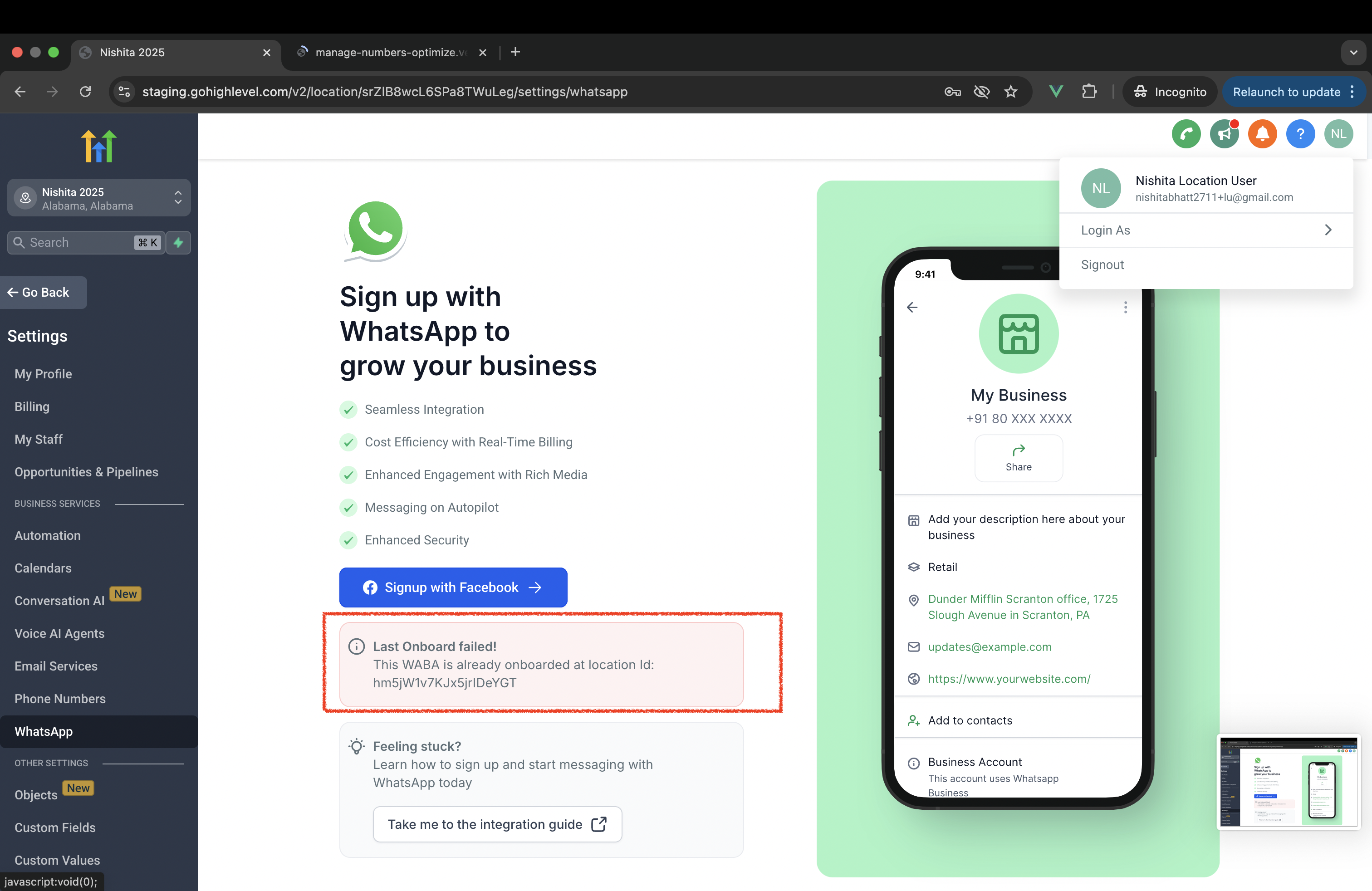
Resolve onboarding error when WABA is already onboarded
- Confirm that the error shows the WABA is attached to a different Location ID.
- Disconnect the WABA from its current location within the platform.
- Proceed to onboard the WABA to the intended Location ID.
06What it looks like in HighLevel
07Things to know before you rely on it
- Frequency capping applies only to marketing template messages sent to Indian phone numbers (+91).
- Session messages and click to WhatsApp ads are exempt from the capping limits.
- Unverified Facebook Business Manager accounts can start up to 250 business conversations in a rolling 24 hour window.
- Approximately 1% of WhatsApp users belong to an experiment group that will not receive marketing templates unless a qualifying conversation window exists.
08If something goes wrong
- Phone numbers or templates do not appear after resubscribing to WhatsApp. Contact the HighLevel support team for assistance.
- Onboarding fails with the message that the WABA is already onboarded at another Location ID. Disconnect the WABA from the existing location before attempting to onboard it to the new location.
09How it connects to the rest of HighLevel
- Full guide for agencies on setting up WhatsApp reselling WhatsApp reselling guide
- Instructions for configuring a WhatsApp subaccount and migrating numbers Subaccount setup guide
- Details on using a LeadConnector number with WhatsApp Business LeadConnector number guide
Michael's take

When a WhatsApp subscription lapses, all your numbers and templates stay on the shelf, but messaging stops. I’d make sure the subscription is active again as soon as possible, because any downtime can interrupt your automated workflows.
If I were setting up a new number, I’d back up the existing chats before deleting the old account. That way you avoid losing any historic data when you move to the WhatsApp Business Platform.