
01Who this is for
- Founders of agencies that resell WhatsApp services need to direct ad replies to the correct system.
- Small business owners with multiple WhatsApp integrations want to control which tool handles service chats versus marketing replies.
02WhatsApp conversation routing, explained
Conversation Routing is a Meta feature that determines which connected integration, such as HighLevel, an AI agent, or another WhatsApp app, receives incoming messages. The routing decision is based on five predefined message types: Service, Click to WhatsApp Ads, Utility Response, Marketing Response, and Calls. Each type can be assigned a primary responder, an optional escalation partner that can take over an existing conversation, and an optional standby partner that can only observe.
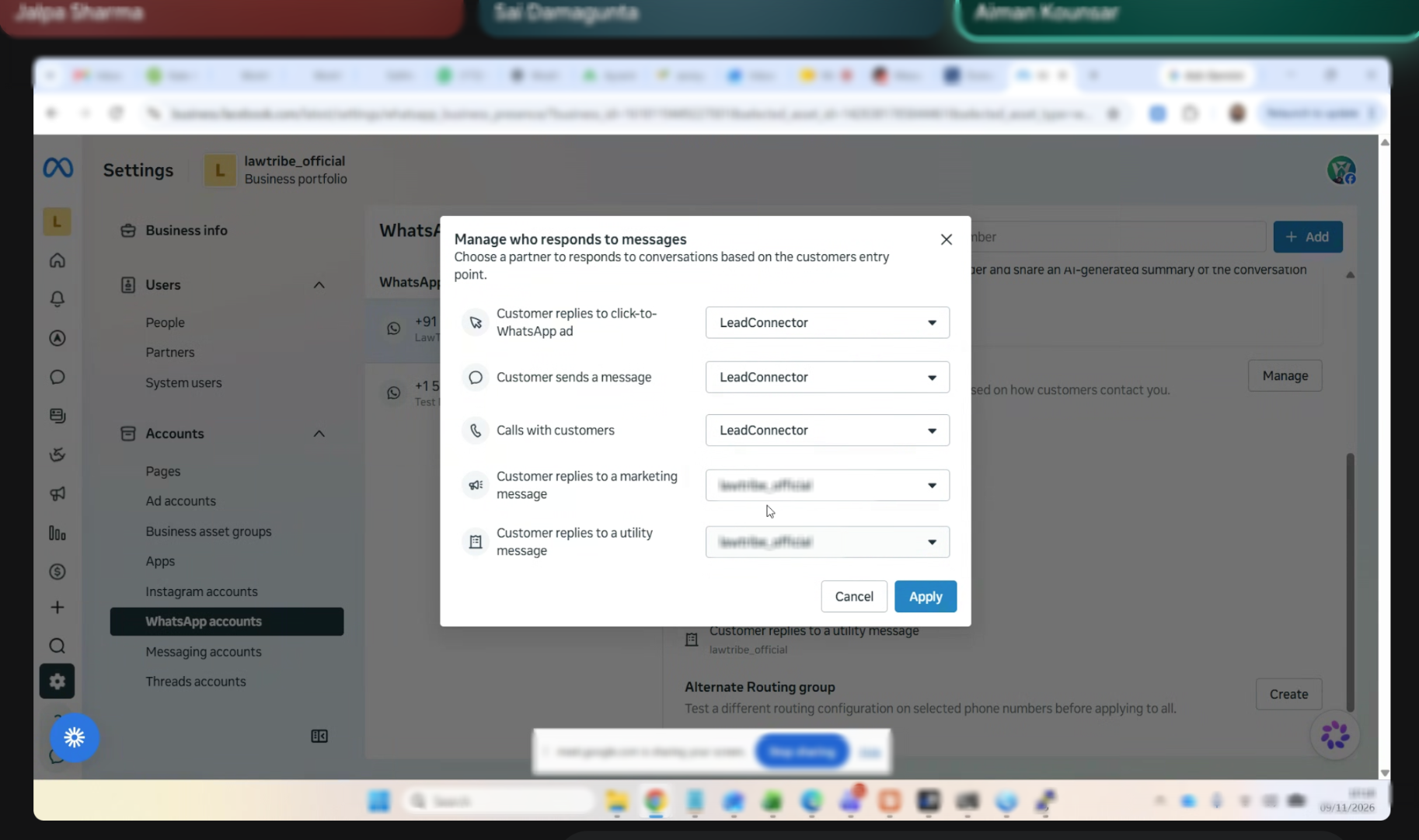
The configuration lives exclusively in Meta Business Suite. The platform offers a Manage who responds to messages window where each message type has its own dropdown list. The HighLevel appears in that list as LeadConnector. Changes made in Meta Business Suite affect where messages are delivered; HighLevel does not automatically become the primary responder without explicit selection.
Because Meta provides no public API for this setting, routing cannot be altered from HighLevel. Integrations must also have the appropriate webhook subscriptions, such as messaging_handovers and standby, set up by the integration provider.
03How businesses use WhatsApp conversation routing
- Digital marketing agency. The agency assigns its CRM as the primary responder for Service messages while directing Click to WhatsApp Ad replies to a dedicated AI agent. It also sets a standby partner to monitor Marketing responses without replying.
- Ecommerce store. The store configures HighLevel to handle Utility Response messages for order updates, designates an escalation partner for Call entries, and leaves Marketing replies to a separate WhatsApp integration.
- Real estate firm. The firm routes Service chats to its CRM, assigns an AI agent as the primary responder for Click to WhatsApp Ads, and uses a standby partner to observe Calls while a human agent handles the takeover.
04Before you start
- The business must accept the Meta Business Agents and Platform Terms of Service to enable standby visibility and thread ownership transfers.
05How to set up and use WhatsApp conversation routing in HighLevel
Open conversation routing settings
- Open Meta Business Settings and select the business portfolio that owns the WhatsApp account.
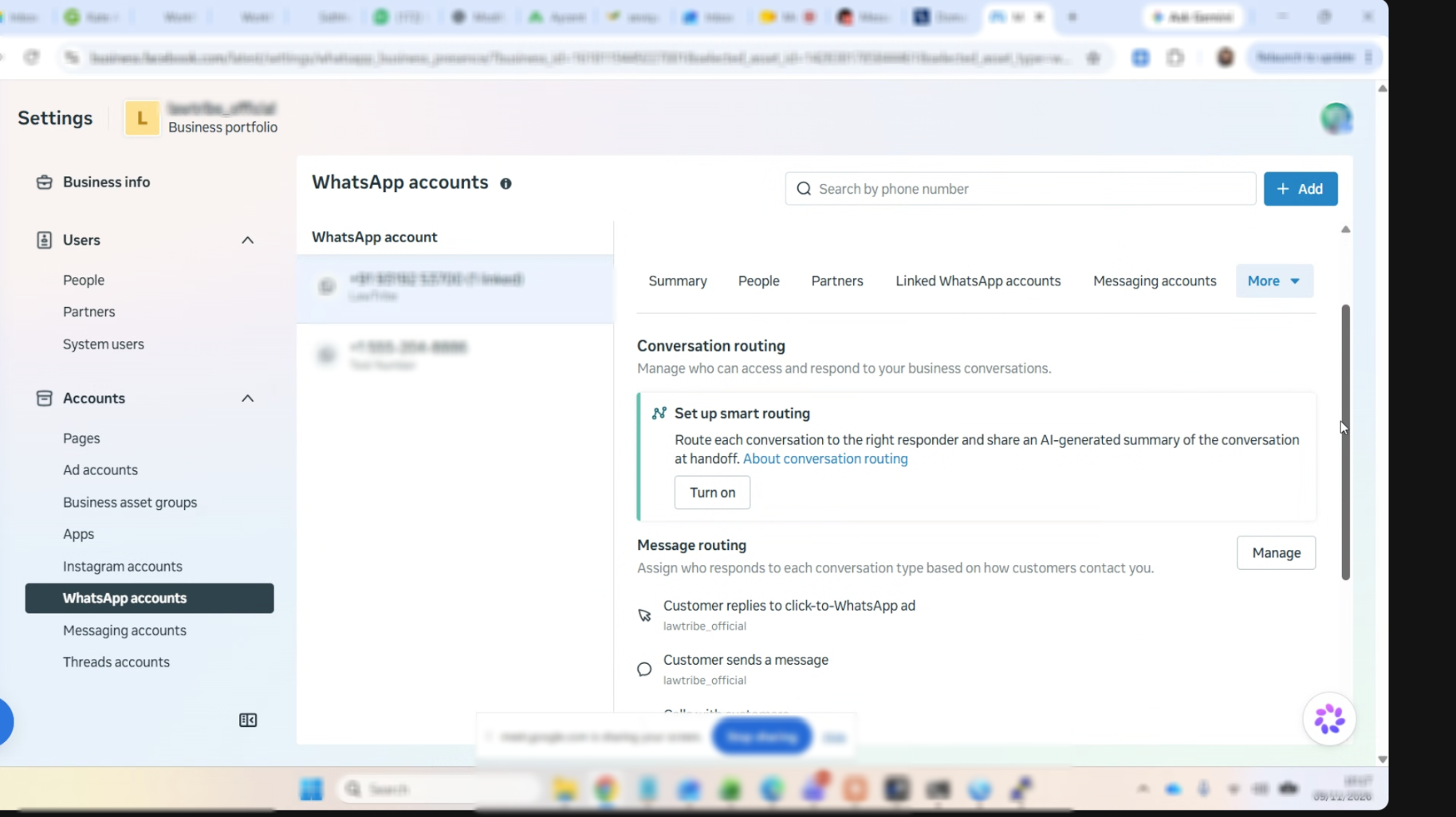
- Navigate to Accounts > WhatsApp accounts and choose the relevant WhatsApp account.
- Open the More menu and select Conversation routing.
- Under Message routing, click Manage, assign responders for each message type, then click Apply.
06What it looks like in HighLevel
07Settings that matter
- Primary Responder. The integration that receives incoming messages for a specific message type when the conversation is idle.
- Escalation Partner. An integration allowed to take over an existing conversation; only one can be set.
- Standby Partner. An integration that can view messages and status updates but cannot reply until it takes control.
08Things to know before you rely on it
- Only one escalation partner can be configured at a time.
- Standby visibility is unavailable unless the business accepts Meta's Business Agents and Platform Terms of Service.
- Conversation Routing cannot be changed via a public API; it must be edited in Meta Business Suite.
- Existing routing settings are not automatically overwritten when a new partner is onboarded.
- If fewer than two responders remain after a removal, Meta deletes the routing configuration and reverts to default behavior.
09If something goes wrong
- Messages are not appearing in HighLevel. Confirm HighLevel is set as the primary responder for the affected message type in Meta Business Suite’s Conversation routing screen.
- Messages are received but you cannot reply. Check whether the integration is in standby mode; standby partners can view messages but cannot reply.
- Problems after enabling a Meta Business AI Agent. Verify if the AI agent became the primary responder and moved the previously connected integration to standby.
- Problems after removing a partner. Look for message types that now lack a primary responder or an escalation partner and assign replacements as needed.
- Standby or escalation options are missing. Ensure the business has accepted the Meta Business Agents and Platform Terms of Service.
10How it connects to the rest of HighLevel
- Set up WhatsApp automation workflows in HighLevel WhatsApp workflow integration
- Create and manage WhatsApp templates in HighLevel WhatsApp template guide
- Increase your HighLevel WhatsApp message limit to 2,000 Message limit increase
Michael's take

Once the primary responder is set, I would double check that the escalation partner is the right system for taking over when a conversation needs a human handoff.