
01Who this is for
- Agency owners who resell WhatsApp services, because they need to know when cross country campaigns may fail.
- Ecommerce brands selling internationally, so they can plan messaging strategies for Brazil and Indonesia.
- Local businesses operating in Brazil or Indonesia, to understand that they can only message customers within the same country.
02WhatsApp messaging restrictions, explained
WhatsApp introduced a temporary restriction on September 15 that stops cross country messaging involving Brazil (BR) and Indonesia (ID). Companies outside these nations cannot send messages to users in Brazil or Indonesia, and companies inside can only message users within their own country. The rule is enforced directly by WhatsApp (Meta) and applies to all WhatsApp Business accounts.
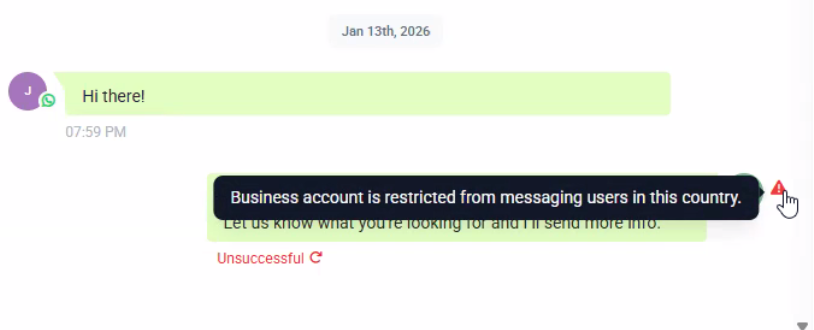
The restriction appears in HighLevel as the error “Business account is restricted from messaging users in this country.” Messaging that stays within the same country continues to work, inbound messages are unaffected, and account status, templates, quality rating, and balance remain unchanged.
03How businesses use WhatsApp messaging restrictions
- Digital marketing agency. The agency checks each client’s target audience location before launching a WhatsApp campaign. If a client wants to reach Brazil from outside, the agency sets up a Brazil based WhatsApp Business account or switches to another channel using HighLevel’s account management tools.
- International ecommerce retailer. The retailer ensures promotional messages to customers in Brazil are sent from a WhatsApp Business account registered in Brazil, configuring separate accounts per region within HighLevel to comply with the restriction.
- Local restaurant in Indonesia. The restaurant continues sending reservation confirmations to Indonesian customers from its existing account, knowing inbound messages and template usage are not impacted by the restriction.
04The numbers and rules that matter
- Effective September 15, WhatsApp implemented a temporary restriction on crosscountry messaging involving Brazil (BR) and Indonesia (ID).
05How to set up and use WhatsApp messaging restrictions in HighLevel
Addressing the WhatsApp country restriction error
- Identify the country where your business WhatsApp account is registered and the location of the intended recipient.
- Confirm whether the message involves Brazil or Indonesia and if it is cross country.
- Recognize that the restriction cannot be overridden by HighLevel.
- Align your messaging plan to send only within the same country when the restriction applies.
- If you need cross country outreach, create separate WhatsApp Business accounts for each region or use an alternative communication channel.
06What it looks like in HighLevel
07Things to know before you rely on it
- Effective September 15, WhatsApp imposed a temporary cross country messaging restriction for Brazil and Indonesia.
- Businesses outside Brazil or Indonesia cannot send messages to users in those two countries.
- Businesses located in Brazil or Indonesia may only message users within the same country.
- The limitation is enforced by WhatsApp (Meta) and cannot be removed or overridden from HighLevel.
08If something goes wrong
- Error: Business account is restricted from messaging users in this country.. Verify that the recipient is in an allowed country. If cross country messaging is required, set up a separate WhatsApp Business account for that region or choose another communication method.
09How it connects to the rest of HighLevel
- Review the full WhatsApp setup guide for agencies to ensure account configuration aligns with regional policies. WhatsApp agency setup guide
- Learn how to create subaccounts for each region, which can help work around cross country limits. WhatsApp subaccount guide
- Check the messaging limits guide for options to raise your outbound quota once regional restrictions are respected. WhatsApp limits guide
Michael's take

If I were setting up a new campaign, I’d split my WhatsApp strategy by region: Keep one account for Brazil, another for Indonesia, and use email or SMS for any crosscountry follow ups.