
01Who this is for
- Agencies that run outbound campaigns benefit because they can reach multiple leads in a single dialing round, reducing agent time.
- Small businesses that need to schedule appointments gain efficiency by calling several prospects simultaneously and handling callbacks in the same room.
- Call centers that use warm transfers can keep all participants in one conference, simplifying billing and tracking.
02MultiLine dialer pricing, explained
The multi line dialer is part of HighLevel’s Phone System. When you start a round, your browser creates a shared conference room and the system dials the contacts on your list. The first answer connects you directly; additional answers hear a callback message and are placed in a queue.
Billing is split into three parts: the agent connection (your browser’s time in the room), a charge for each contact that answers, and a conference charge based on every participant’s minutes. All rates follow the standard outbound and conference rates defined in the Phone System Pricing & Billing Guide. Optional features such as recording, transcription, or text to speech generate separate charges.
03How businesses use multiLine dialer pricing
- Real estate agency. The agency dials several property leads at once. The first lead that answers is spoken to, while others hear a callback message and are queued for a later call. The agency checks the wallet to see charges for each answered lead and the conference usage.
- Medical clinic. The clinic calls multiple patients for appointment reminders. Patients who answer receive the reminder and stay in the room; those who only hear the callback message are billed for the call but do not add conference minutes. The clinic reviews the wallet to verify the costs.
- Sales call center. Agents dial three prospects simultaneously, then warm transfer a qualified prospect to a specialist. The transfer adds a new participant to the same conference room, and the center checks the wallet for the agent connection, each contact’s call minutes, and the transfer’s conference usage.
04The numbers and rules that matter
- Agent connection (browser) $0.004 per connected minute (per HighLevel's help center, checked November 2026).
- Contact call (US destination) $0.0126 per answered minute (per HighLevel's help center, checked November 2026).
- Conference (US region) $0.0018 per participant minute (per HighLevel's help center, checked November 2026).
- Conference (Singapore region) $0.003 per participant minute (per HighLevel's help center, checked November 2026).
05Before you start
- Phone System must be enabled and outbound and conference rates must be defined.
- If rebilling is required, the rebilling configuration should be set in the wallet settings before making calls.
06How to set up and use multiLine dialer pricing in HighLevel
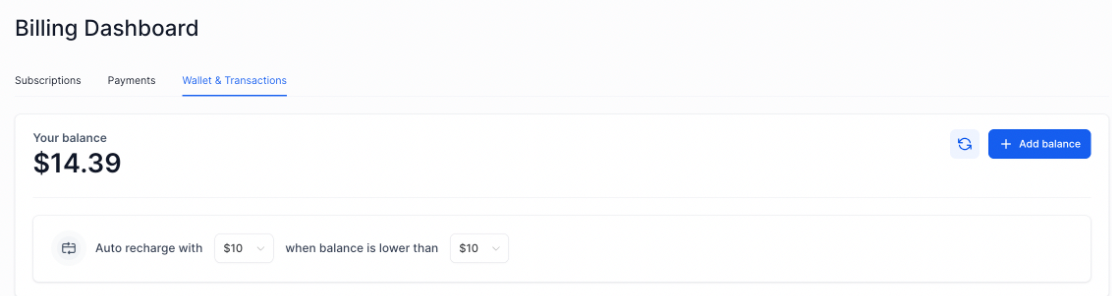
Read wallet transactions
- Record which contacts you dialed and the start time of the round.
- Open the wallet and locate the matching Outbound Call and Conference Call entries.
- Expand each transaction to view its role, duration and rate.
- Verify that each duration follows the rounding up rule and matches your rate schedule.
- If rebilling is enabled, compare the same transactions in the subaccount wallet.
Check a round
- Identify the contacts dialed and the exact moment the round began.
- Find and open the related wallet transactions for that round.
- Sort the transactions into agent connection, contact calls and conference items.
- Confirm each transaction’s minutes align with the expected rounded minutes.
- When rebilling is active, ensure the subaccount wallet shows matching charges.
07What it looks like in HighLevel
08Settings that matter
- Rebilling Setting. Determines how phone usage charges from a multi line round are passed to subaccounts, with options for agency coverage, 1× pass through, or 2× markup.
09Things to know before you rely on it
- Charges are rounded up to the next full minute for each participant.
- There is no flat fee for using the multi line dialer; you only pay standard outbound and conference rates.
- Contacts that only hear the callback message are billed for the call but do not add conference usage.
- Contacts that never answer generate no charge.
- Waiting contacts in the callback queue do not incur call minutes.
- Some phone providers support only single line dialing; in those cases the shared room billing does not apply.
10If something goes wrong
- Rebilling shows a payment method hold. Resolve the hold before expecting usage to be rebilled.
- Charges do not appear immediately after the call. Charges are processed in the background and may appear later; wait for the background job to complete.
11How it connects to the rest of HighLevel
- Phone system pricing and rebilling guide Pricing & rebilling guide
- LC Phone, built in SMS and calling for agencies LC Phone overview
- HighLevel pricing and plans Pricing page
Michael's take

Don't assume the MultiLine dialer will magically lower your phone bill. Every answered call and every minute in the conference room adds up, and the charges appear as separate wallet transactions. That can make it harder to see the total cost at a glance.
When you understand how each piece. Agent connection, contact calls and conference minutes. Is measured, you can predict usage and set appropriate rebilling rules. That visibility turns a seemingly complex bill into a clear, manageable expense.