
01Who this is for
- Businesses that accept online card payments through HighLevel can use the feature.
- Agencies that manage client payments in HighLevel can benefit from the added fraud protection.
023D Secure (3DS) payments, explained
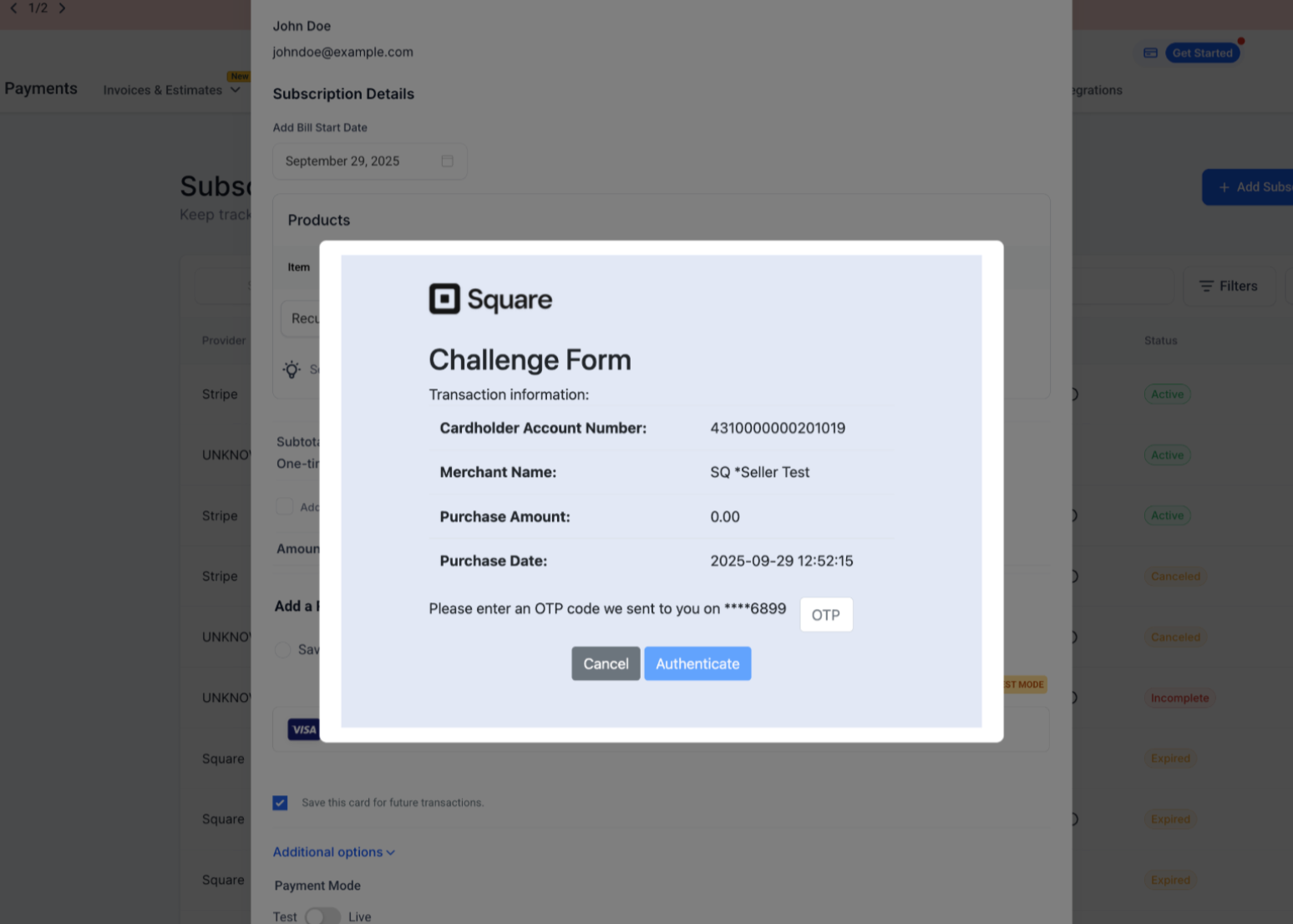
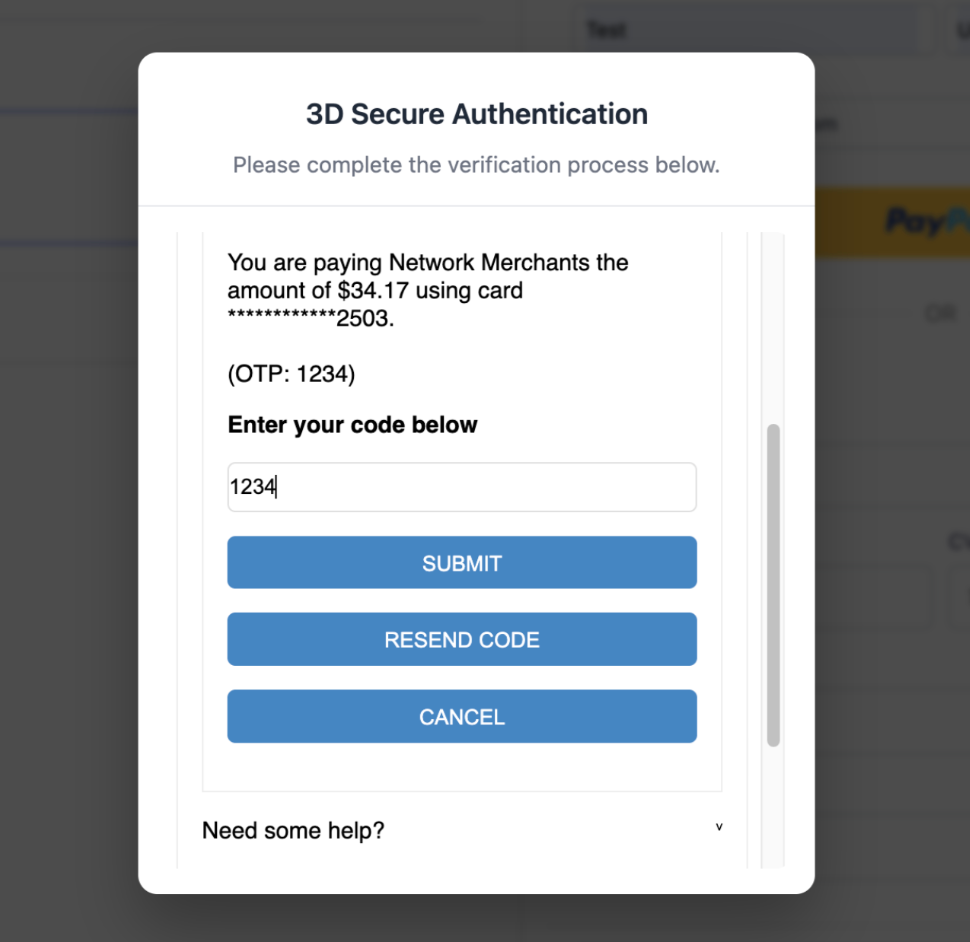
The feature sends every Square payment request from HighLevel to Square’s Risk Manager. Square evaluates the card, amount, and location, then decides whether to invoke 3D Secure. If required, a small in page pop up asks the buyer for a one time code, Face ID, or bank redirect. When the buyer completes the step, HighLevel marks the order or invoice as Paid. If the buyer fails or abandons the step, the transaction is declined and HighLevel shows the error on the checkout screen.
The 3DS flow works automatically wherever Square payments are accepted in HighLevel, order forms, payment links, the online store, and invoices. No extra code or toggle is needed once the Square account is linked and the checkout form captures billing address and contact details. All gateway responses are stored under Payments > Transactions for later review.
The integration lives under the Subaccount section in HighLevel. Navigate to Subaccount > Payments > Integrations to connect a Square account, then ensure the Square location is set to Live mode. After that, make sure the checkout forms include the billing address and email/phone fields so Square can perform the verification.
03How businesses use 3D Secure (3DS) payments
- Online boutique. The boutique adds billing address and phone fields to its product checkout page. When a European customer pays with a card that requires SCA, Square shows a verification pop up. The purchase completes only after the customer approves the code, reducing declined attempts.
- Fitness studio selling class packages. The studio includes an invoice payment form that captures the member’s address and email. If a member’s card triggers 3D Secure, a quick authentication window appears. Once approved, the invoice status updates to Paid in HighLevel.
- Digital marketing agency processing client retainers. The agency uses a payment link that requests the client’s billing address and phone number. Should the client’s card need authentication, Square presents the challenge automatically, and the agency sees the transaction marked as Paid after successful verification.
04The numbers and rules that matter
- Square provides 3DS as part of its built in Risk Manager.
- Square does not charge additional 3DS fees; standard Square processing rates apply.
- 3DS applies only to real time cardholder initiated payments; Card on File debits are exempt.
- You cannot disable 3DS from inside HighLevel.
- 3DS is solely for online (card not present) flows.
05Before you start
- A Square account must be linked at Subaccount > Payments > Integrations.
- The Square location must be set to Live mode.
- Checkout forms need visible billing address and email/phone fields, preferably marked required.
06How to set up and use 3D Secure (3DS) payments in HighLevel
Activate Square 3D Secure in HighLevel
- Connect a Square account by opening Subaccount > Payments > Integrations and following the prompts.
- Confirm the Square location is switched to Live mode within the Square dashboard.
- Add billing address, email, and phone fields to every checkout form and set them as required if possible.
07What it looks like in HighLevel
08Things to know before you rely on it
- 3DS runs only for online (card not present) transactions; it does not apply to in person POS or mobile payments.
- Card on file debits are exempt; 3DS is used only for real time cardholder initiated payments.
- The feature cannot be turned off from HighLevel; Square controls when to trigger the verification.
- No additional fees are charged for using 3DS; standard Square processing rates apply.
09If something goes wrong
- Authentication failed. Ask the buyer to retry the code or choose a different card.
- Issuer declined. Suggest the buyer contact their bank for more information.
- 3DS not completed. Encourage the buyer to finish the pop up rather than closing it.
- Repeated 3DS failures. Verify the billing address matches the card issuer’s records, ensure the device permits pop ups, and advise using another card if problems persist.
10How it connects to the rest of HighLevel
- Learn how to link a Square sandbox for testing payments in HighLevel Square sandbox connection
- View the list of payment providers supported in each HighLevel product area Supported payment providers
- Explore all payments related features available in HighLevel Payments feature overview
Michael's take

Wondering if the extra step of 3D Secure will hurt my checkout speed? It adds only a few seconds, and the pop up stays inside the page so the buyer never leaves your funnel. That little pause can protect you from chargebacks and keep you compliant in regions that demand Strong Customer Authentication.
If I were setting up a new online store, I’d make sure the billing address and contact fields are required on every form. That simple tweak lets Square’s risk engine do its job and fire 3DS only when needed. A quick check of the transaction log in Payments > Transactions will tell you if anything is tripping up the flow.